
Arduino UNO-Based Water Contaminant Detection System with TDS, pH, and Turbidity Sensors
View and Edit Project In Cirkit Designer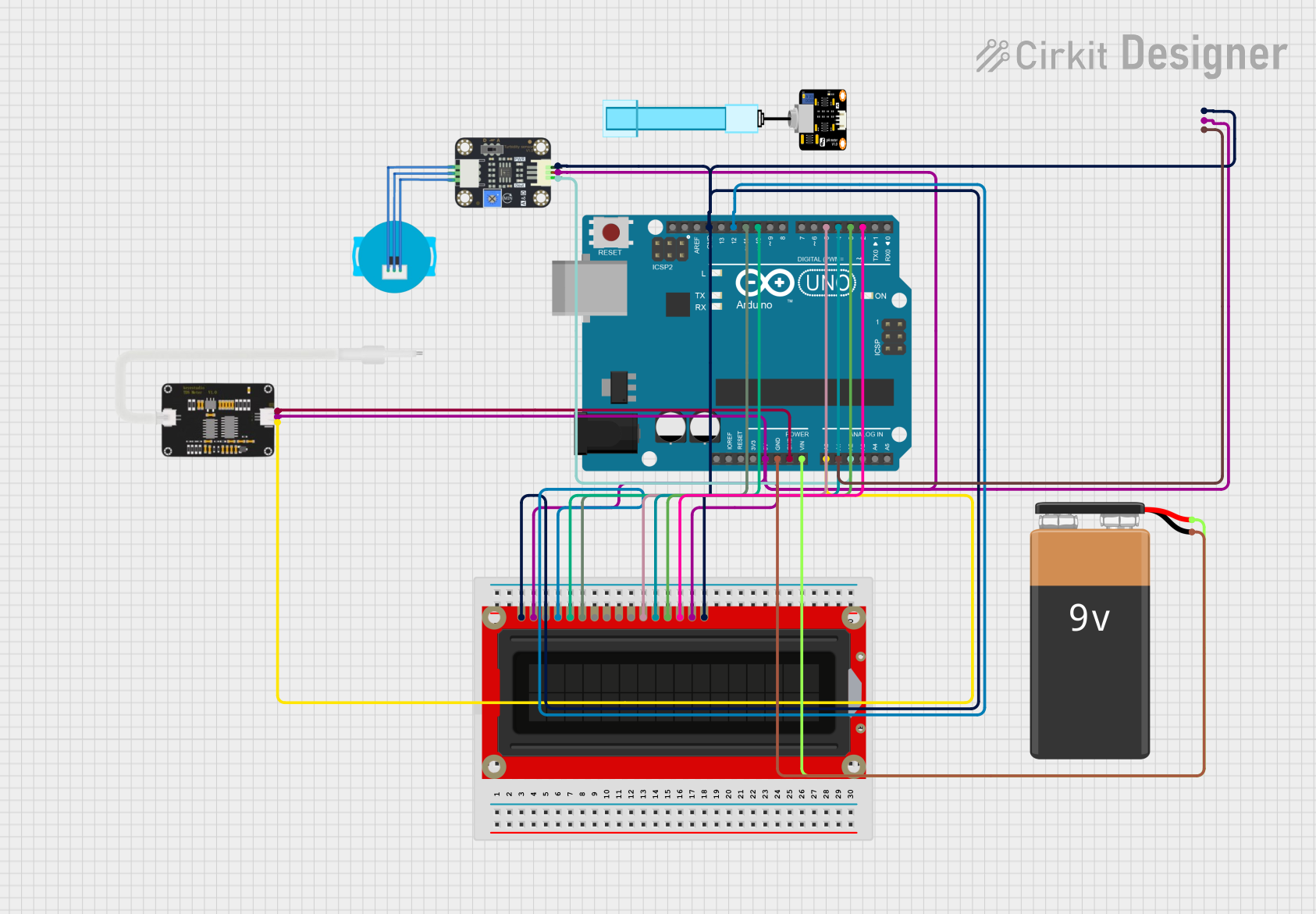
Water Contaminant Detection System Documentation
Summary
This document provides a detailed overview of a Water Contaminant Detection System. The system uses an Arduino UNO microcontroller to read data from TDS, pH, and Turbidity sensors. The data is then displayed on an LCD screen. The system is powered by a 9V battery.
Component List
Arduino UNO
- Description: A microcontroller board based on the ATmega328P.
- Pins: UNUSED, IOREF, Reset, 3.3V, 5V, GND, Vin, A0, A1, A2, A3, A4, A5, SCL, SDA, AREF, D13, D12, D11, D10, D9, D8, D7, D6, D5, D4, D3, D2, D1, D0
TDS Sensor
- Description: Measures the Total Dissolved Solids (TDS) in water.
- Pins: AI, GND, 5V
Turbidity Sensor
- Description: Measures the turbidity (cloudiness) of water.
- Pins: OUT, VCC, GND
LCD Screen
- Description: Displays data from the sensors.
- Pins: Backlight (GND), VSS, VDD, Contrast, RS, E, R/W, D0, D1, D2, D3, D4, D5, D6, D7, Backlight_PWR
pH Meter
- Description: Measures the pH level of water.
- Pins: Signal, VCC, GND
9V Battery
- Description: Powers the entire system.
- Pins: -, +
Wiring Details
Arduino UNO
5V connected to:
- LCD screen (Backlight_PWR, VDD)
- pH Meter (VCC)
- TDS Sensor (5V)
- Turbidity Sensor (VCC)
GND connected to:
- 9V Battery (-)
- TDS Sensor (GND)
- LCD screen (Backlight (GND), VSS)
- pH Meter (GND)
- Turbidity Sensor (GND)
Vin connected to:
- 9V Battery (+)
A0 connected to:
- TDS Sensor (AI)
A1 connected to:
- pH Meter (Signal)
A2 connected to:
- Turbidity Sensor (OUT)
D12 connected to:
- LCD screen (RS)
D11 connected to:
- LCD screen (E)
D10 connected to:
- LCD screen (R/W)
D5 connected to:
- LCD screen (D4)
D4 connected to:
- LCD screen (D5)
D3 connected to:
- LCD screen (D6)
D2 connected to:
- LCD screen (D7)
TDS Sensor
AI connected to:
- Arduino UNO (A0)
GND connected to:
- Arduino UNO (GND)
5V connected to:
- Arduino UNO (5V)
Turbidity Sensor
OUT connected to:
- Arduino UNO (A2)
VCC connected to:
- Arduino UNO (5V)
GND connected to:
- Arduino UNO (GND)
LCD Screen
Backlight (GND) connected to:
- Arduino UNO (GND)
VSS connected to:
- Arduino UNO (GND)
VDD connected to:
- Arduino UNO (5V)
Backlight_PWR connected to:
- Arduino UNO (5V)
RS connected to:
- Arduino UNO (D12)
E connected to:
- Arduino UNO (D11)
R/W connected to:
- Arduino UNO (D10)
D4 connected to:
- Arduino UNO (D5)
D5 connected to:
- Arduino UNO (D4)
D6 connected to:
- Arduino UNO (D3)
D7 connected to:
- Arduino UNO (D2)
pH Meter
Signal connected to:
- Arduino UNO (A1)
VCC connected to:
- Arduino UNO (5V)
GND connected to:
- Arduino UNO (GND)
9V Battery
- connected to:
- Arduino UNO (GND)
+ connected to:
- Arduino UNO (Vin)
Code Documentation
/*
 * Water Contaminant Detection System
 * This Arduino sketch reads data from TDS, pH, and Turbidity sensors
 * and prints the values to the Serial Monitor.
 */

// Pin definitions
const int tdsPin = A0;
const int phPin = A1;
const int turbidityPin = A2;

void setup() {
  // Initialize serial communication
  Serial.begin(9600);
  // Configure sensor pins as input
  pinMode(tdsPin, INPUT);
  pinMode(phPin, INPUT);
  pinMode(turbidityPin, INPUT);
}

void loop() {
  // Read sensor values
  int tdsValue = analogRead(tdsPin);
  int phValue = analogRead(phPin);
  int turbidityValue = analogRead(turbidityPin);

  // Print sensor values to Serial Monitor
  Serial.print("TDS Value: ");
  Serial.println(tdsValue);
  Serial.print("pH Value: ");
  Serial.println(phValue);
  Serial.print("Turbidity Value: ");
  Serial.println(turbidityValue);

  // Wait for a second before next reading
  delay(1000);
}
This code initializes the Arduino UNO to read analog values from the TDS, pH, and Turbidity sensors and prints these values to the Serial Monitor every second.