
Arduino and ESP32-Based Smart Waste Sorting System with Color Detection and Servo Control
View and Edit Project In Cirkit Designer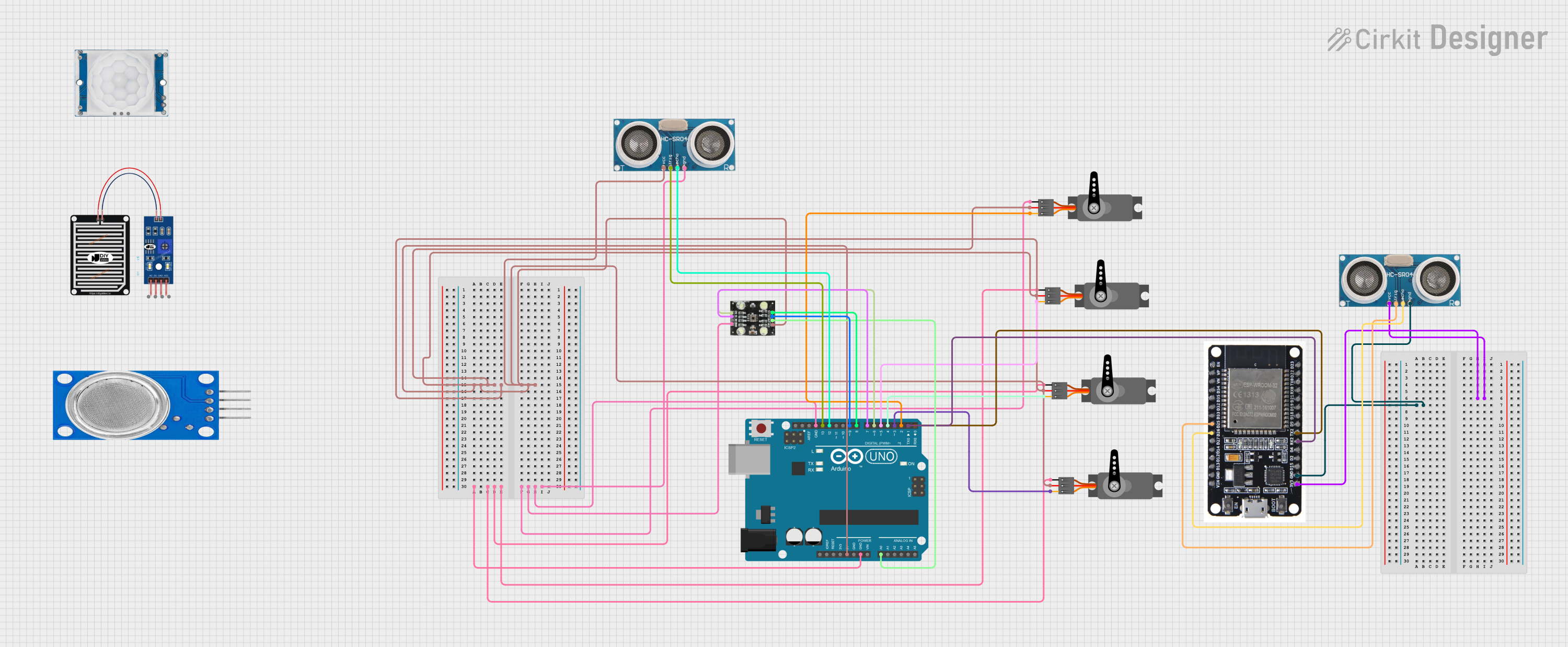
Circuit Documentation
Summary
This circuit involves an Arduino UNO and an ESP32 microcontroller, interfacing with various sensors and actuators. The Arduino UNO is primarily responsible for controlling a TCS230 color sensor and multiple servos, while the ESP32 handles an ultrasonic sensor. The circuit is designed to detect different types of waste based on color and sort them accordingly using servos.
Component List
Arduino UNO
- Description: A microcontroller board based on the ATmega328P.
- Pins: UNUSED, IOREF, Reset, 3.3V, 5V, GND, Vin, A0, A1, A2, A3, A4, A5, SCL, SDA, AREF, D13, D12, D11, D10, D9, D8, D7, D6, D5, D4, D3, D2, D1, D0
ESP32
- Description: A low-cost, low-power system on a chip (SoC) with Wi-Fi and Bluetooth capabilities.
- Pins: EN, VP, VN, D34, D35, D32, D33, D25, D26, D27, D14, D12, D13, GND, VIN, 3V3, D15, D2, D4, RX2, TX2, D5, D18, D19, D21, RX0, TX0, D22, D23, BOOT
Ultrasonic Sensor
- Description: A sensor used to measure distance by using ultrasonic waves.
- Pins: +VCC, Trigger, Echo, GND
Servo
- Description: A rotary actuator that allows for precise control of angular position.
- Pins: GND, VCC, PWM
TCS230
- Description: A color sensor that can detect and measure the intensity of red, green, and blue light.
- Pins: GND, OE, S1, S0, VCC, OUT, S2, S3
RAIN SENSOR
- Description: A sensor used to detect the presence of rain.
- Pins: AO, DO, GRD, VCC
HC-SR501 PIR motion sensor
- Description: A sensor used to detect motion by measuring infrared light radiating from objects in its field of view.
- Pins: Output, Ground, Power Supply
MQ135
- Description: A gas sensor used to measure the concentration of various gases in the air.
- Pins: VCC, GND, A0, D0
Wiring Details
Arduino UNO
- 5V: Connected to VCC of multiple servos, Ultrasonic Sensor, and TCS230.
- GND: Connected to GND of multiple servos, Ultrasonic Sensor, and TCS230.
- A0: Connected to OUT of TCS230.
- D13: Connected to Trigger of Ultrasonic Sensor.
- D12: Connected to Echo of Ultrasonic Sensor.
- D9: Connected to S2 of TCS230.
- D8: Connected to S3 of TCS230.
- D7: Connected to S1 of TCS230.
- D6: Connected to S0 of TCS230.
- D5: Connected to PWM of a Servo.
- D4: Connected to PWM of another Servo.
- D3: Connected to PWM of another Servo.
- D2: Connected to PWM of another Servo.
- D1: Connected to RX2 of ESP32.
- D0: Connected to TX2 of ESP32.
ESP32
- RX2: Connected to D1 of Arduino UNO.
- TX2: Connected to D0 of Arduino UNO.
- D25: Connected to Trigger of another Ultrasonic Sensor.
- D26: Connected to Echo of another Ultrasonic Sensor.
- 3V3: Connected to +VCC of another Ultrasonic Sensor.
- GND: Connected to GND of another Ultrasonic Sensor.
Ultrasonic Sensor
- +VCC: Connected to 5V of Arduino UNO.
- Trigger: Connected to D13 of Arduino UNO.
- Echo: Connected to D12 of Arduino UNO.
- GND: Connected to GND of Arduino UNO.
Another Ultrasonic Sensor
- +VCC: Connected to 3V3 of ESP32.
- Trigger: Connected to D25 of ESP32.
- Echo: Connected to D26 of ESP32.
- GND: Connected to GND of ESP32.
Servo
- VCC: Connected to 5V of Arduino UNO.
- GND: Connected to GND of Arduino UNO.
- PWM: Connected to D5, D4, D3, and D2 of Arduino UNO.
TCS230
- VCC: Connected to 5V of Arduino UNO.
- GND: Connected to GND of Arduino UNO.
- OUT: Connected to A0 of Arduino UNO.
- S2: Connected to D9 of Arduino UNO.
- S3: Connected to D8 of Arduino UNO.
- S1: Connected to D7 of Arduino UNO.
- S0: Connected to D6 of Arduino UNO.
Documented Code
// Définir les broches utilisées pour le TCS3200
#define S0 2
#define S1 3
#define S2 4
#define S3 5
#define OUT 6
#define LED 7 // LED pour éclairage

// Définir la broche du servo moteur
#include <Servo.h>
Servo myservo;  // Crée un objet pour contrôler le servo

void setup() {
  // Initialisation des broches pour le capteur
  pinMode(S0, OUTPUT);
  pinMode(S1, OUTPUT);
  pinMode(S2, OUTPUT);
  pinMode(S3, OUTPUT);
  pinMode(LED, OUTPUT); // LED pour éclairer l'objet
  pinMode(OUT, INPUT);

  // Commencer la communication série pour afficher les résultats
  Serial.begin(9600);

  // Initialisation du servo
  myservo.attach(9); // Broche D9 pour le servo

  // Allumer la LED pour éclairer l'objet
  digitalWrite(LED, HIGH); // Activer l'éclairage LED
}

void loop() {
  // Sélection des filtres pour mesurer les couleurs
  // Pour mesurer la couleur rouge
  digitalWrite(S2, LOW);
  digitalWrite(S3, LOW);
  int redValue = pulseIn(OUT, HIGH); // Mesure du temps en HIGH sur la sortie

  // Pour mesurer la couleur verte
  digitalWrite(S2, HIGH);
  digitalWrite(S3, HIGH);
  int greenValue = pulseIn(OUT, HIGH);

  // Pour mesurer la couleur bleue
  digitalWrite(S2, LOW);
  digitalWrite(S3, HIGH);
  int blueValue = pulseIn(OUT, HIGH);

  // Affichage des valeurs des couleurs sur le moniteur série
  Serial.print("Rouge : ");
  Serial.print(redValue);
  Serial.print("\tVert : ");
  Serial.print(greenValue);
  Serial.print("\tBleu : ");
  Serial.println(blueValue);

  // Identification du type de déchet en fonction des couleurs
  if (redValue > greenValue && redValue > blueValue) {
    Serial.println("Déchet plastique détecté - Couleur : Rouge");
    // Action : Ouvrir le compartiment plastique
    myservo.write(0); // Position du servo pour le plastique
    delay(1000); // Attendre que le compartiment s'ouvre
    myservo.write(90); // Refermer après une seconde
  } else if (greenValue > redValue && greenValue > blueValue) {
    Serial.println("Déchet verre détecté - Couleur : Vert");
    // Action : Ouvrir le compartiment verre
    myservo.write(45); // Position du servo pour le verre
    delay(1000);
    myservo.write(90); // Refermer après une seconde
  } else if (blueValue > redValue && blueValue > greenValue) {
    Serial.println("Déchet papier détecté - Couleur : Bleu");
    // Action : Ouvrir le compartiment papier
    myservo.write(135); // Position du servo pour le papier
    delay(1000);
    myservo.write(90); // Refermer après une seconde
  } else {
    Serial.println("Autre déchet - Couleur indéterminée");
    // Action : Refuser ou stocker dans un compartiment commun
    myservo.write(180); // Position du servo pour déchets autres
    delay(1000);
    myservo.write(90); // Refermer après une seconde
  }

  delay(2000); // Attendre avant de mesurer à nouveau
}
This code is for the Arduino UNO and is responsible for controlling the TCS230 color sensor and a servo motor. The code measures