
Arduino UNO-Based Solar-Powered Water Monitoring System with RF Communication
View and Edit Project In Cirkit Designer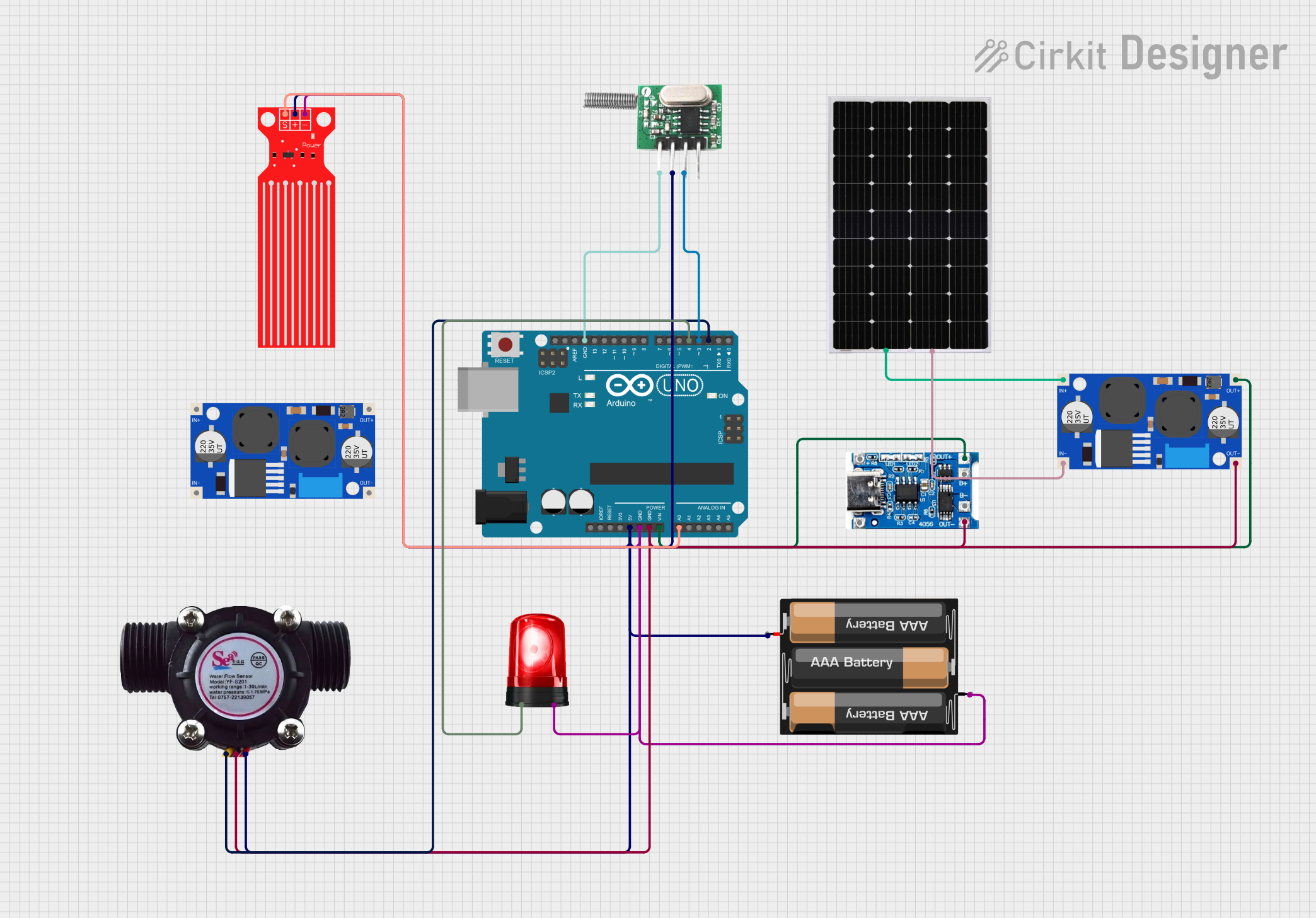
Circuit Documentation
Summary
This circuit is designed to monitor water levels and flow, and it includes a siren for alerts and an RF transmitter for wireless communication. The circuit is powered by a combination of a solar panel and a battery charging module, with an Arduino UNO serving as the central microcontroller.
Component List
Arduino UNO
- Description: A microcontroller board based on the ATmega328P.
- Pins: UNUSED, IOREF, Reset, 3.3V, 5V, GND, Vin, A0, A1, A2, A3, A4, A5, SCL, SDA, AREF, D13, D12, D11, D10, D9, D8, D7, D6, D5, D4, D3, D2, D1, D0
TP4056 Battery Charging Protection Module (Type C)
- Description: A module for charging and protecting lithium-ion batteries.
- Pins: OUT +, B+, B-, OUT -, +, -
Siren
- Description: An alert device that emits a loud sound.
- Pins: Positive, Ground
3xAABattery
- Description: A battery pack consisting of three AA batteries.
- Pins: VCC, GND
Solar Panel
- Description: A device that converts sunlight into electrical energy.
- Pins: +, -
Water Level Sensor
- Description: A sensor that detects the level of water.
- Pins: SIG, VCC, GND
Water Flow Sensor
- Description: A sensor that measures the flow rate of water.
- Pins: Signal, Vcc, GND
RF 433 MHz Transmitter
- Description: A wireless transmitter operating at 433 MHz.
- Pins: -ve, Data, +ve
XL6009E1 Boost Converter
- Description: A DC-DC boost converter.
- Pins: IN+, IN-, OUT-, OUT+
Wiring Details
Arduino UNO
- Vin: Connected to OUT + of TP4056 Battery Charging Protection Module and OUT+ of XL6009E1 Boost Converter.
- GND: Connected to OUT - of TP4056 Battery Charging Protection Module, GND of Water Flow Sensor, OUT- of XL6009E1 Boost Converter, Ground of Siren, GND of 3xAABattery, GND of Water Level Sensor, and -ve of RF 433 MHz Transmitter.
- 5V: Connected to +ve of RF 433 MHz Transmitter, Vcc of Water Flow Sensor, VCC of 3xAABattery, and VCC of Water Level Sensor.
- A0: Connected to SIG of Water Level Sensor.
- D4: Connected to Positive of Siren.
- D3: Connected to Data of RF 433 MHz Transmitter.
- D2: Connected to Signal of Water Flow Sensor.
TP4056 Battery Charging Protection Module (Type C)
- OUT +: Connected to Vin of Arduino UNO and OUT+ of XL6009E1 Boost Converter.
- OUT -: Connected to GND of Water Flow Sensor, GND of Arduino UNO, and OUT- of XL6009E1 Boost Converter.
Siren
- Ground: Connected to GND of Arduino UNO and GND of 3xAABattery.
- Positive: Connected to D4 of Arduino UNO.
3xAABattery
- VCC: Connected to +ve of RF 433 MHz Transmitter, Vcc of Water Flow Sensor, 5V of Arduino UNO, and VCC of Water Level Sensor.
- GND: Connected to Ground of Siren, GND of Arduino UNO, and GND of Water Level Sensor.
Solar Panel
- +: Connected to IN+ of XL6009E1 Boost Converter.
- -: Connected to IN- of XL6009E1 Boost Converter.
Water Level Sensor
- SIG: Connected to A0 of Arduino UNO.
- VCC: Connected to +ve of RF 433 MHz Transmitter, Vcc of Water Flow Sensor, 5V of Arduino UNO, and VCC of 3xAABattery.
- GND: Connected to Ground of Siren, GND of Arduino UNO, and GND of 3xAABattery.
Water Flow Sensor
- Signal: Connected to D2 of Arduino UNO.
- Vcc: Connected to +ve of RF 433 MHz Transmitter, 5V of Arduino UNO, and VCC of 3xAABattery.
- GND: Connected to OUT - of TP4056 Battery Charging Protection Module, GND of Arduino UNO, and OUT- of XL6009E1 Boost Converter.
RF 433 MHz Transmitter
- -ve: Connected to GND of Arduino UNO.
- Data: Connected to D3 of Arduino UNO.
- +ve: Connected to Vcc of Water Flow Sensor, 5V of Arduino UNO, and VCC of 3xAABattery.
XL6009E1 Boost Converter
- IN+: Connected to + of Solar Panel.
- IN-: Connected to - of Solar Panel.
- OUT+: Connected to Vin of Arduino UNO and OUT + of TP4056 Battery Charging Protection Module.
- OUT-: Connected to OUT - of TP4056 Battery Charging Protection Module, GND of Water Flow Sensor, and GND of Arduino UNO.
Documented Code
Arduino UNO Code (sketch.ino)
void setup() {
  // put your setup code here, to run once:

}

void loop() {
  // put your main code here, to run repeatedly:

}
Additional Documentation (documentation.txt)
This documentation provides a comprehensive overview of the circuit, including a summary, detailed component list, wiring details, and the code used in the Arduino UNO.