
Arduino Uno R3 with DHT11 Sensor and LCD I2C Display for Temperature and Humidity Monitoring
View and Edit Project In Cirkit Designer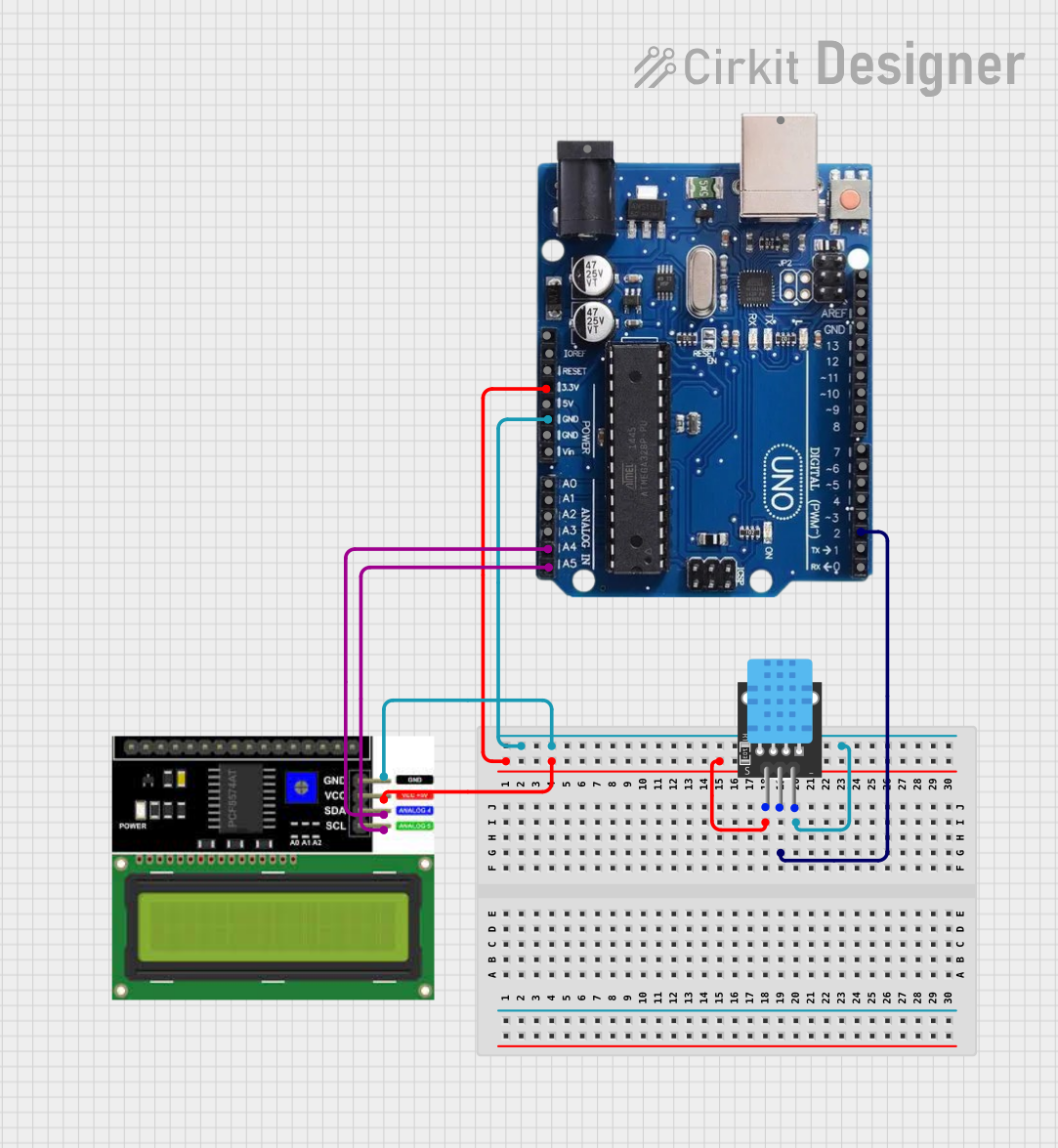
Circuit Documentation
Summary
The circuit in question is designed to interface a DHT11 temperature and humidity sensor with an Arduino Uno R3 microcontroller board, and display the sensor readings on an LCD I2C display. The Arduino Uno R3 serves as the central processing unit, reading data from the DHT11 sensor and controlling the LCD display via the I2C communication protocol.
Component List
DHT11 Temperature and Humidity Sensor
- Pins: 5V, S (Signal), GND
- Description: The DHT11 is a basic, ultra low-cost digital temperature and humidity sensor. It uses a capacitive humidity sensor and a thermistor to measure the surrounding air and outputs a digital signal on the data pin.
Arduino Uno R3
- Pins: USB Port, Power Jack, IOREF, RESET, 3.3V, 5V, GND, VIN, Analog Inputs (A0-A5), Digital I/O (0-13), SDA, SCL, AREF
- Description: The Arduino Uno R3 is a microcontroller board based on the ATmega328P. It has 14 digital input/output pins, 6 analog inputs, a 16 MHz quartz crystal, a USB connection, a power jack, an ICSP header, and a reset button.
LCD I2C Display
- Pins: GND, VCC, SDA, SCL
- Description: This is a liquid crystal display that uses the I2C communication protocol for interfacing with the microcontroller. It is typically used for displaying data or messages in a 2-line alphanumeric format.
Wiring Details
DHT11 Temperature and Humidity Sensor
- 5V: Connected to the 5V output on the Arduino Uno R3.
- S (Signal): Connected to digital pin 2 on the Arduino Uno R3.
- GND: Connected to the ground pin on the Arduino Uno R3.
Arduino Uno R3
- 5V: Provides power to the DHT11 sensor and the LCD I2C Display.
- GND: Common ground for the DHT11 sensor and the LCD I2C Display.
- Digital Pin 2: Receives the signal from the DHT11 sensor.
- Analog Pin A4/SDA: Connected to the SDA pin on the LCD I2C Display for I2C communication.
- Analog Pin A5/SCL: Connected to the SCL pin on the LCD I2C Display for I2C communication.
LCD I2C Display
- GND: Connected to the ground pin on the Arduino Uno R3.
- VCC: Connected to the 5V output on the Arduino Uno R3.
- SDA: Connected to the SDA pin (A4) on the Arduino Uno R3 for I2C communication.
- SCL: Connected to the SCL pin (A5) on the Arduino Uno R3 for I2C communication.
Documented Code
Arduino Uno R3 Code
#include <Wire.h>
#include <LiquidCrystal_I2C.h>
#include "DHT.h"

#define DHTPIN 2
#define DHTTYPE DHT11

DHT dht(DHTPIN, DHTTYPE);

LiquidCrystal_I2C lcd(0x27,16,2);

void setup() {
  dht.begin();
  lcd.init();
  lcd.backlight();
  lcd.clear();

  lcd.setCursor(0,0);
  lcd.print("Temp:");
  lcd.setCursor(0,1);
  lcd.print("Humid:");
}

void loop() {
  delay(1500);

  float h = dht.readHumidity();
  float t = dht.readTemperature();

  if (isnan(h) || isnan(t)) {
    return;
  }

  lcd.setCursor(7, 0);
  lcd.print(t);
  lcd.setCursor(7, 1);
  lcd.print(h);
}
Filename: sketch.ino
Description: This code initializes the DHT11 sensor and the LCD I2C display. In the setup() function, it begins communication with the DHT11 sensor and sets up the LCD display with the initial text for temperature and humidity. The loop() function reads the temperature and humidity from the DHT11 sensor every 1.5 seconds and updates the display with the new readings. If the sensor readings are not valid (NaN), the function returns without updating the display.
(Note: The code for the DHT11 sensor and the LCD I2C display is not provided as it is assumed to be part of the standard libraries included at the beginning of the sketch.)