
Arduino Mega 2560-Based Water Quality Monitoring System with LCD Display
View and Edit Project In Cirkit Designer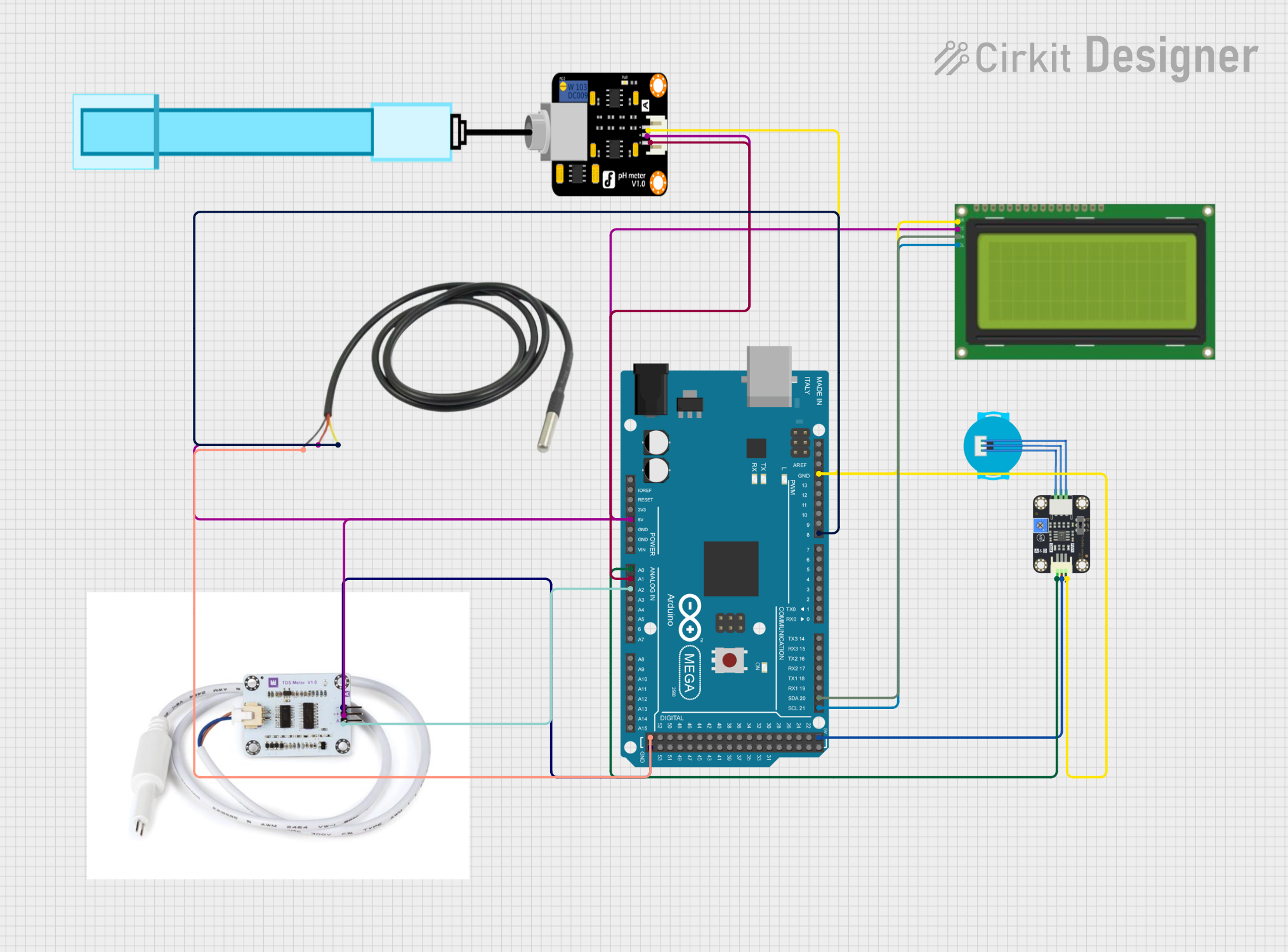
Circuit Documentation
Summary
This document provides a detailed overview of a circuit designed to monitor water quality parameters using various sensors and an Arduino Mega 2560 microcontroller. The circuit includes a TDS sensor, a PH meter, a temperature sensor, a turbidity sensor, and an LCD display for output. The sensors are connected to the Arduino Mega 2560, which processes the data and displays it on the LCD.
Component List
Arduino Mega 2560
- Description: A microcontroller board based on the ATmega2560.
- Pins: IOREF, RESET, 3V3, 5V, GND, VIN, A0-A15, D0-D53, AREF, SDA, SCL
- Purpose: Central processing unit for the circuit, reads sensor data and controls the LCD display.
TDS Sensor (voor waterkwaliteit)
- Description: Measures the Total Dissolved Solids (TDS) in water.
- Pins: gnd, v, analog pin
- Purpose: Provides TDS readings to the Arduino.
PH Meter
- Description: Measures the pH level of the water.
- Pins: Signal, VCC, GND
- Purpose: Provides pH readings to the Arduino.
Temperature Sensor
- Description: Measures the temperature of the water.
- Pins: Temp GND Black, Temp VDD Red, Temp DQ Data Yellow
- Purpose: Provides temperature readings to the Arduino.
Turbidity Sensor
- Description: Measures the turbidity (cloudiness) of the water.
- Pins: OUT, VCC, GND
- Purpose: Provides turbidity readings to the Arduino.
LCD 20x4 I2C
- Description: A 20x4 character LCD display with I2C interface.
- Pins: GND, 5v, SCA, SCL
- Purpose: Displays sensor readings and other information.
Wiring Details
Arduino Mega 2560
- 5V: Connected to the 5V pin of the LCD, Temperature Sensor (Temp VDD Red), TDS Sensor (v), and PH Meter (VCC).
- A0: Connected to the OUT pin of the Turbidity Sensor.
- A1: Connected to the Signal pin of the PH Meter.
- A2: Connected to the analog pin of the TDS Sensor.
- D21/SCL: Connected to the SCL pin of the LCD.
- D20/SDA: Connected to the SCA pin of the LCD.
- D8 PWM: Connected to the Temp DQ Data Yellow pin of the Temperature Sensor.
- GND: Connected to the GND pins of the Turbidity Sensor, LCD, PH Meter, Temperature Sensor (Temp GND Black), and TDS Sensor (gnd).
TDS Sensor (voor waterkwaliteit)
- gnd: Connected to the GND pin of the Arduino.
- v: Connected to the 5V pin of the Arduino.
- analog pin: Connected to the A2 pin of the Arduino.
PH Meter
- Signal: Connected to the A1 pin of the Arduino.
- VCC: Connected to the 5V pin of the Arduino.
- GND: Connected to the GND pin of the Arduino.
Temperature Sensor
- Temp GND Black: Connected to the GND pin of the Arduino.
- Temp VDD Red: Connected to the 5V pin of the Arduino.
- Temp DQ Data Yellow: Connected to the D8 PWM pin of the Arduino.
Turbidity Sensor
- OUT: Connected to the A0 pin of the Arduino.
- VCC: Connected to the 5V pin of the Arduino.
- GND: Connected to the GND pin of the Arduino.
LCD 20x4 I2C
- GND: Connected to the GND pin of the Arduino.
- 5v: Connected to the 5V pin of the Arduino.
- SCA: Connected to the D20/SDA pin of the Arduino.
- SCL: Connected to the D21/SCL pin of the Arduino.
Documented Code
sketch.ino
void setup() {
  // put your setup code here, to run once:

}

void loop() {
  // put your main code here, to run repeatedly:

}
documentation.txt