
Wi-Fi Controlled Vibration-Sensing Robot with Battery Monitoring
View and Edit Project In Cirkit Designer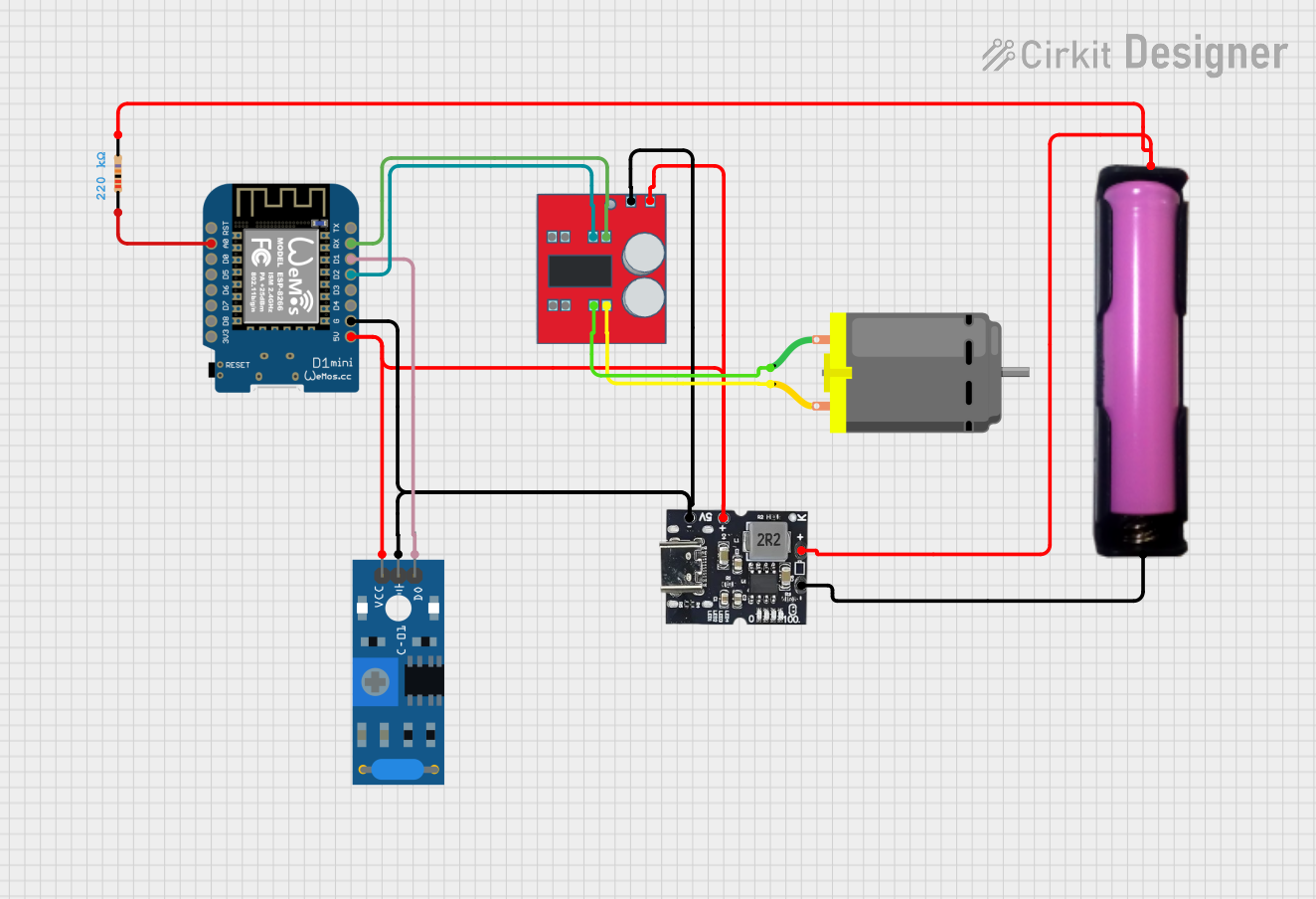
Circuit Documentation
Summary
The circuit in question is designed to utilize a Wemos D1 Mini microcontroller to interface with various components including a MX1508 DC Motor Driver, a Type-C Power Bank Module, a SW-420 Vibration Sensor, an 18650 battery in a holder, a DC Motor, and a Resistor. The circuit is powered by the Type-C Power Bank Module, which also charges the 18650 battery. The Wemos D1 Mini controls the DC Motor through the MX1508 driver and reads vibrations from the SW-420 sensor. The resistor is used for an analog input to the Wemos D1 Mini.
Component List
Wemos D1 Mini
- Microcontroller board based on the ESP8266
- Pins: RST, A0, D0, D5, D6, D7, D8, 3V3, 5V, G, D4, D3, D2, D1, RX, TX
MX1508 DC Motor Driver
- Dual-channel motor driver
- Pins: OUT 4, OUT 3, OUT 2, OUT1, IN 1, IN 2, IN 3, IN 4, Negative (-), Positive (+)
Type-c Power Bank Module
- Power supply and charging module for 18650 battery
- Pins: Gnd, +Ve (Bat), +5v
SW-420 Vibration Sensor
- Vibration detection sensor with digital output
- Pins: vcc, Ground, Digital output
18650 in holder
- Battery holder for a single 18650 cell
- Pins: GND, VCC
DC Motor
- Standard DC motor with two connection pins
- Pins: pin 1, pin 2
Resistor
- Passive component used to limit current or divide voltages
- Resistance: 220,000 Ohms
- Pins: pin1, pin2
Wiring Details
Wemos D1 Mini
- A0 connected to Resistor (for analog input)
- 5V connected to SW-420 Vibration Sensor, Type-c Power Bank Module, MX1508 DC Motor Driver (power supply)
- G connected to SW-420 Vibration Sensor, Type-c Power Bank Module, MX1508 DC Motor Driver (ground)
- D2 connected to MX1508 DC Motor Driver (control signal)
- D1 connected to SW-420 Vibration Sensor (vibration detection)
- RX connected to MX1508 DC Motor Driver (control signal)
MX1508 DC Motor Driver
- OUT 2, OUT1 connected to DC Motor (motor control outputs)
- IN 2 connected to Wemos D1 Mini (control input)
- IN 1 connected to Wemos D1 Mini (control input)
- Negative (-) connected to Type-c Power Bank Module, SW-420 Vibration Sensor, Wemos D1 Mini (ground)
- Positive (+) connected to Type-c Power Bank Module, SW-420 Vibration Sensor, Wemos D1 Mini (power supply)
Type-c Power Bank Module
- Gnd connected to SW-420 Vibration Sensor, MX1508 DC Motor Driver, Wemos D1 Mini, 18650 in holder (ground)
- +Ve (Bat) connected to 18650 in holder, Resistor (battery positive)
- +5v connected to SW-420 Vibration Sensor, MX1508 DC Motor Driver, Wemos D1 Mini (5V supply)
SW-420 Vibration Sensor
- vcc connected to Type-c Power Bank Module, MX1508 DC Motor Driver, Wemos D1 Mini (power supply)
- Ground connected to Type-c Power Bank Module, MX1508 DC Motor Driver, Wemos D1 Mini (ground)
- Digital output connected to Wemos D1 Mini (vibration signal)
18650 in holder
- GND connected to Type-c Power Bank Module (ground)
- VCC connected to Type-c Power Bank Module, Resistor (battery positive)
DC Motor
- pin 1 connected to MX1508 DC Motor Driver (motor control)
- pin 2 connected to MX1508 DC Motor Driver (motor control)
Resistor
- pin1 connected to Wemos D1 Mini (analog input)
- pin2 connected to Type-c Power Bank Module, 18650 in holder (voltage divider)
Documented Code
The code provided is for the Wemos D1 Mini microcontroller and is written using the ESPHome framework. The code is designed to connect the microcontroller to a Wi-Fi network, read the state of the vibration sensor, and control the motor driver based on the sensor's output. It also includes a battery voltage monitoring system.
esphome:
  name: "trash"

esp8266:
  board: esp01_1m

globals:
  - id: sensore_pronto
    type: bool
    initial_value: "true"

# Enable logging
logger:

# Enable Home Assistant API
api:

ota:
  - platform: esphome

wifi:
  ssid: !secret wifi_ssid
  password: !secret wifi_password
  manual_ip:
    static_ip: 192.168.1.20
    gateway: 192.168.1.1
    subnet: 255.255.255.0
  power_save_mode: HIGH  # Power saving mode for Wi-Fi
  fast_connect: true      # Quick reconnection to the network

  ap:
    ssid: "Trash Fallback Hotspot"
    password: "fqLnFj9ff337"

web_server:

captive_portal:

# Vibration sensor configuration on a digital pin
binary_sensor:
  - platform: gpio
    pin: GPIO5  # Replace with the pin connected to the vibration sensor on the ESP8266
    name: "Vibration Sensor"
    id: vibration_sensor
    filters:
      - delayed_on: 10ms
      - delayed_off: 500ms

    on_press:
      then:
        - if:
            condition:
              - lambda: "return id(sensore_pronto);"
            then:
              - lambda: |-
                  id(sensore_pronto) = false;
              - switch.turn_on: apre
              - switch.turn_off: chiude
              - delay: 2s
              - switch.turn_off: apre
              - delay: 6s
              - switch.turn_on: chiude
              - delay: 200ms
              - switch.turn_off: chiude
              - switch.turn_off: apre
              - lambda: |-
                  id(sensore_pronto) = true;

switch:
  - platform: gpio
    pin: GPIO4
    id: apre
    name: "Switch Apre"

  - platform: gpio
    pin: GPIO3
    id: chiude
    name: "Switch Chiude"

sensor:
  - platform: adc
    pin: A0
    name: Batteria
    accuracy_decimals: 2
    update_interval: 1h
    filters:
      - multiply: 5.3509
The code includes comments in Italian, which provide additional context for the configuration and operation of the system. The binary_sensor section configures the vibration sensor, and the switch section defines two GPIO pins to control the motor driver. The sensor section reads the battery voltage through the ADC pin A0 and applies a multiplier to calibrate the voltage reading.