
Arduino UNO-Based Smart Parking System with IR Sensors and LCD Display
View and Edit Project In Cirkit Designer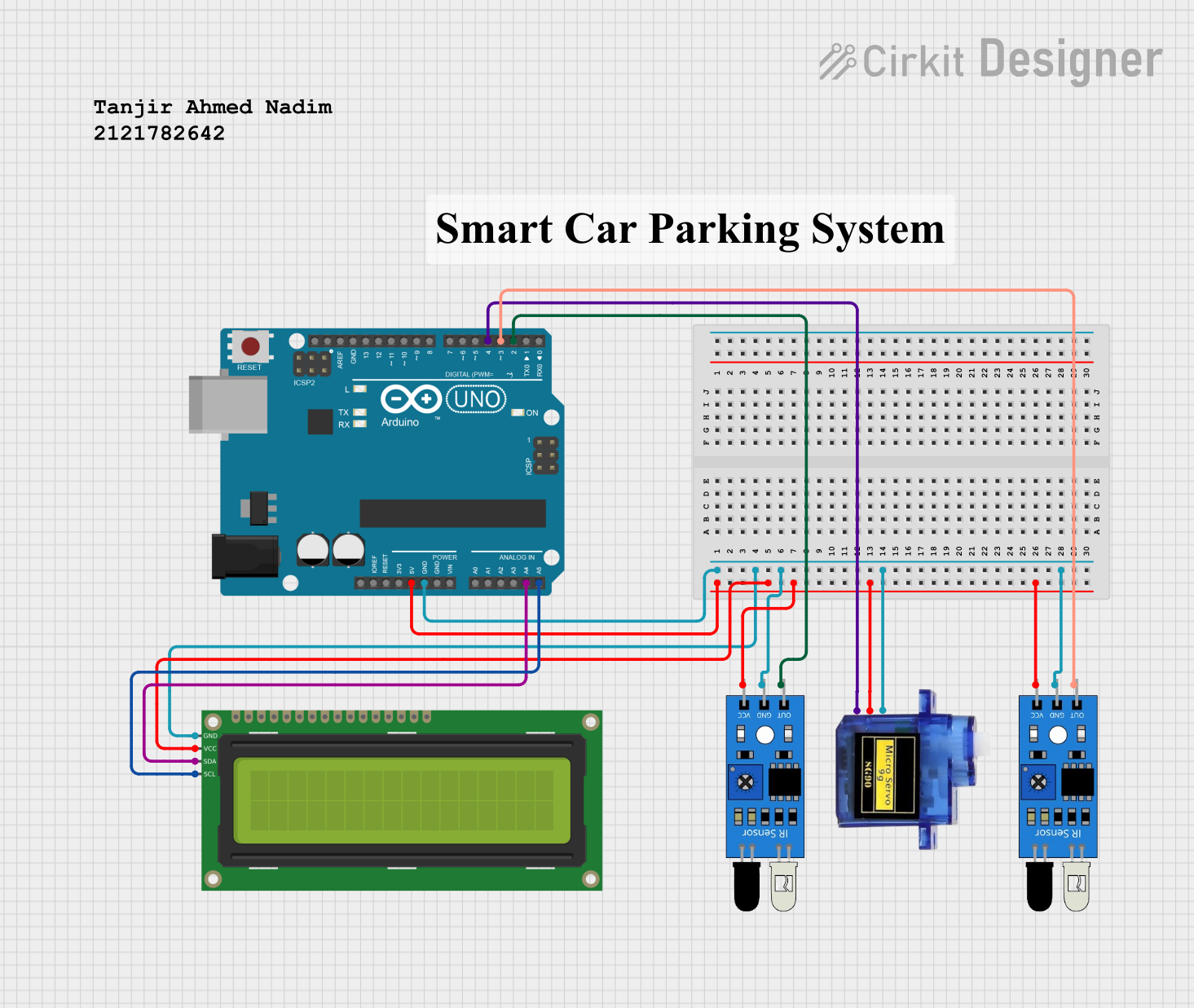
Circuit Documentation
Summary
This circuit is designed to create a parking system using an Arduino UNO, IR sensors, a micro servo, and a 16x2 I2C LCD display. The system detects the presence of a vehicle using IR sensors and displays the number of available slots on the LCD. The micro servo is used to control a barrier that opens and closes based on the availability of parking slots.
Component List
Arduino UNO
- Description: A microcontroller board based on the ATmega328P.
- Pins: UNUSED, IOREF, Reset, 3.3V, 5V, GND, Vin, A0, A1, A2, A3, A4, A5, SCL, SDA, AREF, D13, D12, D11, D10, D9, D8, D7, D6, D5, D4, D3, D2, D1, D0
IR Sensor
- Description: Infrared sensor used to detect the presence of a vehicle.
- Pins: out, gnd, vcc
Micro Servo 9G
- Description: A small servo motor used to control the barrier.
- Pins: GND, +5V, PWM
16x2 I2C LCD
- Description: A 16x2 character LCD display with I2C interface.
- Pins: GND, VCC, SDA, SCL
Comment
- Description: Placeholder for comments in the circuit design.
- Pins: None
Wiring Details
Arduino UNO
- 5V: Connected to VCC of 16x2 I2C LCD, VCC of IR Sensor (2 instances), and +5V of Micro Servo 9G
- GND: Connected to GND of 16x2 I2C LCD, GND of IR Sensor (2 instances), and GND of Micro Servo 9G
- D3: Connected to out of IR Sensor
- D2: Connected to out of IR Sensor
- A4: Connected to SDA of 16x2 I2C LCD
- A5: Connected to SCL of 16x2 I2C LCD
- D4: Connected to PWM of Micro Servo 9G
IR Sensor (Instance 1)
- out: Connected to D3 of Arduino UNO
- gnd: Connected to GND of Arduino UNO
- vcc: Connected to 5V of Arduino UNO
IR Sensor (Instance 2)
- out: Connected to D2 of Arduino UNO
- gnd: Connected to GND of Arduino UNO
- vcc: Connected to 5V of Arduino UNO
Micro Servo 9G
- GND: Connected to GND of Arduino UNO
- +5V: Connected to 5V of Arduino UNO
- PWM: Connected to D4 of Arduino UNO
16x2 I2C LCD
- GND: Connected to GND of Arduino UNO
- VCC: Connected to 5V of Arduino UNO
- SDA: Connected to A4 of Arduino UNO
- SCL: Connected to A5 of Arduino UNO
Code Documentation
#include <LiquidCrystal_I2C.h>
#include <Wire.h>
#include <LiquidCrystal_I2C.h>
LiquidCrystal_I2C lcd(0x27,16,2);
#include <Servo.h>
Servo myservo;
int IR1 = 2;
int IR2 = 3;
int Slot = 4;
int flag1 = 0;
int flag2 = 0;

void setup() {
  Serial.begin(9600);
  lcd.init();
  lcd.backlight();
  pinMode(IR1, INPUT);
  pinMode(IR2, INPUT);
  myservo.attach(4);
  myservo.write(100);
  lcd.setCursor (0,0);
  lcd.print("     ARDUINO    ");
  lcd.setCursor (0,1);
  lcd.print(" PARKING SYSTEM ");
  delay (2000);
  lcd.clear();
}

void loop(){
  if(digitalRead (IR1) == LOW && flag1==0){
    if(Slot>0){
      flag1=1;
      if(flag2==0){
        myservo.write(0);
        Slot = Slot-1;
      }
    } else {
      lcd.setCursor (0,0);
      lcd.print("    SORRY :(    ");
      lcd.setCursor (0,1);
      lcd.print("  Parking Full  ");
      delay (3000);
      lcd.clear();
    }
    if(digitalRead (IR2) == LOW && flag2==0){
      flag2=1;
      if(flag1==0){
        myservo.write(0);
        Slot = Slot+1;
      }
    }
    if(flag1==1 && flag2==1){
      delay (1000);
      myservo.write(100);
      flag1=0, flag2=0;
    }
    lcd.setCursor (0,0);
    lcd.print("    WELCOME!    ");
    lcd.setCursor (0,1);
    lcd.print("Slot Left: ");
    lcd.print(Slot);
  }
}
This code initializes the LCD and servo, sets up the IR sensors as inputs, and controls the servo based on the sensor readings. The LCD displays messages and the number of available slots.