
Arduino and ESP32-Based Smart Water Quality Monitoring System with Motor Control
View and Edit Project In Cirkit Designer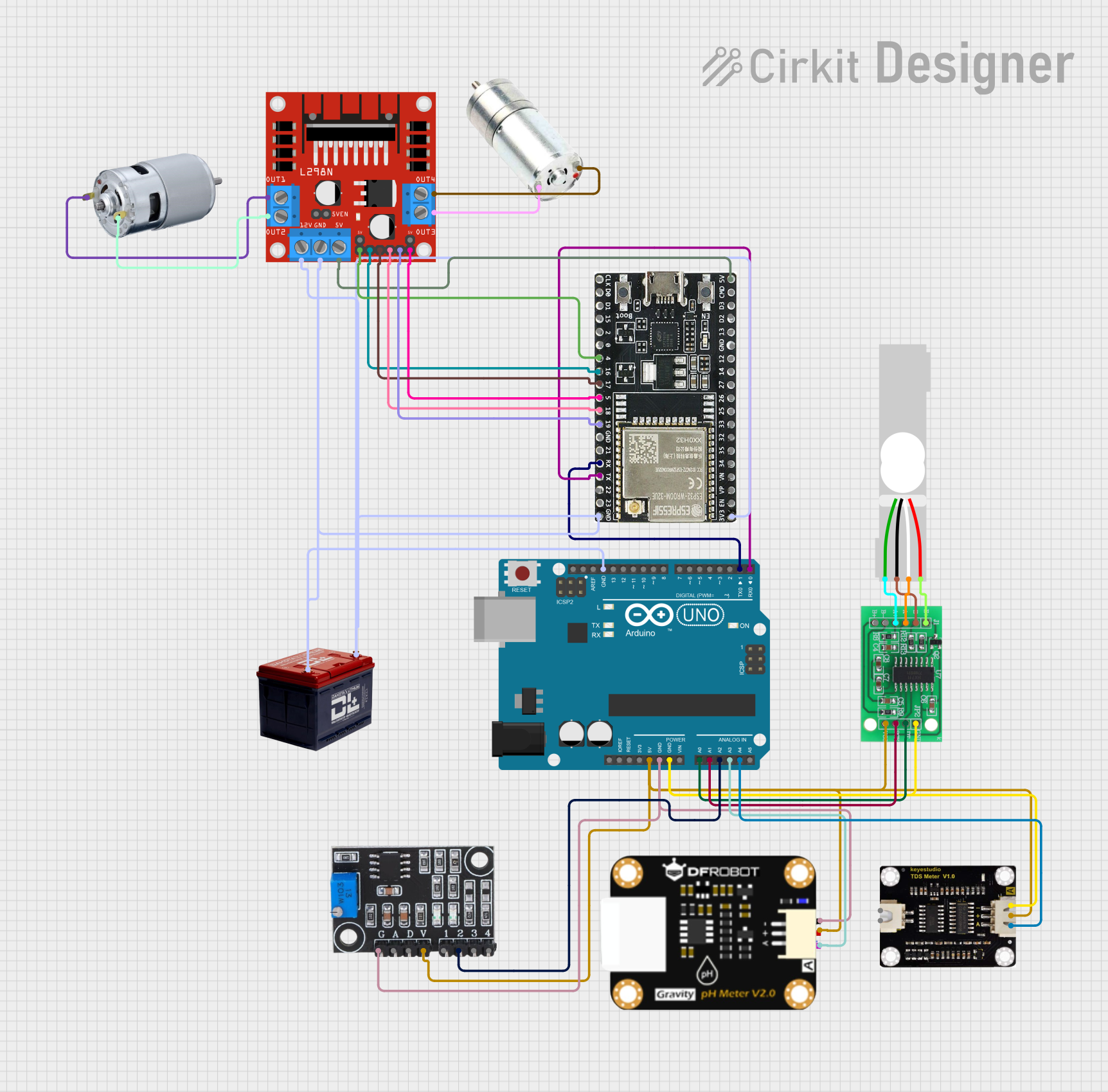
Circuit Documentation
Summary
This document provides a detailed overview of a circuit that integrates various sensors, motor drivers, and microcontrollers to perform multiple tasks. The circuit includes an Arduino UNO, an ESP32-WROOM-32UE, a L298N DC motor driver, and several sensors such as a TDS sensor, a turbidity module, a pH degree sensor module, an HX711 bridge sensor interface, and a load cell. The circuit is powered by a 12V battery and is designed to control motors and read sensor data, which is then transmitted to a Blynk application for monitoring.
Component List
Arduino UNO
- Description: A microcontroller board based on the ATmega328P.
- Pins: UNUSED, IOREF, Reset, 3.3V, 5V, GND, Vin, A0, A1, A2, A3, A4, A5, SCL, SDA, AREF, D13, D12, D11, D10, D9, D8, D7, D6, D5, D4, D3, D2, D1, D0
L298N DC Motor Driver
- Description: A dual H-Bridge motor driver module.
- Pins: OUT1, OUT2, 12V, GND, 5V, OUT3, OUT4, 5V-ENA-JMP-I, 5V-ENA-JMP-O, +5V-J1, +5V-J2, ENA, IN1, IN2, IN3, IN4, ENB
ESP32-WROOM-32UE
- Description: A powerful, generic Wi-Fi+BT+BLE MCU module.
- Pins: 3v3, EN, VP, VN, 34, 35, 32, 33, 25, 26, 27, 14, 12, GND, 13, D2, D3, 5V, 23, 22, TX, RX, 21, 19, 18, 5, 17, 16, 4, 0, 2, 15, D1, D0, CKL
Battery 12V
- Description: A 12V battery for powering the circuit.
- Pins: -, +
HX711 - Bridge Sensor Interface
- Description: A precision 24-bit analog-to-digital converter (ADC) designed for weigh scales and industrial control applications.
- Pins: E+, E-, A-, A+, B-, B+, GND - GROUND, DATA (OUT), SCK - CLOCK (IN), 3.3/3.5V Supply
Load Cell - Red/White/Black/Green
- Description: A sensor used to measure weight.
- Pins: E+, A-, E-, A+
Turbidity Module
- Description: A sensor used to measure the turbidity (cloudiness) of water.
- Pins: GND, AO, DO, VCC, S+, SO, S-
TDS Sensor
- Description: A sensor used to measure the Total Dissolved Solids (TDS) in water.
- Pins: P1, P2, +, -, A
pH Degree Sensor Module
- Description: A sensor used to measure the pH level of a solution.
- Pins: pH Negative, pH Positive, pH A
775 Motor
- Description: A high-power DC motor.
- Pins: positive, negative
Geared Motor
- Description: A motor with an integrated gearbox for increased torque.
- Pins: negative, positive
Wiring Details
Arduino UNO
5V connected to:
- TDS Sensor (+)
- Turbidity Module (VCC)
- pH Degree Sensor Module (pH Positive)
- HX711 - Bridge Sensor Interface (3.3/3.5V Supply)
GND connected to:
- Turbidity Module (GND)
- pH Degree Sensor Module (pH Negative)
- TDS Sensor (-)
- HX711 - Bridge Sensor Interface (GND - GROUND)
- ESP32-WROOM-32UE (GND)
- L298N DC Motor Driver (GND)
- Battery 12V (-)
A0 connected to:
- HX711 - Bridge Sensor Interface (DATA (OUT))
A1 connected to:
- HX711 - Bridge Sensor Interface (SCK - CLOCK (IN))
A2 connected to:
- Turbidity Module (SO)
A3 connected to:
- pH Degree Sensor Module (pH A)
A4 connected to:
- TDS Sensor (A)
D1 connected to:
- ESP32-WROOM-32UE (RX)
D0 connected to:
- ESP32-WROOM-32UE (TX)
L298N DC Motor Driver
12V connected to:
- Battery 12V (+)
5V connected to:
- ESP32-WROOM-32UE (5V)
OUT1 connected to:
- 775 Motor (positive)
OUT2 connected to:
- 775 Motor (negative)
OUT3 connected to:
- Geared Motor (negative)
OUT4 connected to:
- Geared Motor (positive)
ENA connected to:
- ESP32-WROOM-32UE (4)
IN1 connected to:
- ESP32-WROOM-32UE (16)
IN2 connected to:
- ESP32-WROOM-32UE (17)
IN3 connected to:
- ESP32-WROOM-32UE (18)
IN4 connected to:
- ESP32-WROOM-32UE (19)
ENB connected to:
- ESP32-WROOM-32UE (5)
ESP32-WROOM-32UE
3v3 connected to:
- ESP32-WROOM-32UE (GND)
RX connected to:
- Arduino UNO (D1)
TX connected to:
- Arduino UNO (D0)
HX711 - Bridge Sensor Interface
E+ connected to:
- Load Cell (E+)
E- connected to:
- Load Cell (E-)
A- connected to:
- Load Cell (A-)
A+ connected to:
- Load Cell (A+)
Battery 12V
+ connected to:
- L298N DC Motor Driver (12V)
- connected to:
- Arduino UNO (GND)
- L298N DC Motor Driver (GND)
Documented Code
Arduino UNO Code
#include <AFMotor.h>
#include "HX711.h"
#include <Wire.h>

// Define pin connections
#define conveyorMotorPin 9    // Pin for controlling the conveyor motor
#define TURBIDITY_PIN A2      // Pin for reading turbidity data
#define PH_PIN A3             // Pin for reading pH data
#define TDS_PIN A4            // Pin for reading TDS data
#define RX_PIN 0              // Arduino RX connected to ESP32 TX
#define TX_PIN 1              // Arduino TX connected to ESP32 RX

// Initialize motor drivers
AF_DCMotor motorLeft(1);      // Left motor connected to M1
AF_DCMotor motorRight(2);     // Right motor connected to M2

// Initialize the HX711 weight sensor
HX711 scale;

void setup() {
  Serial.begin(9600); // Initialize serial communication for debugging

  // Initialize motors
  motorLeft.setSpeed(150); // Set left motor speed (0-255)
  motorRight.setSpeed(150); // Set right motor speed (0-255)
  pinMode(conveyorMotorPin, OUTPUT); // Set conveyor motor pin as output

  // Initialize HX711
  scale.begin(A0, A1); // Connect DATA to A0, CLOCK to A1
  scale.set_scale(2280.f); // Adjust calibration factor based on your load cell
  scale.tare(); // Reset the scale to 0 weight

  // Print initialization message
  Serial.println("Setup complete. Starting operations...");
}

void moveMotors(int direction, int duration) {
  if (direction == FORWARD) {
    motorLeft.run(FORWARD);
    motorRight.run(FORWARD);
  } else if (direction == BACKWARD) {
    motorLeft.run(BACKWARD);
    motorRight.run(BACKWARD);
  } else {
    motorLeft.run(RELEASE);
    motorRight.run(RELEASE);
  }
  delay(duration); // Duration of movement
  motorLeft.run(RELEASE);
  motorRight.run(RELEASE); // Stop motors
}

void operateConveyor(int speed, int duration) {
  analogWrite(conveyorMotorPin, speed); // Set conveyor motor speed
  delay(duration); // Duration of conveyor operation
  analogWrite(conveyorMotorPin, 0); // Stop conveyor motor
}

void readSensors() {
  // Read and display weight from HX711