
ESP32 CAM Motion Detection System with PIR Sensor and FTDI Programmer
View and Edit Project In Cirkit Designer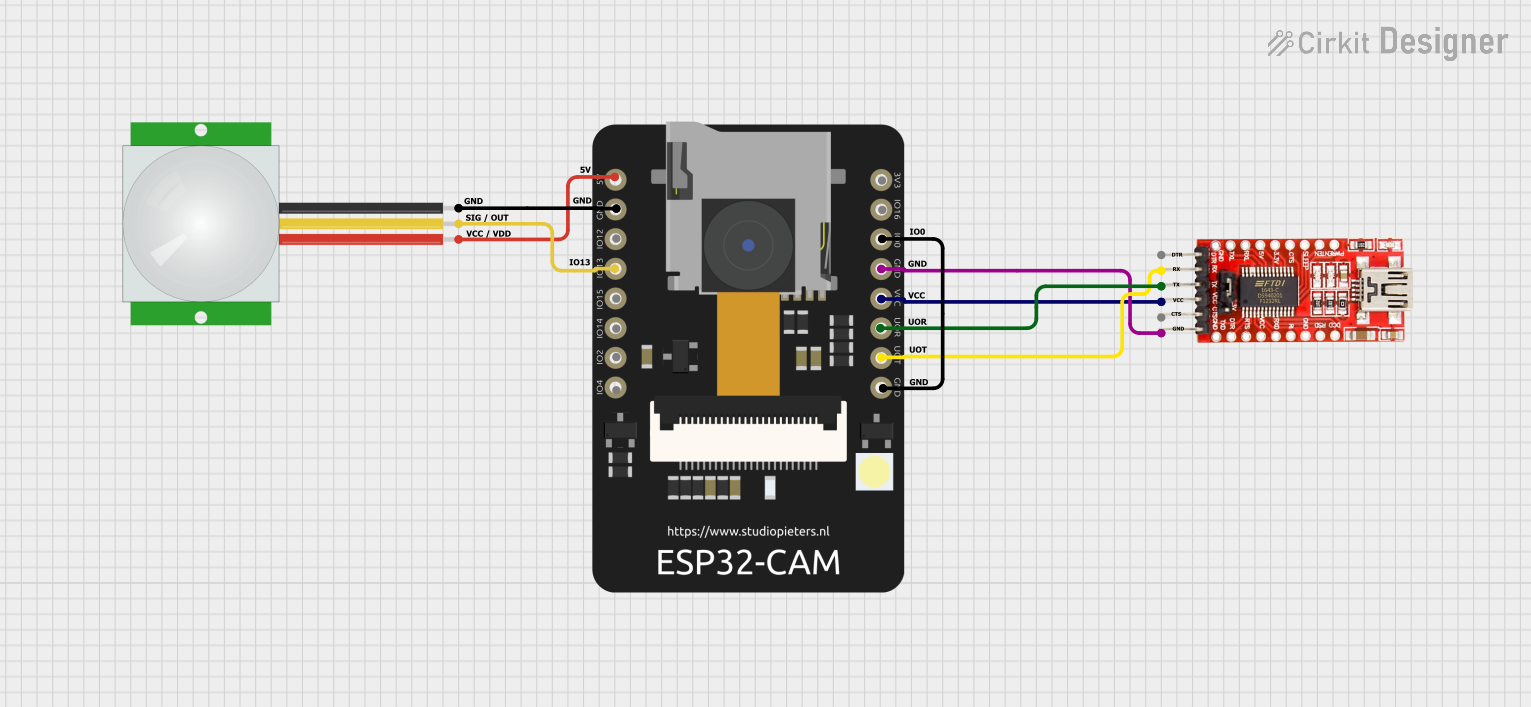
Circuit Documentation
Summary
This circuit involves an ESP32 CAM module, an FTDI Programmer, and a PIR sensor. The ESP32 CAM is used to detect motion via the PIR sensor and communicate the detection status through serial communication. The FTDI Programmer is used to program the ESP32 CAM.
Component List
ESP32 CAM
- Description: A microcontroller with integrated Wi-Fi and Bluetooth, equipped with a camera module.
- Pins: 5V, GND, GPIO12, GPIO13, GPIO15, GPIO14, GPIO2, GPIO4, 3.3V, GPIO16, GPIO0, 3.3V / 5V / P_OUT, GPIO3 / RX, GPIO1 / TX
FTDI Programmer
- Description: A USB-to-serial converter used to program microcontrollers.
- Pins: DTR, RX, TX, VCC, CTS, GND
PIR Sensor
- Description: A passive infrared sensor used to detect motion.
- Pins: VDD, SIG, GND
Wiring Details
ESP32 CAM
- 5V: Connected to VDD of PIR sensor
- GND: Connected to GND of PIR sensor, GND of FTDI Programmer, and GPIO0 of ESP32 CAM
- GPIO13: Connected to SIG of PIR sensor
- 3.3V / 5V / P_OUT: Connected to VCC of FTDI Programmer
- GPIO3 / RX: Connected to TX of FTDI Programmer
- GPIO1 / TX: Connected to RX of FTDI Programmer
FTDI Programmer
- GND: Connected to GND of ESP32 CAM
- VCC: Connected to 3.3V / 5V / P_OUT of ESP32 CAM
- TX: Connected to GPIO3 / RX of ESP32 CAM
- RX: Connected to GPIO1 / TX of ESP32 CAM
PIR Sensor
- VDD: Connected to 5V of ESP32 CAM
- SIG: Connected to GPIO13 of ESP32 CAM
- GND: Connected to GND of ESP32 CAM
Code Documentation
ESP32 CAM Code
const int PIR_PIN = 13; // PIR sensor output pin

void setup() {
  pinMode(PIR_PIN, INPUT);
  Serial.begin(115200);
  Serial.println("Waiting for motion...");
}

void loop() {
  int sensorState = digitalRead(PIR_PIN);
  if (sensorState == LOW) {
    Serial.println("Motion detected!");
    delay(1000); // Debounce delay
  }
}
- PIR_PIN: Defines the GPIO pin connected to the PIR sensor output.
- setup(): Initializes the PIR_PIN as an input and starts the serial communication at 115200 baud rate.
- loop(): Continuously reads the state of the PIR sensor. If motion is detected (sensorState is LOW), it prints "Motion detected!" to the serial monitor and waits for 1 second to debounce.