
Arduino UNO-Based Smart Sorting System with Servo and Stepper Motors
View and Edit Project In Cirkit Designer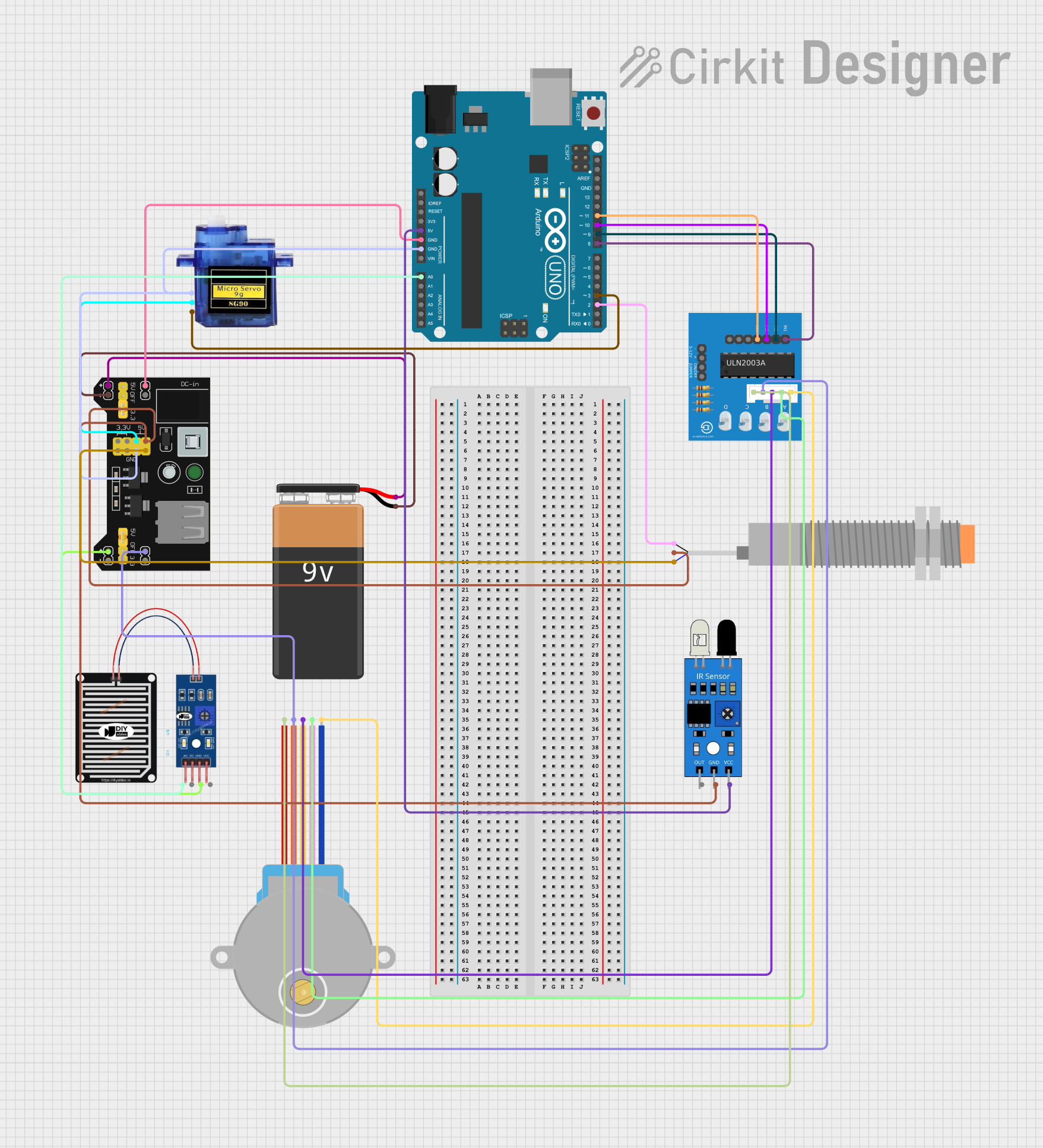
Circuit Documentation
Summary
This circuit is designed to detect different types of materials (wet, metal, and plastic) using various sensors. Based on the detected material, it rotates a compartment using a stepper motor to place the material in the designated compartment. A servo motor is used to control a gate mechanism to drop the material.
Component List
Arduino UNO
- Description: Microcontroller board based on the ATmega328P.
- Pins: UNUSED, IOREF, Reset, 3.3V, 5V, GND, Vin, A0, A1, A2, A3, A4, A5, SCL, SDA, AREF, D13, D12, D11, D10, D9, D8, D7, D6, D5, D4, D3, D2, D1, D0
MB102 Breadboard Power Supply Module 3.3V/5V
- Description: Power supply module that provides 3.3V and 5V outputs.
- Pins: VCC, GND, 3.3V, 5V
Micro servo 9G
- Description: Small servo motor used for precise control of angular position.
- Pins: GND, +5V, PWM
RAIN SENSOR
- Description: Sensor used to detect the presence of water.
- Pins: AO, DO, GRD, VCC
28BYJ-48 Stepper Motor
- Description: Stepper motor used for precise control of rotational position.
- Pins: BLUE, PINK, YELLOW, ORANGE, RED
ULN2003A breakout board
- Description: Driver board for controlling the 28BYJ-48 stepper motor.
- Pins: In 1, In 2, In 3, In 4, In 5, In 6, In 7, 0V, +5V, ON/OFF jumper switch, BLUE wire, PINK wire, YELLOW wire, ORANGE wire, RED wire
LJ18A3-H-ZBX Inductive Proximity Sensor
- Description: Sensor used to detect metal objects.
- Pins: VO (BLU), VI (BRN), SIG (BLK)
9V Battery
- Description: Power source for the circuit.
- Pins: -, +
IR Sensor
- Description: Sensor used to detect objects using infrared light.
- Pins: out, gnd, vcc
Wiring Details
Arduino UNO
- 5V to IR Sensor vcc
- GND to MB102 Breadboard Power Supply Module VCC
- GND to Micro servo 9G GND
- GND to RAIN SENSOR GRD
- A0 to RAIN SENSOR AO
- D11 to ULN2003A breakout board In 4
- D10 to ULN2003A breakout board In 3
- D9 to ULN2003A breakout board In 2
- D8 to ULN2003A breakout board In 1
- D3 to Micro servo 9G PWM
- D2 to LJ18A3-H-ZBX Inductive Proximity Sensor SIG (BLK)
MB102 Breadboard Power Supply Module 3.3V/5V
- VCC to 9V Battery +
- GND to 9V Battery -
- GND to Micro servo 9G GND
- GND to LJ18A3-H-ZBX Inductive Proximity Sensor VO (BLU)
- 5V to Micro servo 9G +5V
- 5V to LJ18A3-H-ZBX Inductive Proximity Sensor VI (BRN)
- VCC to RAIN SENSOR GRD
Micro servo 9G
- GND to MB102 Breadboard Power Supply Module GND
- +5V to MB102 Breadboard Power Supply Module 5V
- PWM to Arduino UNO D3
RAIN SENSOR
- AO to Arduino UNO A0
- GRD to MB102 Breadboard Power Supply Module VCC
28BYJ-48 Stepper Motor
- ORANGE to ULN2003A breakout board ORANGE wire
- BLUE to ULN2003A breakout board BLUE wire
- PINK to ULN2003A breakout board PINK wire
- YELLOW to ULN2003A breakout board YELLOW wire
- RED to ULN2003A breakout board RED wire
ULN2003A breakout board
- In 4 to Arduino UNO D11
- In 3 to Arduino UNO D10
- In 2 to Arduino UNO D9
- In 1 to Arduino UNO D8
- ORANGE wire to 28BYJ-48 Stepper Motor ORANGE
- BLUE wire to 28BYJ-48 Stepper Motor BLUE
- PINK wire to 28BYJ-48 Stepper Motor PINK
- YELLOW wire to 28BYJ-48 Stepper Motor YELLOW
- RED wire to 28BYJ-48 Stepper Motor RED
LJ18A3-H-ZBX Inductive Proximity Sensor
- SIG (BLK) to Arduino UNO D2
- VI (BRN) to MB102 Breadboard Power Supply Module 5V
- VO (BLU) to MB102 Breadboard Power Supply Module GND
9V Battery
- + to MB102 Breadboard Power Supply Module VCC
- - to MB102 Breadboard Power Supply Module GND
IR Sensor
- vcc to Arduino UNO 5V
- gnd to MB102 Breadboard Power Supply Module GND
Code Documentation
/*
 * This Arduino sketch reads from three sensors to detect metal, plastic, and wet
 * materials. Based on the detected material, it rotates a compartment using a
 * stepper motor to place the material in the designated compartment. A servo
 * motor is used to control a gate mechanism to drop the material.
 */

#include <Servo.h>
#include <Stepper.h>

// Pin definitions
const int rainSensorPin = A0;
const int proximitySensorPin = 2;
const int servoPin = 3;
const int stepperIn1 = 8;
const int stepperIn2 = 9;
const int stepperIn3 = 10;
const int stepperIn4 = 11;

// Stepper motor setup
const int stepsPerRevolution = 2048;
Stepper myStepper(stepsPerRevolution, stepperIn1, stepperIn3, stepperIn2, stepperIn4);

// Servo motor setup
Servo myServo;

void setup() {
  // Initialize serial communication
  Serial.begin(9600);

  // Initialize sensors
  pinMode(rainSensorPin, INPUT);
  pinMode(proximitySensorPin, INPUT);

  // Initialize servo motor
  myServo.attach(servoPin);
  myServo.write(0); // Initial position

  // Initialize stepper motor
  myStepper.setSpeed(10); // Set speed to 10 RPM
}

void loop() {
  // Read sensor values
  int rainValue = analogRead(rainSensorPin);
  int proximityValue = digitalRead(proximitySensorPin);

  // Determine material type
  if (rainValue > 500) { // Wet material detected
    Serial.println("Wet material detected");
    rotateCompartment(0); // Rotate to wet compartment
  } else if (proximityValue == HIGH) { // Metal detected
    Serial.println("Metal detected");
    rotateCompartment(1); // Rotate to metal compartment
  } else { // Assume plastic if no other material detected
    Serial.println("Plastic detected");
    rotateCompartment(2); // Rotate to plastic compartment
  }

  // Drop material
  dropMaterial();

  // Wait before next detection
  delay(2000);
}

void rotateCompartment(int compartment) {
  // Rotate stepper motor to the correct compartment
  int steps = compartment * (stepsPerRevolution / 3); // Assuming 3 compartments
  myStepper.step(steps);
}

void dropMaterial() {
  // Use servo to drop material
  myServo.write(90); // Open gate
  delay(1000); // Wait for material to drop
  myServo.write(0); // Close gate
}
This code reads sensor values to detect the type of material and then uses a stepper motor to rotate to the appropriate compartment. A servo motor is used to open and close a gate to drop the material into the compartment.