
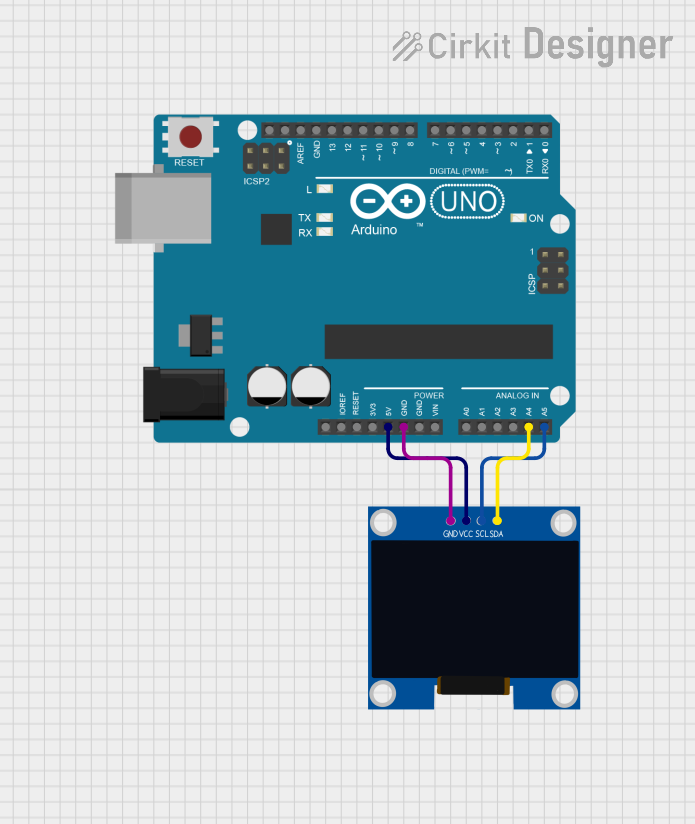
Circuit Documentation
Summary of the Circuit
This circuit consists of an Arduino UNO microcontroller board interfaced with a 128x64 OLED display using I2C communication protocol. The OLED display is powered by the 5V supply from the Arduino and communicates over the SDA and SCL lines. The ground of both the Arduino and the OLED display is connected to establish a common reference point for the voltages. The purpose of this circuit is to display the message "Hello, World!" on the OLED screen.
Component List
128x64 OLED Display (I2C IIC SPI Serial)
- Description: An OLED display capable of showing graphics and text in a 128x64 pixel resolution.
- Pins: GND, SDA, SCL, VCC
Arduino UNO
- Description: A microcontroller board based on the ATmega328P, widely used for building digital devices and interactive objects.
- Pins: UNUSED, IOREF, Reset, 3.3V, 5V, GND, Vin, A0, A1, A2, A3, A4, A5, SCL, SDA, AREF, D13, D12, D11, D10, D9, D8, D7, D6, D5, D4, D3, D2, D1, D0
Wiring Details
128x64 OLED Display (I2C IIC SPI Serial)
- GND: Connected to the GND pin on the Arduino UNO.
- SDA: Connected to the A4 pin on the Arduino UNO.
- SCL: Connected to the A5 pin on the Arduino UNO.
- VCC: Connected to the 5V pin on the Arduino UNO.
Arduino UNO
- GND: Connected to the GND pin on the OLED Display.
- A4 (SDA): Connected to the SDA pin on the OLED Display.
- A5 (SCL): Connected to the SCL pin on the OLED Display.
- 5V: Connected to the VCC pin on the OLED Display.
Documented Code
Arduino UNO Code
#include <Wire.h>
#include <Adafruit_GFX.h>
#include <Adafruit_SSD1306.h>

#define SCREEN_WIDTH 128
#define SCREEN_HEIGHT 64
#define OLED_RESET -1  // Reset pin is not used with some OLED displays

Adafruit_SSD1306 display(SCREEN_WIDTH, SCREEN_HEIGHT, &Wire, OLED_RESET);

void setup() {
  if(!display.begin(SSD1306_I2C_ADDRESS, OLED_RESET)) {
    Serial.println(F("SSD1306 allocation failed"));
    for(;;); // Halt if display initialization fails
  }
  display.display();
  delay(2000);  // Pause for 2 seconds

  display.clearDisplay();

  display.setTextSize(1);       // Normal 1:1 pixel scale
  display.setTextColor(SSD1306_WHITE); // White text
  display.setCursor(0,0);       // Start at top-left corner
  display.print(F("Hello, World!"));
  display.display();
}

void loop() {
  // Nothing needed in loop for static display
}
File Name: sketch.ino
This code initializes the OLED display and prints "Hello, World!" on the screen. The setup() function begins by initializing the display with the display.begin() function. If the initialization fails, the program enters an infinite loop, effectively halting the system. If successful, it clears the display and sets the text size and color before setting the cursor position and printing the message. The loop() function is left empty as the display content is static.