
Arduino UNO Based Soil Moisture Monitoring and Alert System with I2C LCD and Relay-Controlled Buzzer
View and Edit Project In Cirkit Designer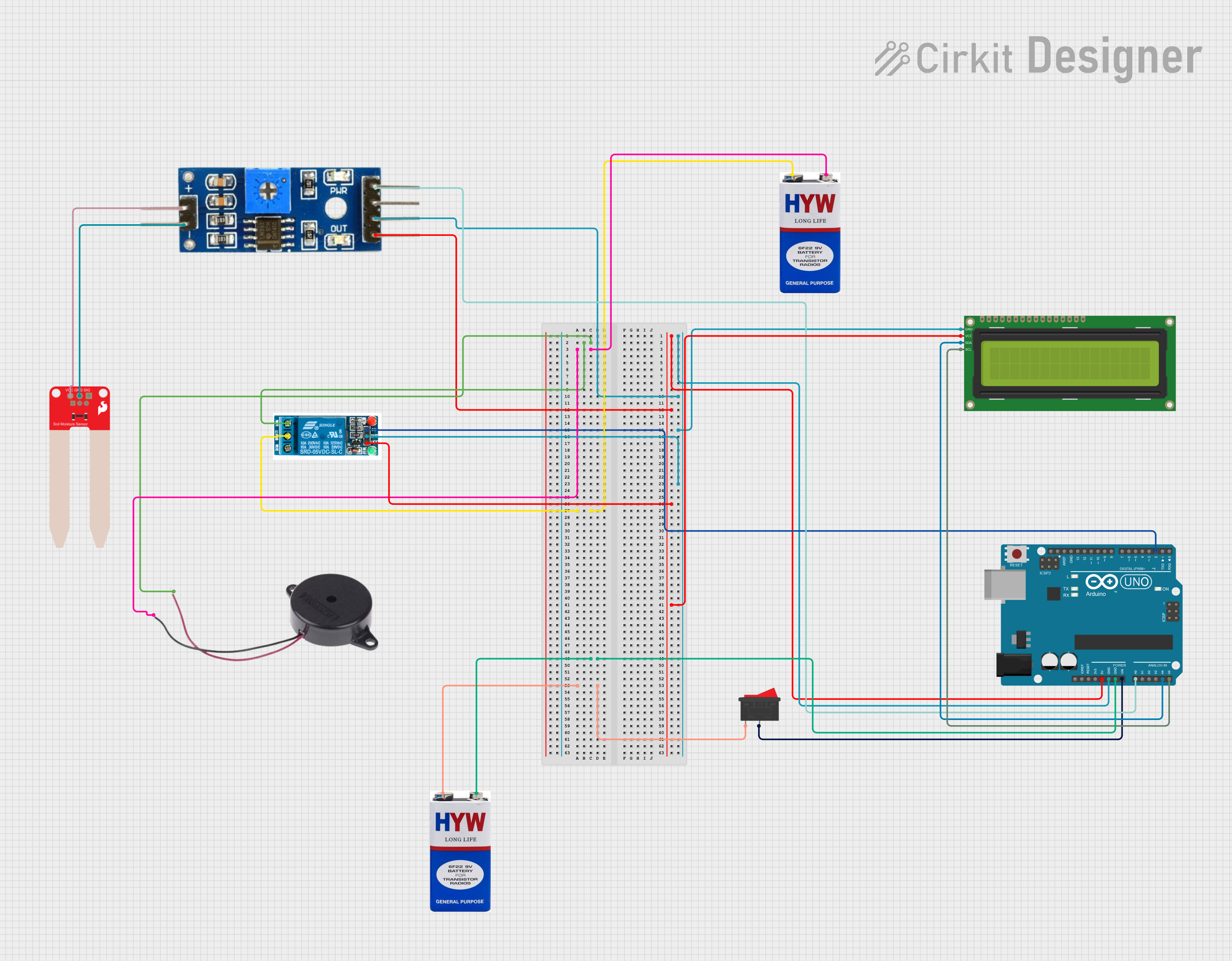
Circuit Documentation
Summary of the Circuit
This circuit is designed to monitor soil moisture levels and activate a buzzer and relay based on the moisture content. It features an Arduino UNO as the central microcontroller, interfaced with a 16x2 I2C LCD for display, a soil moisture module paired with a SparkFun Soil Moisture Sensor for detecting moisture levels, a 5V relay to control power to the buzzer, and a buzzer for audible alerts. The system is powered by two 9V batteries, with a rocker switch to control the power supply to the Arduino.
Component List
Arduino UNO
- Microcontroller board based on the ATmega328P
- Features digital and analog I/O pins
- Provides 5V and 3.3V power outputs
16x2 I2C LCD
- Alphanumeric liquid crystal display
- I2C communication interface
- Displays information such as system status and moisture levels
5V Relay
- Electromechanical switch with a coil rated at 5V
- Has Normally Open (NO) and Normally Closed (NC) contacts
- Controls the buzzer activation
Buzzer
- An audible signaling device
- Activates to alert when soil moisture is low
Rocker Switch
- A simple on/off switch
- Controls the power supply to the Arduino
9V Batteries (x2)
- Provide power to the circuit
- One battery powers the Arduino, and the other powers the relay and buzzer
Soil Moisture Module
- Interfaces with the soil moisture sensor
- Provides analog output corresponding to the moisture level
SparkFun Soil Moisture Sensor
- Detects the moisture content in the soil
- Outputs an analog signal to the soil moisture module
Wiring Details
Arduino UNO
5Vto Soil Moisture ModuleVCC, 5V RelayVCC, and 16x2 I2C LCDVCCGNDto Soil Moisture ModuleGround, 16x2 I2C LCDGND, and 5V RelayGNDVinconnected through Rocker Switch to 9V batteryA0to Soil Moisture ModuleAnalogA4(SDA) to 16x2 I2C LCDSDAA5(SCL) to 16x2 I2C LCDSCLD2to 5V RelayIn
16x2 I2C LCD
GNDto Arduino UNOGNDVCCto Arduino UNO5VSDAto Arduino UNOA4SCLto Arduino UNOA5
5V Relay
VCCto Arduino UNO5VGNDto Arduino UNOGNDInto Arduino UNOD2Normally Opento BuzzerPOSITIVECommon terminalto 9V battery+
Buzzer
POSITIVEto 5V RelayNormally OpenNEGATIVEto 9V battery-
Rocker Switch
- One terminal to 9V battery
+ - Other terminal to Arduino UNO
Vin
Soil Moisture Module
VCCto Arduino UNO5VGroundto Arduino UNOGNDAnalogto Arduino UNOA0positiveto SparkFun Soil Moisture SensorVCCnegativeto SparkFun Soil Moisture SensorGND
SparkFun Soil Moisture Sensor
VCCto Soil Moisture ModulepositiveGNDto Soil Moisture Modulenegative
Documented Code
#include <LiquidCrystal_I2C.h>
LiquidCrystal_I2C lcd(0x27, 16, 2);

void setup() {
  Serial.begin(9600);
  lcd.init();
  lcd.backlight();
  lcd.clear();
  pinMode(2, OUTPUT);
  digitalWrite(2, HIGH);
  delay(1000);
  lcd.setCursor(0, 0);
  lcd.print("IRRIGATION");
  lcd.setCursor(0, 1);
  lcd.print("SYSTEM IS ON ");
  lcd.print("");
  delay(3000);
  lcd.clear();
}

void loop() {
  int value = analogRead(A0);
  Serial.println(value);
  if (value > 950) {
    digitalWrite(2, HIGH);
    lcd.setCursor(0, 0);
    lcd.print("BUZZER is OFF ");
  } else {
    digitalWrite(2, LOW);
    lcd.setCursor(0, 0);
    lcd.print("BUZZER is ON");
  }

  if (value < 500) {
    lcd.setCursor(0, 1);
    lcd.print("Moisture : HIGH");
  } else if (value > 500 && value < 950) {
    lcd.setCursor(0, 1);
    lcd.print("Moisture : MID ");
  } else if (value > 950) {
    lcd.setCursor(0, 1);
    lcd.print("Moisture : LOW ");
  }
}
This code initializes the LCD and sets up the Arduino to read the analog value from the soil moisture sensor. Depending on the moisture level, it activates or deactivates the relay (which controls the buzzer) and updates the display with the moisture status.