
Arduino UNO Obstacle Avoiding Car with Ultrasonic Sensor and DC Motors
View and Edit Project In Cirkit Designer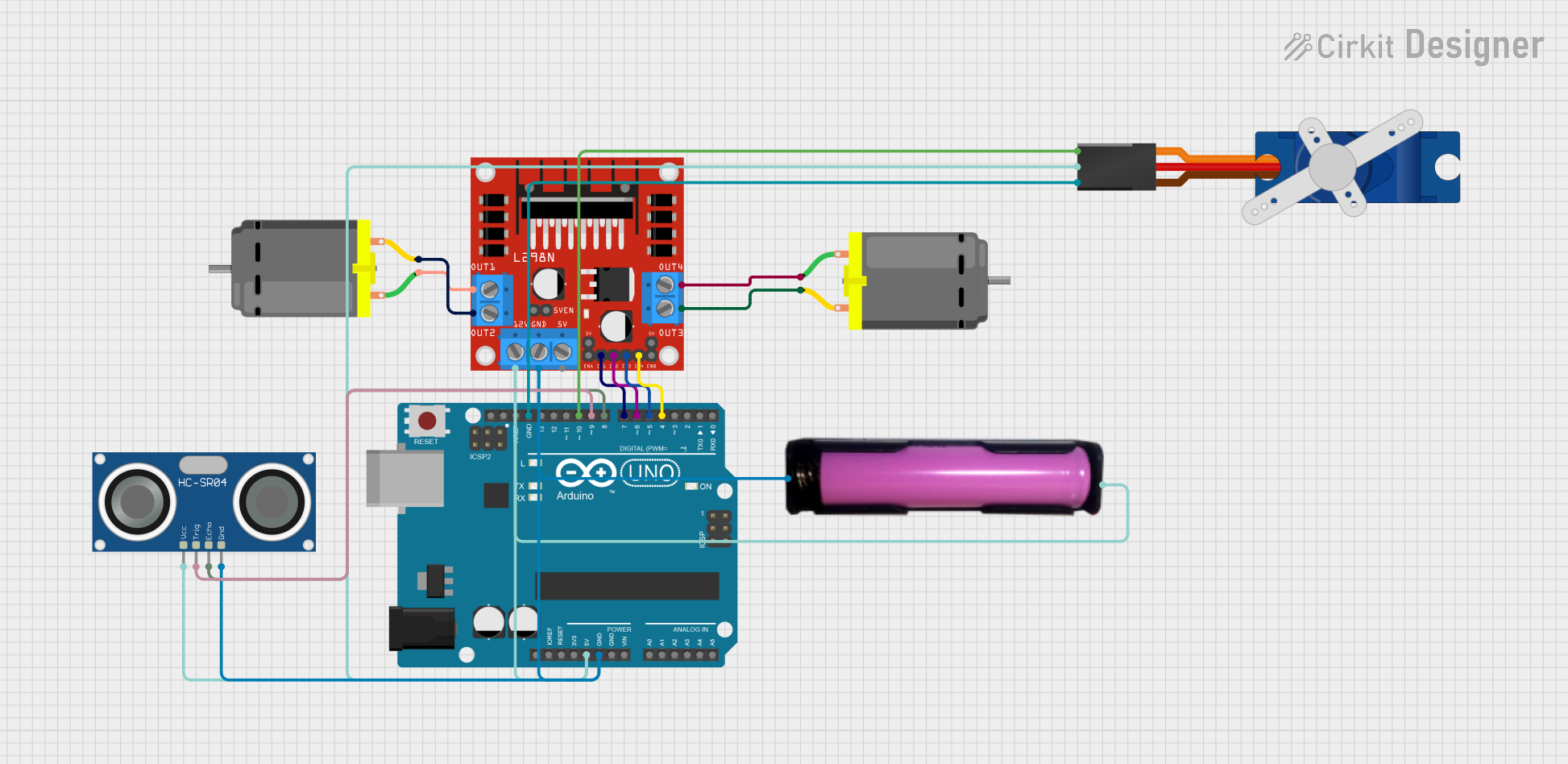
Circuit Documentation
Summary
This document provides a detailed overview of a circuit designed to control a DC motor and a servo motor using an Arduino UNO. The circuit also includes an ultrasonic sensor for obstacle detection and a motor driver for controlling the DC motors. The power is supplied by a 18650 battery in a holder.
Component List
Arduino UNO
- Description: A microcontroller board based on the ATmega328P.
- Pins: UNUSED, IOREF, Reset, 3.3V, 5V, GND, Vin, A0, A1, A2, A3, A4, A5, SCL, SDA, AREF, D13, D12, D11, D10, D9, D8, D7, D6, D5, D4, D3, D2, D1, D0
DC Motor
- Description: A simple DC motor.
- Pins: pin 1, pin 2
L298N DC Motor Driver
- Description: A dual H-Bridge motor driver.
- Pins: OUT1, OUT2, 12V, GND, 5V, OUT3, OUT4, 5V-ENA-JMP-I, 5V-ENA-JMP-O, +5V-J1, +5V-J2, ENA, IN1, IN2, IN3, IN4, ENB
18650 in Holder
- Description: A battery holder for a 18650 lithium-ion battery.
- Pins: GND, VCC
HC-SR04 Ultrasonic Sensor
- Description: An ultrasonic sensor for distance measurement.
- Pins: VCC, TRIG, ECHO, GND
Tower Pro SG90 Servo
- Description: A small servo motor.
- Pins: Signal, +5V, GND
Wiring Details
Arduino UNO
5V connected to:
- +5V of Tower Pro SG90 Servo
- 12V of L298N DC Motor Driver
- VCC of 18650 in Holder
- VCC of HC-SR04 Ultrasonic Sensor
GND connected to:
- GND of L298N DC Motor Driver
- GND of 18650 in Holder
- GND of HC-SR04 Ultrasonic Sensor
- GND of Tower Pro SG90 Servo
D10 connected to:
- Signal of Tower Pro SG90 Servo
D9 connected to:
- TRIG of HC-SR04 Ultrasonic Sensor
D8 connected to:
- ECHO of HC-SR04 Ultrasonic Sensor
D7 connected to:
- IN1 of L298N DC Motor Driver
D6 connected to:
- IN2 of L298N DC Motor Driver
D5 connected to:
- IN3 of L298N DC Motor Driver
D4 connected to:
- IN4 of L298N DC Motor Driver
DC Motor 1
pin 1 connected to:
- OUT4 of L298N DC Motor Driver
pin 2 connected to:
- OUT3 of L298N DC Motor Driver
DC Motor 2
pin 1 connected to:
- OUT1 of L298N DC Motor Driver
pin 2 connected to:
- OUT2 of L298N DC Motor Driver
L298N DC Motor Driver
12V connected to:
- 5V of Arduino UNO
GND connected to:
- GND of Arduino UNO
IN1 connected to:
- D7 of Arduino UNO
IN2 connected to:
- D6 of Arduino UNO
IN3 connected to:
- D5 of Arduino UNO
IN4 connected to:
- D4 of Arduino UNO
18650 in Holder
VCC connected to:
- 5V of Arduino UNO
GND connected to:
- GND of Arduino UNO
HC-SR04 Ultrasonic Sensor
VCC connected to:
- 5V of Arduino UNO
GND connected to:
- GND of Arduino UNO
TRIG connected to:
- D9 of Arduino UNO
ECHO connected to:
- D8 of Arduino UNO
Tower Pro SG90 Servo
+5V connected to:
- 5V of Arduino UNO
GND connected to:
- GND of Arduino UNO
Signal connected to:
- D10 of Arduino UNO
Code Documentation
// Arduino: 1.8.19 (Windows Store 1.8.57.0) (Windows 10), Board: "Arduino Uno"

// The sketch name had to be modified.
// Sketch names must start with a letter or number, followed by letters,
// numbers, dashes, dots and underscores. Maximum length is 63 characters.

// my_car_project:2:13: error: expected constructor, destructor, or type conversion before 'Avoiding'
// * Obstacle Avoiding Car
// ^~~~~~~~

// In file included from C:\Program Files\WindowsApps\ArduinoLLC.ArduinoIDE_1.8.57.0_x86__mdqgnx93n4wtt\libraries\Servo\src/Servo.h:63:0,
// from C:\Users\DELL\Desktop\my_car_project\my_car_project.ino:8:

// C:\Program Files\WindowsApps\ArduinoLLC.ArduinoIDE_1.8.57.0_x86__mdqgnx93n4wtt\libraries\Servo\src/avr/ServoTimers.h:57:41: error: 'timer16_Sequence_t' does not name a type
// typedef enum { _timer1, _Nbr_16timers } timer16_Sequence_t;
// ^~~~~~~~~~~~~~~~~~

// exit status 1

// expected constructor, destructor, or type conversion before 'Avoiding'

// This report would have more information with
// "Show verbose output during compilation"
// option enabled in File -> Preferences.