
Arduino UNO Based Keypad Door Lock with LCD Feedback and Relay Control
View and Edit Project In Cirkit Designer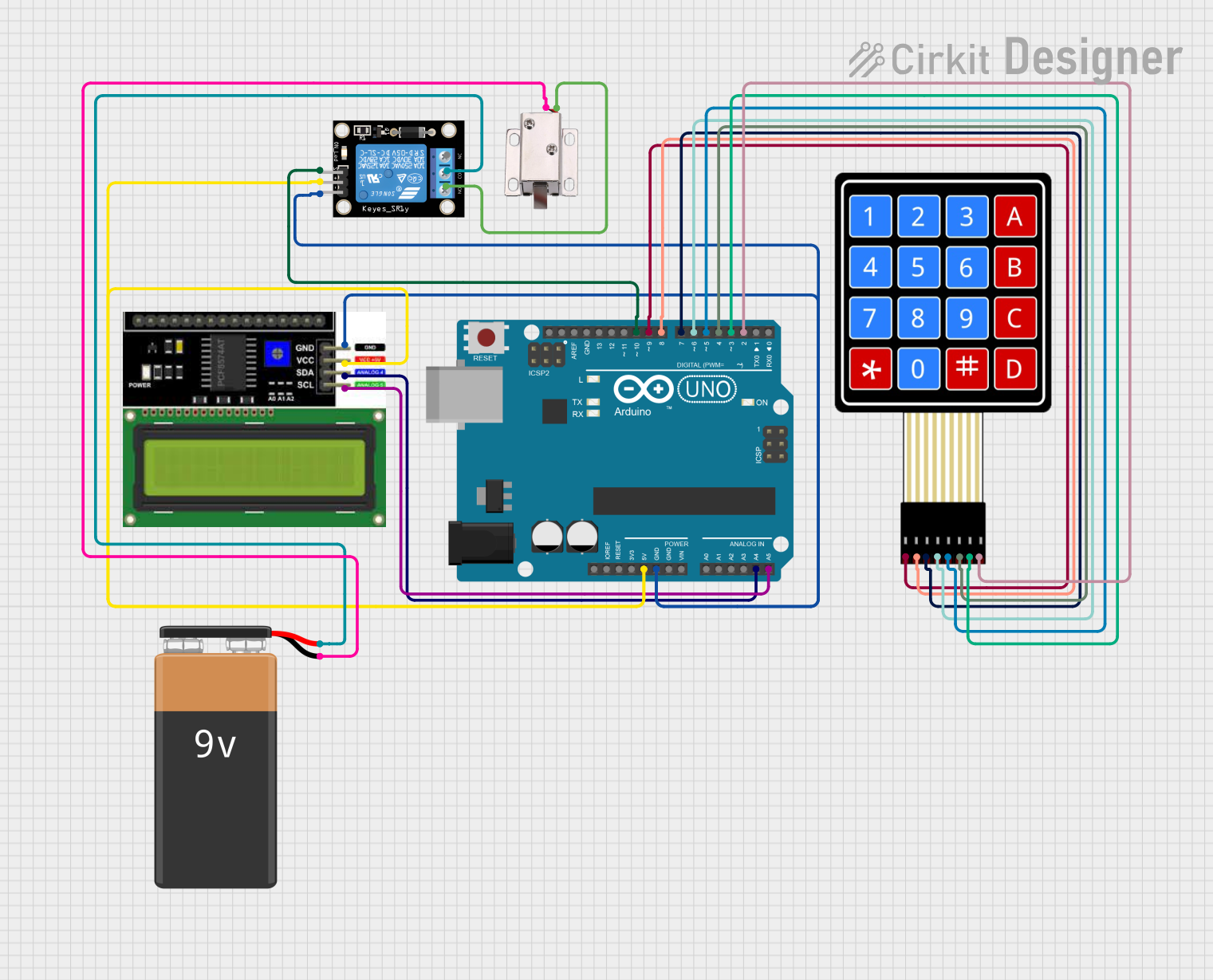
Circuit Documentation
Summary
This circuit is designed to function as a door lock system, utilizing a 4x4 membrane matrix keypad for input, an LCD I2C display for user feedback, a relay module to control a 12V solenoid lock, and an Arduino UNO as the central microcontroller. The system prompts the user to enter a password on the keypad, displays the input on the LCD, and if the correct password is entered, activates the relay to unlock the solenoid lock for a brief period.
Component List
Arduino UNO
- Microcontroller board based on the ATmega328P
- It has 14 digital input/output pins, 6 analog inputs, a 16 MHz quartz crystal, a USB connection, a power jack, an ICSP header, and a reset button.
LCD I2C Display
- A 16x2 character LCD display with an I2C interface module for easy communication with the Arduino.
Relay Module 1 Channel
- An electrically operated switch that allows you to control a high power circuit with a low power signal.
- It has a single channel which can be used to control the solenoid lock.
4X4 Membrane Matrix Keypad
- A 16-button keypad that provides a simple user interface for entering the password.
12V Solenoid Lock
- An electromechanical lock that can be controlled via the relay to lock or unlock.
9V Battery
- Provides power to the relay module, which in turn controls the solenoid lock.
Wiring Details
Arduino UNO
5VandGNDare used to power the LCD I2C display and the relay module.A4 (SDA)andA5 (SCL)are connected to the corresponding SDA and SCL pins on the LCD I2C display for I2C communication.- Digital pins
D2toD9are connected to the keypad pinsC4toR1respectively. - Digital pin
D10is connected to the signal pinSof the relay module.
LCD I2C Display
VCCconnected to 5V from the Arduino UNO.GNDconnected to GND on the Arduino UNO.SDAconnected to A4 on the Arduino UNO.SCLconnected to A5 on the Arduino UNO.
Relay Module 1 Channel
5Vconnected to 5V from the Arduino UNO.GNDconnected to GND on the Arduino UNO.S(signal) connected to digital pinD10on the Arduino UNO.COMconnected to the positive terminal of the 9V battery.NO(Normally Open) connected to theVCCof the 12V solenoid lock.
4X4 Membrane Matrix Keypad
R1toR4connected to digital pinsD9toD6on the Arduino UNO.C1toC4connected to digital pinsD5toD2on the Arduino UNO.
12V Solenoid Lock
VCCconnected toNOon the relay module.GNDconnected to the negative terminal of the 9V battery.
9V Battery
+connected toCOMon the relay module.-connected toGNDon the 12V solenoid lock.
Documented Code
/*
 * Door Lock System using 4x4 Keypad, LCD, and Relay
 * This code reads input from a 4x4 keypad, displays it on an LCD using I2C,
 * and checks if the entered code matches a predefined password to
 * unlock the door by activating a relay. Feedback is provided on incorrect
 * entry, and blocking delays are prevented.
 * Password: 1234
 */

#include <Keypad.h>
#include <Wire.h>
#include <LiquidCrystal_I2C.h>

const byte ROWS = 4; // Four rows
const byte COLS = 4; // Four columns
char keys[ROWS][COLS] = {
  {'1','2','3','A'},
  {'4','5','6','B'},
  {'7','8','9','C'},
  {'*','0','#','D'}
};
byte rowPins[ROWS] = {9, 8, 7, 6}; // Connect to the row pinouts of the keypad
byte colPins[COLS] = {5, 4, 3, 2}; // Connect to the column pinouts of the keypad

Keypad keypad = Keypad(makeKeymap(keys), rowPins, colPins, ROWS, COLS);

LiquidCrystal_I2C lcd(0x27, 16, 2); // Set the LCD address to 0x27 for a 16 chars and 2 line display

const int relayPin = 10; // Pin connected to the relay
String password = "1234";
String input = "";
unsigned long lastInteraction = 0;
const unsigned long timeout = 3000; // 3 seconds timeout for feedback

void setup() {
  pinMode(relayPin, OUTPUT);
  digitalWrite(relayPin, LOW); // Ensure relay is off initially
  lcd.begin(16,2);
  lcd.backlight();
  lcd.print("Enter Password:");
}

void loop() {
  char key = keypad.getKey();
  if (key) {
    lastInteraction = millis();
    if (key == '#') {
      if (input == password) {
        lcd.clear();
        lcd.print("Access Granted");
        digitalWrite(relayPin, HIGH); // Activate relay
        delay(5000); // Keep relay on for 5 seconds
        digitalWrite(relayPin, LOW); // Deactivate relay
      } else {
        lcd.clear();
        lcd.print("Access Denied");
      }
      input = "";
    } else if (key == '*') {
      input = "";
      lcd.clear();
      lcd.print("Enter Password:");
    } else {
      input += key;
      lcd.setCursor(0, 1);
      lcd.print(input);
    }
  }
  if (millis() - lastInteraction > timeout && input != "") {
    lcd.clear();
    lcd.print("Enter Password:");
    input = "";
  }
}
This code is responsible for the operation of the door lock system. It initializes the keypad and LCD, waits for user input, compares the input to a predefined password, and controls the relay to lock or unlock the door accordingly. The LCD provides feedback to the user, prompting for the password and indicating whether access is granted or denied.