
Circuit Documentation
Summary
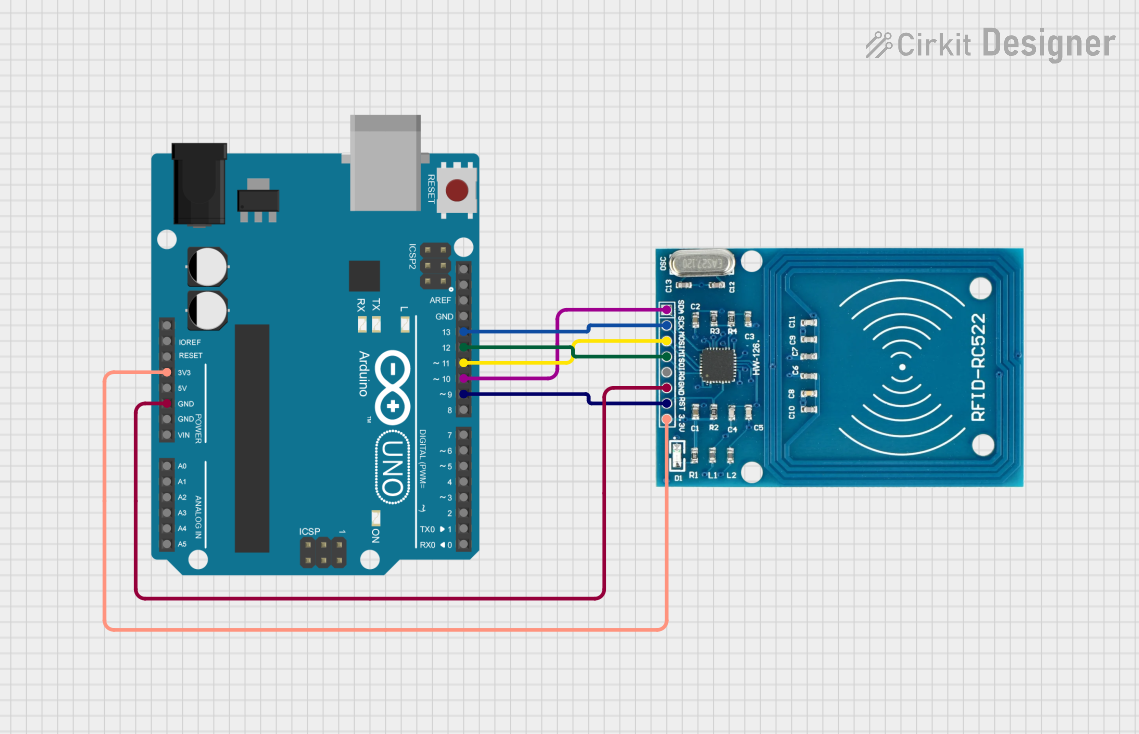
This circuit involves an Arduino UNO microcontroller interfacing with an RFID-RC522 module. The RFID module is used for reading RFID tags, and the Arduino UNO processes the data from the RFID module. The connections between the Arduino UNO and the RFID-RC522 are established through various digital and power pins.
Component List
Arduino UNO
- Description: A microcontroller board based on the ATmega328P.
- Pins: UNUSED, IOREF, Reset, 3.3V, 5V, GND, Vin, A0, A1, A2, A3, A4, A5, SCL, SDA, AREF, D13, D12, D11, D10, D9, D8, D7, D6, D5, D4, D3, D2, D1, D0
RFID-RC522
- Description: A low-cost RFID module that uses the MFRC522 IC.
- Pins: VCC (3.3V), RST, GND, IRQ, MISO, MOSI, SCK, SDA
Wiring Details
Arduino UNO
- 3.3V: Connected to RFID-RC522 VCC (3.3V)
- GND: Connected to RFID-RC522 GND
- D13: Connected to RFID-RC522 SCK
- D12: Connected to RFID-RC522 MISO
- D11: Connected to RFID-RC522 MOSI
- D10: Connected to RFID-RC522 SDA
- D9: Connected to RFID-RC522 RST
RFID-RC522
- VCC (3.3V): Connected to Arduino UNO 3.3V
- GND: Connected to Arduino UNO GND
- SCK: Connected to Arduino UNO D13
- MISO: Connected to Arduino UNO D12
- MOSI: Connected to Arduino UNO D11
- SDA: Connected to Arduino UNO D10
- RST: Connected to Arduino UNO D9
Code Documentation
Arduino UNO Code
void setup() {
  // put your setup code here, to run once:

}

void loop() {
  // put your main code here, to run repeatedly:

}
This code is a basic template for the Arduino UNO. The setup() function is where you initialize your components and settings, and the loop() function is where the main logic of your program runs repeatedly.
Additional Documentation
This section is reserved for any additional documentation or notes that may be required for understanding the code or the circuit.