
Arduino UNO Gas Leak Detection System with LCD Display and SIM800L Alert
View and Edit Project In Cirkit Designer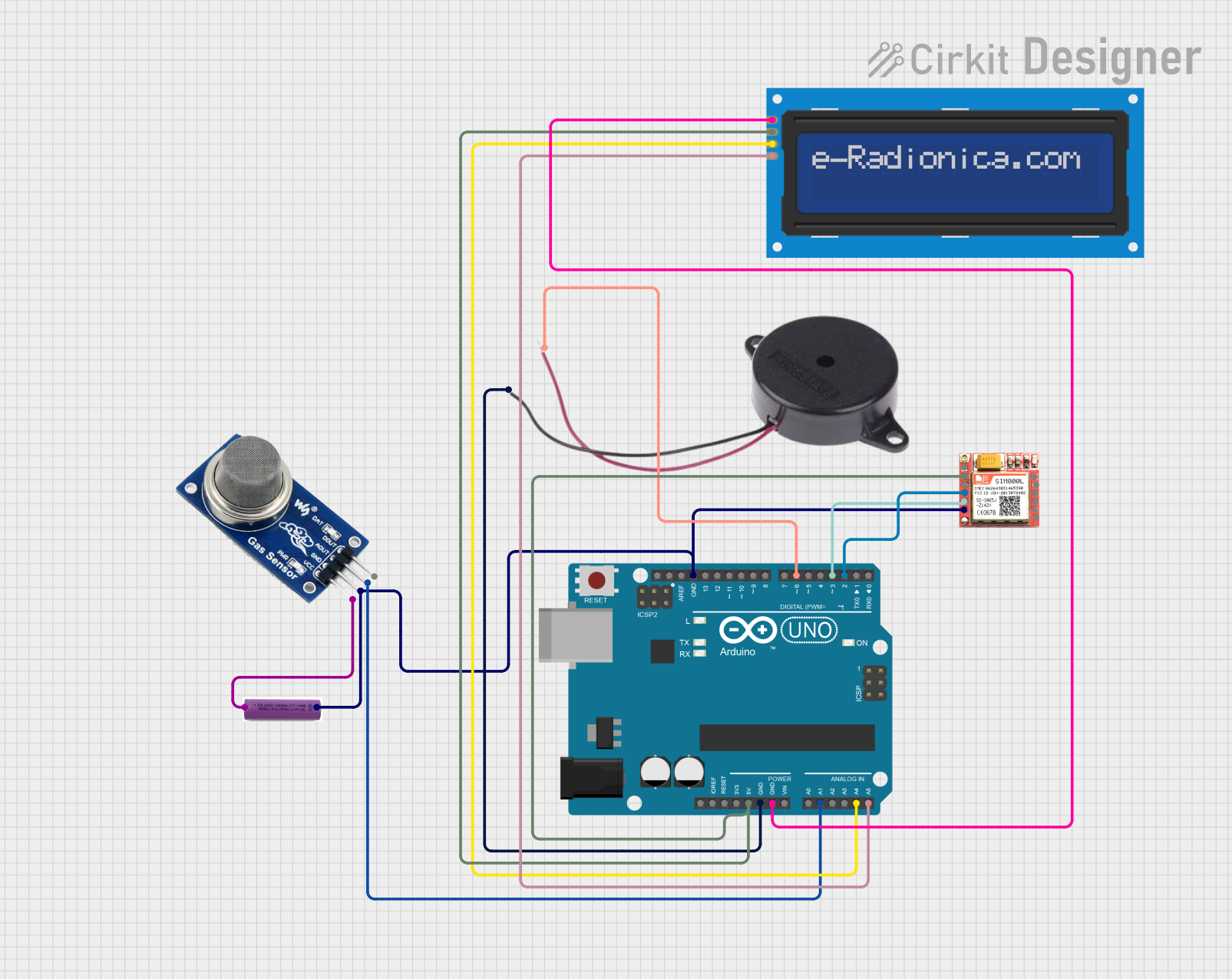
Circuit Documentation
Summary
This circuit is designed to monitor gas levels using an MQ2 gas sensor and display the readings on a 16x2 I2C LCD screen. If the gas level exceeds a certain threshold, an alert is sent via the SIM800L module, and a buzzer is activated. The circuit is controlled by an Arduino UNO microcontroller.
Component List
Arduino UNO
- Description: Microcontroller board based on the ATmega328P.
- Pins: UNUSED, IOREF, Reset, 3.3V, 5V, GND, Vin, A0, A1, A2, A3, A4, A5, SCL, SDA, AREF, D13, D12, D11, D10, D9, D8, D7, D6, D5, D4, D3, D2, D1, D0
MQ2
- Description: Gas sensor for detecting LPG, i-butane, propane, methane, alcohol, hydrogen, and smoke.
- Pins: VCC, GND, AOUT, DOUT
LCD screen 16x2 I2C
- Description: 16x2 character LCD display with I2C interface.
- Pins: SCL, SDA, VCC, GND
SIM800L
- Description: GSM/GPRS module for sending SMS and connecting to the internet.
- Pins: NFT, RING, VCC, DTR, RST, MIC +, RXD, MIC-, TXD, SPK+, GND, SPK-
3.7V Battery
- Description: Power source for the circuit.
- Pins: +, -
Buzzer
- Description: Audio signaling device.
- Pins: POSITIVE, NEGATIVE
Wiring Details
Arduino UNO
- 5V connected to VCC of SIM800L and LCD screen 16x2 I2C.
- GND connected to GND of Buzzer, LCD screen 16x2 I2C, SIM800L, MQ2, and 3.7V Battery.
- A1 connected to AOUT of MQ2.
- A4 connected to SDA of LCD screen 16x2 I2C.
- A5 connected to SCL of LCD screen 16x2 I2C.
- D6 connected to POSITIVE of Buzzer.
- D3 connected to TXD of SIM800L.
- D2 connected to RXD of SIM800L.
MQ2
- VCC connected to + of 3.7V Battery.
- GND connected to GND of Arduino UNO.
- AOUT connected to A1 of Arduino UNO.
LCD screen 16x2 I2C
- VCC connected to 5V of Arduino UNO.
- GND connected to GND of Arduino UNO.
- SDA connected to A4 of Arduino UNO.
- SCL connected to A5 of Arduino UNO.
SIM800L
- VCC connected to 5V of Arduino UNO.
- GND connected to GND of Arduino UNO.
- TXD connected to D3 of Arduino UNO.
- RXD connected to D2 of Arduino UNO.
3.7V Battery
- + connected to VCC of MQ2.
- - connected to GND of Arduino UNO.
Buzzer
- POSITIVE connected to D6 of Arduino UNO.
- NEGATIVE connected to GND of Arduino UNO.
Documented Code
#include <Wire.h>
#include <LiquidCrystal_I2C.h>
#include <SoftwareSerial.h>

// Define the pins
const int gasSensorPin = A1; // MQ2 analog output connected to A1
const int buzzerPin = 6;     // Buzzer connected to D6
const int sim800lTx = 3;     // SIM800L TX connected to D3
const int sim800lRx = 2;     // SIM800L RX connected to D2

// Initialize the LCD
LiquidCrystal_I2C lcd(0x27, 16, 2); // Change the address to 0x27 if needed

// Initialize the SIM800L
SoftwareSerial sim800l(sim800lRx, sim800lTx);

void setup() {
  // Initialize the LCD
  lcd.begin(16, 2); // Specify the number of columns and rows
  lcd.backlight();

  // Initialize the serial communication for debugging
  Serial.begin(9600);

  // Initialize the SIM800L
  sim800l.begin(9600);

  // Set the buzzer pin as output
  pinMode(buzzerPin, OUTPUT);

  // Print a message to the LCD
  lcd.setCursor(0, 0);
  lcd.print("Gas Sensor Init");
  delay(2000);
  lcd.clear();
}

void loop() {
  // Read the gas sensor value
  int gasValue = analogRead(gasSensorPin);

  // Print the gas value to the LCD
  lcd.setCursor(0, 0);
  lcd.print("Gas Value: ");
  lcd.print(gasValue);

  // Print the gas value to the serial monitor
  Serial.print("Gas Value: ");
  Serial.println(gasValue);

  // Check if the gas value exceeds the threshold
  if (gasValue > 300) { // Adjust the threshold as needed
    // Sound the buzzer
    digitalWrite(buzzerPin, HIGH);

    // Send an alert message using SIM800L
    sendAlertMessage(gasValue);
  } else {
    digitalWrite(buzzerPin, LOW);
  }

  // Wait for a second before the next reading
  delay(1000);
}

void sendAlertMessage(int gasValue) {
  // Send SMS alert
  sim800l.println("AT+CMGF=1"); // Set SMS mode to text
  delay(1000);
  sim800l.println("AT+CMGS=\"+1234567890\""); // Replace with the recipient's phone number
  delay(1000);
  sim800l.print("Gas Alert! Value: ");
  sim800l.print(gasValue);
  delay(1000);
  sim800l.write(26); // ASCII code for CTRL+Z to send the message
  delay(1000);
}
This code initializes the LCD and SIM800L modules, reads the gas sensor value, displays it on the LCD, and sends an alert message if the gas value exceeds a specified threshold. The buzzer is also activated when the threshold is exceeded.