
Circuit Documentation
Summary
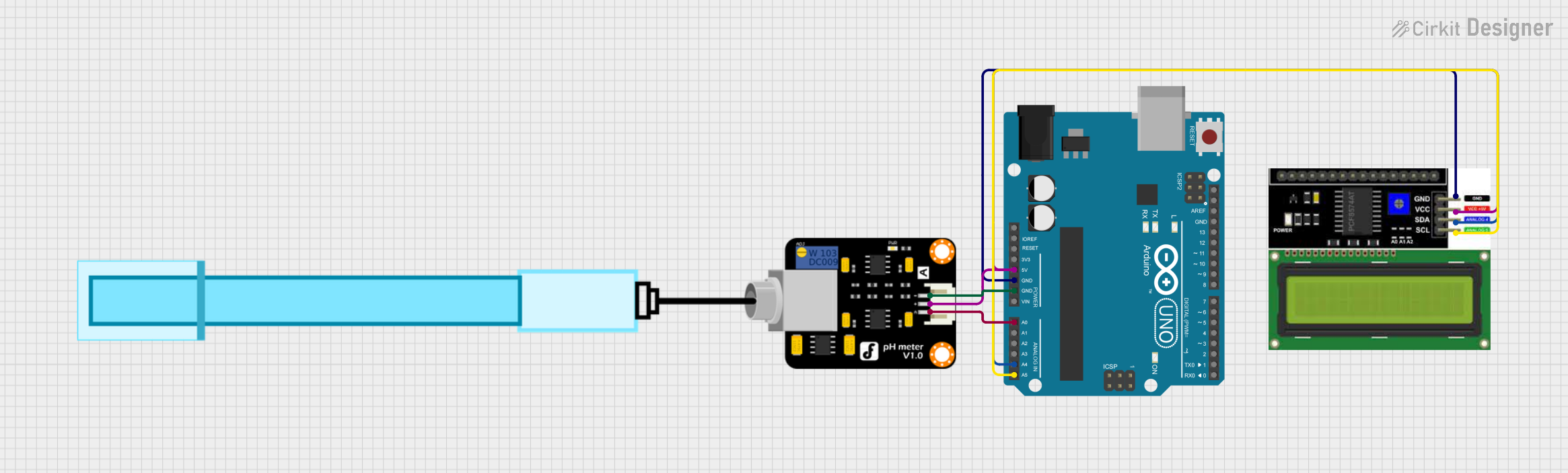
This circuit consists of an Arduino UNO microcontroller, an LCD I2C display, and a pH meter. The Arduino UNO serves as the central processing unit, controlling the LCD display via the I2C communication protocol and reading the pH level from the pH meter through one of its analog input pins. The LCD display is used to show the pH value measured by the pH meter. The pH meter provides a real-time analog signal corresponding to the pH level of the solution it is submerged in.
Component List
Arduino UNO
- Description: A microcontroller board based on the ATmega328P.
- Pins Used: IOREF, 3.3V, 5V, GND, A0, A4 (SDA), A5 (SCL), and other digital pins for general I/O.
LCD I2C Display
- Description: A liquid crystal display that communicates with the Arduino over the I2C protocol.
- Pins Used: GND, VCC, SDA, SCL.
PH Meter
- Description: An electronic device used to measure the pH (acidity or alkalinity) of a liquid.
- Pins Used: Signal, VCC, GND.
Wiring Details
Arduino UNO
- 5V to LCD I2C Display VCC and PH Meter VCC.
- GND to LCD I2C Display GND and PH Meter GND.
- A0 to PH Meter Signal.
- A4 (SDA) to LCD I2C Display SDA.
- A5 (SCL) to LCD I2C Display SCL.
LCD I2C Display
- VCC connected to Arduino UNO 5V.
- GND connected to Arduino UNO GND.
- SDA connected to Arduino UNO A4 (SDA).
- SCL connected to Arduino UNO A5 (SCL).
PH Meter
- Signal connected to Arduino UNO A0.
- VCC connected to Arduino UNO 5V.
- GND connected to Arduino UNO GND.
Documented Code
#include <Wire.h>
#include <LiquidCrystal_I2C.h>

// Initialize the LCD I2C display
LiquidCrystal_I2C lcd(0x27, 16, 2);

// Calibration value for the pH meter
float calibration_value = 21.34;

void setup() {
    // Initialize the LCD
    lcd.init();
    lcd.begin(16, 2);
    lcd.backlight();
    // Welcome message
    lcd.setCursor(0, 0);
    lcd.print("   Welcome to      ");
    lcd.setCursor(0, 1);
    lcd.print(" Circuit Digest    ");
    delay(2000);
    lcd.clear();
}

void loop() {
    int buffer_arr[10]; // Buffer array for storing readings
    int temp;           // Temporary variable for sorting
    int avgval = 0;     // Average value accumulator

    // Read the analog value multiple times and store it in the buffer
    for(int i=0; i<10; i++) {
        buffer_arr[i] = analogRead(A0);
        delay(30);
    }

    // Sort the buffer to remove noise
    for(int i=0; i<9; i++) {
        for(int j=i+1; j<10; j++) {
            if(buffer_arr[i] > buffer_arr[j]) {
                temp = buffer_arr[i];
                buffer_arr[i] = buffer_arr[j];
                buffer_arr[j] = temp;
            }
        }
    }

    // Calculate the average of the middle six values
    for(int i=2; i<8; i++) {
        avgval += buffer_arr[i];
    }

    // Convert the average value to voltage
    float volt = (float)avgval * 5.0 / 1024 / 6;
    // Calculate the actual pH value using the calibration value
    float ph_act = -5.70 * volt + calibration_value;

    // Display the pH value on the LCD
    lcd.setCursor(0, 0);
    lcd.print("pH Val:");
    lcd.setCursor(8, 0);
    lcd.print(ph_act);

    // Update every second
    delay(1000);
}
This code is designed to read the pH level from the pH meter, process the signal, and display the resulting pH value on the LCD screen. The pH meter's analog signal is read multiple times, sorted, and averaged to reduce noise. The average value is then converted to a voltage, which is used to calculate the pH value using a calibration constant. The calculated pH value is displayed on the LCD.