
Arduino-Controlled Automated Liquid Dispensing System with Weight Measurement
View and Edit Project In Cirkit Designer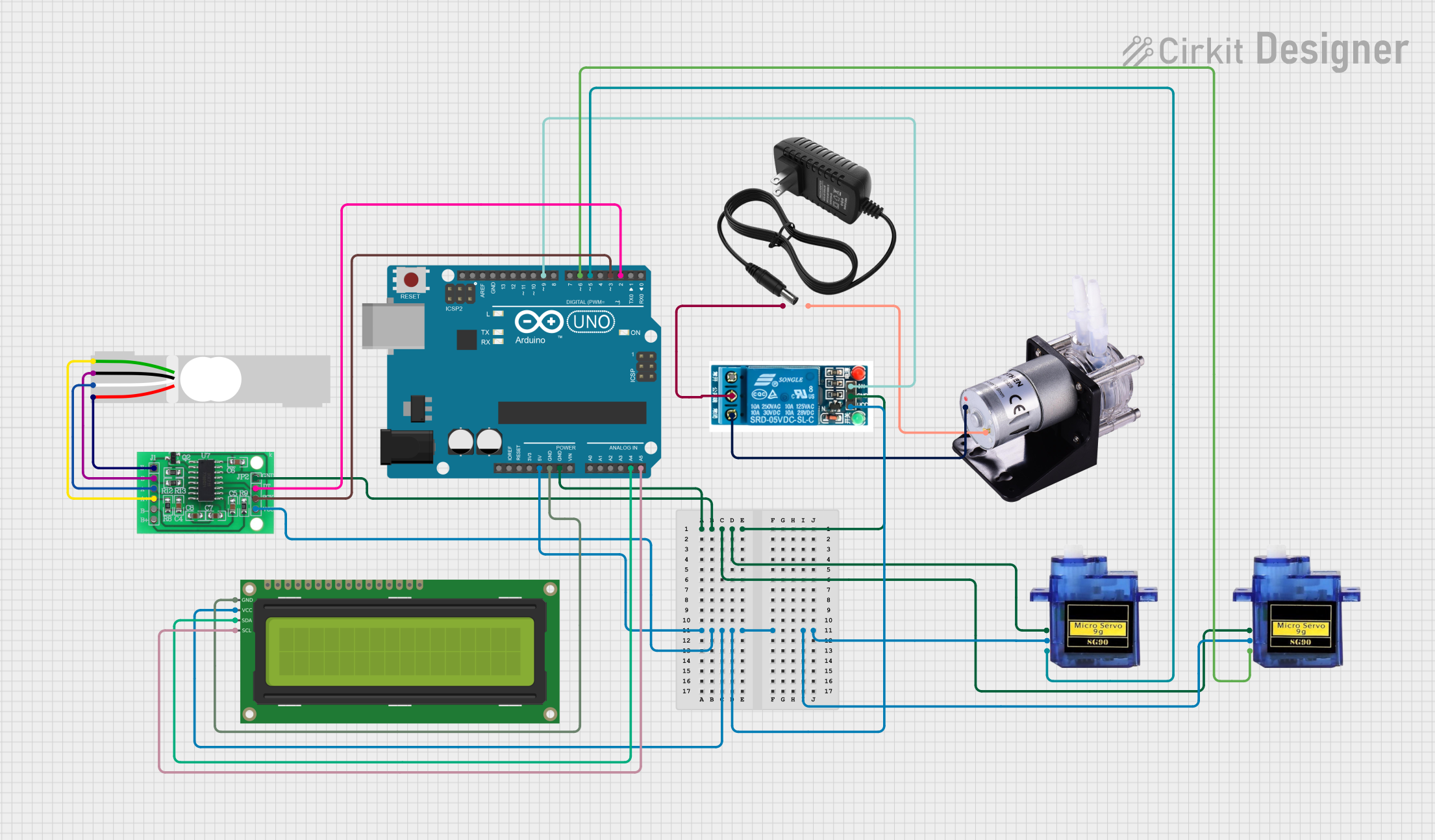
Circuit Documentation
Summary
The circuit in question is designed to control a peristaltic pump and two micro servos using an Arduino UNO microcontroller. The system also includes a 5V relay to switch the pump, a 12V power supply for the pump, a 16x2 I2C LCD for display purposes, an HX711 bridge sensor interface for weight measurement, and a load cell as the weighing sensor. The Arduino UNO is programmed to operate the servos and pump based on the weight measurements from the load cell, providing a controlled dispensing system.
Component List
Arduino UNO
- Microcontroller board based on the ATmega328P
- Provides I/O pins and power for the circuit components
- Used for controlling the servos, pump, and reading data from the HX711 and load cell
5V Relay
- Electromechanical switch used to control high power devices with low power signals
- Allows the Arduino to control the 12V peristaltic pump
12V Power Supply
- Provides power to the peristaltic pump through the relay
Micro Servo 9G (x2)
- Small servo motors used to control mechanical valves
- Operated by the Arduino to manage the flow of liquids based on weight measurements
Peristaltic Pump
- A type of positive displacement pump used for pumping various fluids
- Powered by the 12V power supply and controlled by the relay
16x2 I2C LCD
- A liquid crystal display with an I2C interface for showing information
- Connected to the Arduino to display weight and system status
HX711 - Bridge Sensor Interface
- A precision 24-bit analog-to-digital converter (ADC) designed for weigh scales
- Interfaces with the load cell to provide weight data to the Arduino
Load Cell - Red/white/black/green
- A transducer that converts force into an electrical signal
- Used to measure the weight of the liquid being dispensed
Wiring Details
Arduino UNO
GNDconnected to the common ground net5Vconnected to the 5V net supplying power to various componentsA4 (SDA)connected to the SDA pin of the 16x2 I2C LCDA5 (SCL)connected to the SCL pin of the 16x2 I2C LCDD9connected to the 'In' pin of the 5V relayD6connected to the PWM pin of one Micro servo 9GD5connected to the PWM pin of the other Micro servo 9GD3connected to the SCK - CLOCK (IN) pin of the HX711D2connected to the DATA (OUT) pin of the HX711
5V Relay
GNDconnected to the common ground netVCCconnected to the 5V netIncontrolled by the Arduino UNO (D9)Common terminalconnected to the positive terminal of the 12V power supplyNormally Closedconnected to the positive terminal of the Peristaltic Pump
12V Power Supply
+connected to the common terminal of the 5V relay-connected to the negative terminal of the Peristaltic Pump
Micro Servo 9G
GNDconnected to the common ground net+5Vconnected to the 5V netPWMcontrolled by the Arduino UNO (D6 for one servo, D5 for the other)
Peristaltic Pump
+connected to the Normally Closed terminal of the 5V relay-connected to the negative terminal of the 12V power supply
16x2 I2C LCD
GNDconnected to the common ground netVCCconnected to the 5V netSDAconnected to the SDA pin (A4) of the Arduino UNOSCLconnected to the SCL pin (A5) of the Arduino UNO
HX711 - Bridge Sensor Interface
GND - GROUNDconnected to the common ground net3.3/3.5V Supplyconnected to the 5V netSCK - CLOCK (IN)controlled by the Arduino UNO (D3)DATA (OUT)connected to the Arduino UNO (D2)E+,A-,E-,A+connected to the corresponding pins of the Load Cell
Load Cell - Red/white/black/green
E+,A-,E-,A+connected to the corresponding pins of the HX711
Documented Code
#include <Servo.h>
#include <HX711.h>

// Pin assignments
int servoPin1 = 5;  // Red Valve
int servoPin2 = 6; // Blue Valve
const int pumpPin = 9;

// Servo objects
Servo servoRed;
Servo servoBlue;

// HX711 circuit wiring
const int LOADCELL_DOUT_PIN = 2;
const int LOADCELL_SCK_PIN = 3;

HX711 scale;
float redWeight = 0;  // Desired weight for Red Liquid (grams)
float blueWeight = 0;  // Desired weight for Blue Liquid (grams)

// State tracking
bool redValveOpen = false;
bool blueValveOpen = false;

void setup() {
    // Attach servos to pins
    servoRed.attach(servoPin1);
    servoBlue.attach(servoPin2);

    // Initialize both servos to closed state (0 degrees)
    servoRed.write(0);
    servoBlue.write(0);

    // Initialize the scale
    Serial.begin(115200);
    scale.begin(LOADCELL_DOUT_PIN, LOADCELL_SCK_PIN);

    // Tare the scale to zero out
    if (scale.is_ready()) {
        Serial.println("Taring... Remove any weights.");
        delay(5000);
        scale.tare();
        Serial.println("Tare done. Ready to measure.");
    } else {
        Serial.println("HX711 not found.");
    }

    // Set pump pin as output
    pinMode(pumpPin, OUTPUT);
    digitalWrite(pumpPin, LOW);  // Ensure pump is off initially
    inputWeights();
}

void loop() {
    // Open Red Valve until redWeight is reached
    float currentWeight = 0;  // Variable to hold the current weight

    // Open the Red Valve and start the pump
    if (!redValveOpen) {
        servoRed.write(90);  // Open the Red Valve
        digitalWrite(pumpPin, HIGH);  // Start the pump
        redValveOpen = true;
        Serial.println(F("Red Valve opened."));
    }

    // Continuously check the current weight
    while (currentWeight < redWeight) {
        currentWeight = scale.get_units(10);  // Measure the weight
        Serial.print(F("Current Weight: "));
        Serial.println(currentWeight);
        delay(100);  // Small delay to avoid overwhelming the processor
    }

    // Once the target weight is reached, close the Red Valve
    servoRed.write(0);  // Close the Red Valve
    digitalWrite(pumpPin, LOW);   // Stop the pump
    redValveOpen = false;  // Update the state
    Serial.println(F("Red Valve closed."));

    // Repeat for the Blue Valve
    // Open Blue Valve until blueWeight is reached
    currentWeight = 0;  // Reset current weight for the blue liquid

    // Open the Blue Valve and start the pump
    if (!blueValveOpen) {
        servoBlue.write(90);  // Open the Blue Valve
        digitalWrite(pumpPin, HIGH);  // Start the pump
        blueValveOpen = true;
        Serial.println(F("Blue Valve opened."));
    }

    // Continuously check the current weight for the blue liquid
    while (currentWeight < blueWeight) {
        currentWeight = scale.get_units(10);  // Measure the weight
        Serial.print(F("Current Weight: "));
        Serial.println(currentWeight);
        delay(100);  // Small delay to avoid overwhelming the processor
    }

    // Once the target weight is reached, close the Blue Valve
    servoBlue.write(0);  // Close the Blue Valve
    digitalWrite(pumpPin, LOW);   // Stop the pump
    blueValveOpen = false;  // Update the state
    Serial.println(F("Blue Valve closed."));

    // Add a delay or condition to avoid immediate repetition
    delay(1000);  // Wait before the next loop iteration (optional)
}

void inputWeights() {
    Serial.println("Enter desired weight for Red Liquid (grams): ");
    while (Serial.available() == 0);  // Wait for user input
    redWeight = Serial.parseFloat();   // Read the input and convert to float
    Serial.print("Red weight set to: ");
    Serial.println(redWeight);

    Serial.println("Enter desired weight for Blue Liquid (grams): ");
    while (Serial.available() == 0);  // Wait for user input