
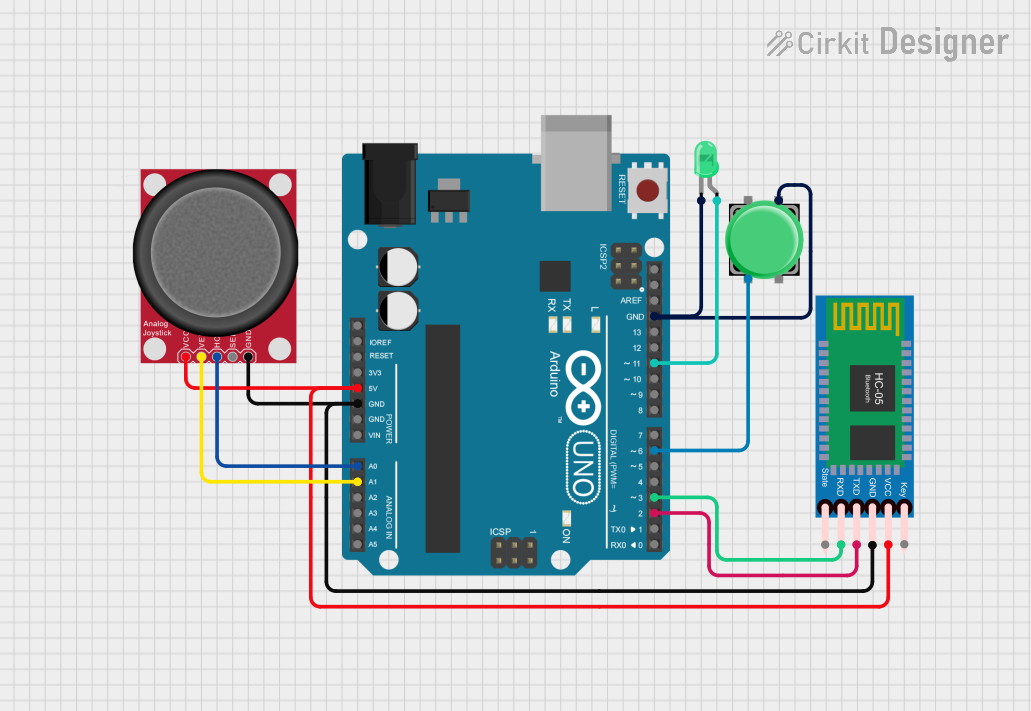
Circuit Documentation
Summary
This circuit consists of an Arduino UNO microcontroller, an HC-05 Bluetooth module, an analog joystick, a pushbutton, and a green LED. The Arduino UNO serves as the central controller, interfacing with the joystick for analog input, the Bluetooth module for wireless communication, and the pushbutton and LED for user interaction.
Component List
Arduino UNO
- Description: A microcontroller board based on the ATmega328P.
- Pins: UNUSED, IOREF, Reset, 3.3V, 5V, GND, Vin, A0, A1, A2, A3, A4, A5, SCL, SDA, AREF, D13, D12, D11, D10, D9, D8, D7, D6, D5, D4, D3, D2, D1, D0
LED: Two Pin (green)
- Description: A green LED with two pins: anode and cathode.
- Pins: cathode, anode
HC-05 Bluetooth Module
- Description: A Bluetooth module for wireless communication.
- Pins: Key, VCC, TXD, RXD, State, GND
Analog Joystick (Wokwi Compatible)
- Description: An analog joystick with vertical and horizontal axes and a select button.
- Pins: VCC, VERT, HORZ, SEL, GND
Pushbutton
- Description: A simple pushbutton with four pins.
- Pins: Pin 2, Pin 1, Pin 3, Pin 4
Wiring Details
Arduino UNO
- 5V: Connected to VCC of the Analog Joystick and HC-05 Bluetooth Module.
- GND: Connected to GND of the Analog Joystick, HC-05 Bluetooth Module, cathode of the LED, and Pin 3 of the Pushbutton.
- A0: Connected to HORZ of the Analog Joystick.
- A1: Connected to VERT of the Analog Joystick.
- D11: Connected to anode of the LED.
- D6: Connected to Pin 2 of the Pushbutton.
- D3: Connected to RXD of the HC-05 Bluetooth Module.
- D2: Connected to TXD of the HC-05 Bluetooth Module.
LED: Two Pin (green)
- cathode: Connected to GND of the Arduino UNO and Pin 3 of the Pushbutton.
- anode: Connected to D11 of the Arduino UNO.
HC-05 Bluetooth Module
- VCC: Connected to 5V of the Arduino UNO.
- GND: Connected to GND of the Arduino UNO.
- RXD: Connected to D3 of the Arduino UNO.
- TXD: Connected to D2 of the Arduino UNO.
Analog Joystick (Wokwi Compatible)
- VCC: Connected to 5V of the Arduino UNO.
- GND: Connected to GND of the Arduino UNO.
- HORZ: Connected to A0 of the Arduino UNO.
- VERT: Connected to A1 of the Arduino UNO.
Pushbutton
- Pin 2: Connected to D6 of the Arduino UNO.
- Pin 3: Connected to GND of the Arduino UNO and cathode of the LED.
Code
Arduino UNO Code (sketch.ino)
void setup() {
  // put your setup code here, to run once:

}

void loop() {
  // put your main code here, to run repeatedly:

}
This code initializes the Arduino UNO but does not contain any specific functionality. You can add your setup and loop code to control the components connected to the Arduino.