
Arduino UNO Based Bi-Directional Visitor Counter with Automatic Light Control
View and Edit Project In Cirkit Designer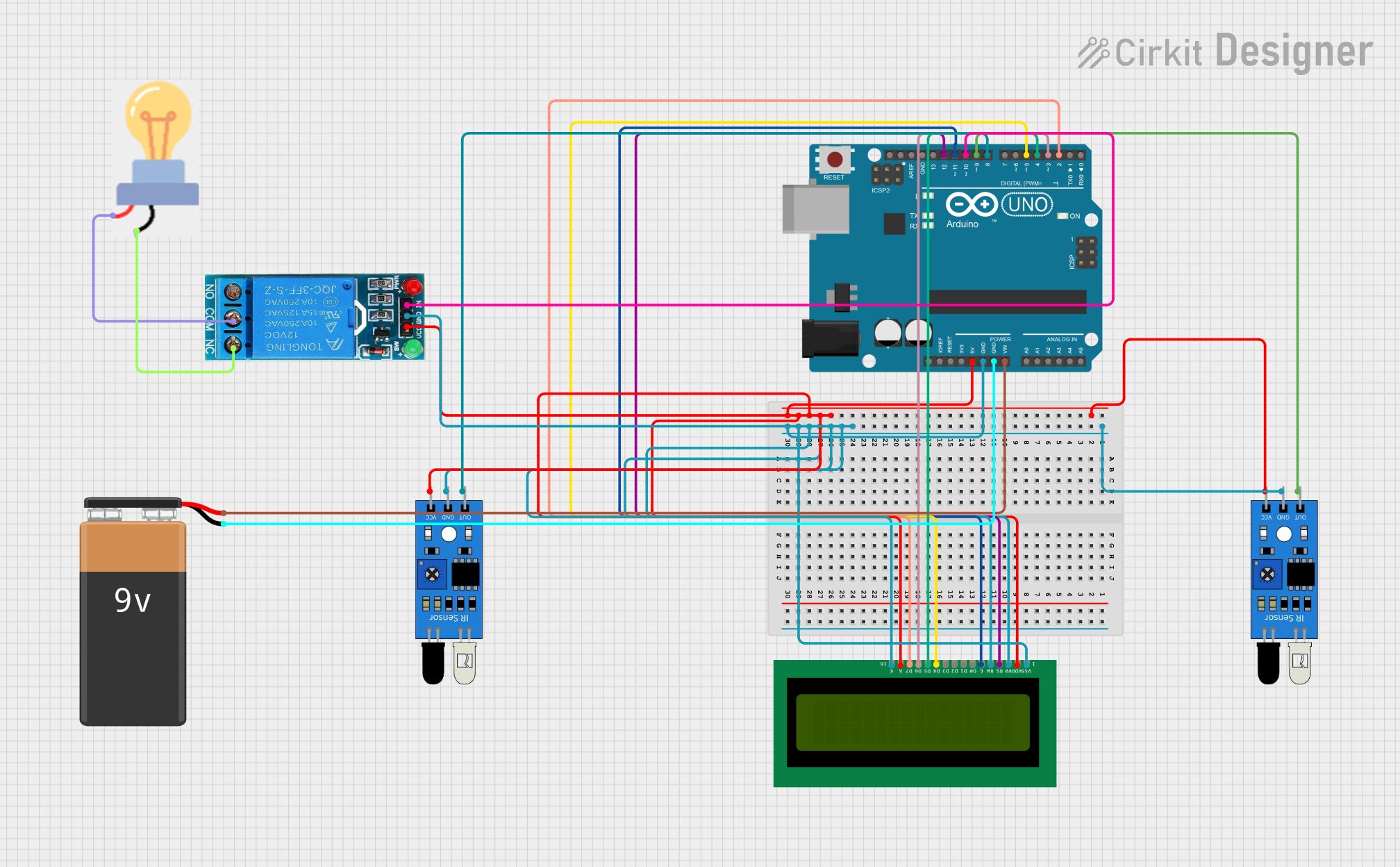
Circuit Documentation
Summary
This circuit is designed to function as a bi-directional visitor counter with an integrated lighting control system. It utilizes an Arduino UNO as the central processing unit, interfaced with two IR sensors to detect visitor entry and exit, a 16x2 LCD display for user feedback, a single-channel 12V relay to control a bulb, and a 9V battery to power the Arduino UNO. The system counts the number of visitors inside a room and controls the lighting based on occupancy: the light turns off when the room is unoccupied.
Component List
Arduino UNO
- Microcontroller board based on the ATmega328P
- Provides digital I/O pins, analog inputs, and various power outputs
IR Sensors (2x)
- Used to detect the presence of visitors entering or exiting
- Each sensor has an output, ground, and VCC pin
16X2 LCD
- Alphanumeric liquid crystal display
- Used for displaying the visitor count and system messages
12V Single Channel Relay
- Electromechanical switch used to control the power to the bulb
- Has Normally Closed (NC), Common (COM), Normally Open (NO), Input (IN), Ground (GND), and VCC pins
Bulb
- Acts as the load controlled by the relay
- Has power and ground connections
9V Battery
- Provides power to the Arduino UNO
Wiring Details
Arduino UNO
- GND connected to the common ground net
- 5V connected to the common VCC net
- Vin connected to the positive terminal of the 9V battery
- D12 connected to the RS pin of the 16X2 LCD
- D11 connected to the E pin of the 16X2 LCD
- D10 connected to the IN pin of the 12V Single Channel Relay
- D9 connected to the out pin of one IR sensor
- D8 connected to the out pin of the other IR sensor
- D5 connected to the D4 pin of the 16X2 LCD
- D4 connected to the D5 pin of the 16X2 LCD
- D3 connected to the D6 pin of the 16X2 LCD
- D2 connected to the D7 pin of the 16X2 LCD
IR Sensors
- out of each sensor connected to digital pins D9 and D8 of the Arduino UNO respectively
- gnd of each sensor connected to the common ground net
- vcc of each sensor connected to the common VCC net
16X2 LCD
- VSS, RW, V0, K connected to the common ground net
- VDD, A connected to the common VCC net
- RS connected to D12 of the Arduino UNO
- E connected to D11 of the Arduino UNO
- D4 connected to D5 of the Arduino UNO
- D5 connected to D4 of the Arduino UNO
- D6 connected to D3 of the Arduino UNO
- D7 connected to D2 of the Arduino UNO
12V Single Channel Relay
- IN connected to D10 of the Arduino UNO
- GND connected to the common ground net
- VCC connected to the common VCC net
- NC connected to the GND pin of the bulb
- COM connected to the power pin of the bulb
Bulb
- GND connected to the NC pin of the 12V Single Channel Relay
- power connected to the COM pin of the 12V Single Channel Relay
9V Battery
- - (negative terminal) connected to the common ground net
- + (positive terminal) connected to the Vin pin of the Arduino UNO
Documented Code
/*
  Hey Guys! Welcome to RENU ROBOTICS
  This is a Simple Project
  Bi - Directional Visitor Counter
  Hope you Like It!!
*/

#include<LiquidCrystal.h> // Declaring the Library

LiquidCrystal lcd(12,11,5,4,3,2); // Setting up lcd

#define in 8  // Defining In Sensor
#define out 9 // Defining Out Sensor
#define bulb 10 //Defining Bulb(Relay)

int count = 0; // Declaring count Value

void setup()
{
  lcd.begin(16,2); // Beginning the lcd
  lcd.print("Visitor Counter"); // Printing "Visitor Counter" to the LCD
  delay(2000); // Delay of 2 seconds
  pinMode(in,INPUT); // Setting up In Sensor as INPUT
  pinMode(out,INPUT); // Setting up Out Sensor as INPUT
  pinMode(bulb,OUTPUT); // Setting up Bulb(Relay) pin as OUTPUT
  lcd.clear(); // Clearing/Erasing the String in LCD
  lcd.print("Person In Room:"); // Printing "Person in Room" to the LCD
  lcd.setCursor(0,1); // Setting Cursor to Print the Counting
  lcd.print(count); // Printing the Counting
}

void loop()
{
  int in_value = digitalRead(in); // Setting Variables & Reading Values from In Sensor
  int out_value = digitalRead(out); // Setting Variables & Reading Values from Out Sensor

  if(in_value == LOW)
  {
    count++;
    lcd.clear();
    lcd.print("Person In Room:");
    lcd.setCursor(0,1);
    lcd.print(count);
    delay(1000);
  }                                                        // Conditions

  if(out_value == LOW)
  {
    count--;
    lcd.clear();
    lcd.print("Person In Room:");
    lcd.setCursor(0,1);
    lcd.print(count);
    delay(1000);
  }                                                        // Conditions


  if(count==0)
  {
    lcd.clear();
    digitalWrite(bulb,HIGH);
    lcd.clear();
    lcd.print("Nobody In Room");
    lcd.setCursor(0,1);
    lcd.print("Light is Off");
    delay(200);
  }                                                       // Conditions

  else
  {
    digitalWrite(bulb,LOW);
  }                                                      // Conditions
}
This code is responsible for controlling the visitor counter and the lighting system. It initializes the LCD and sets up the IR sensors and relay. The loop function reads the sensor inputs to increment or decrement the visitor count and updates the LCD accordingly. It also controls the relay to turn the bulb on or off based on the room occupancy.