
Arduino UNO RFID Access Control System with Servo Lock and LCD Feedback
View and Edit Project In Cirkit Designer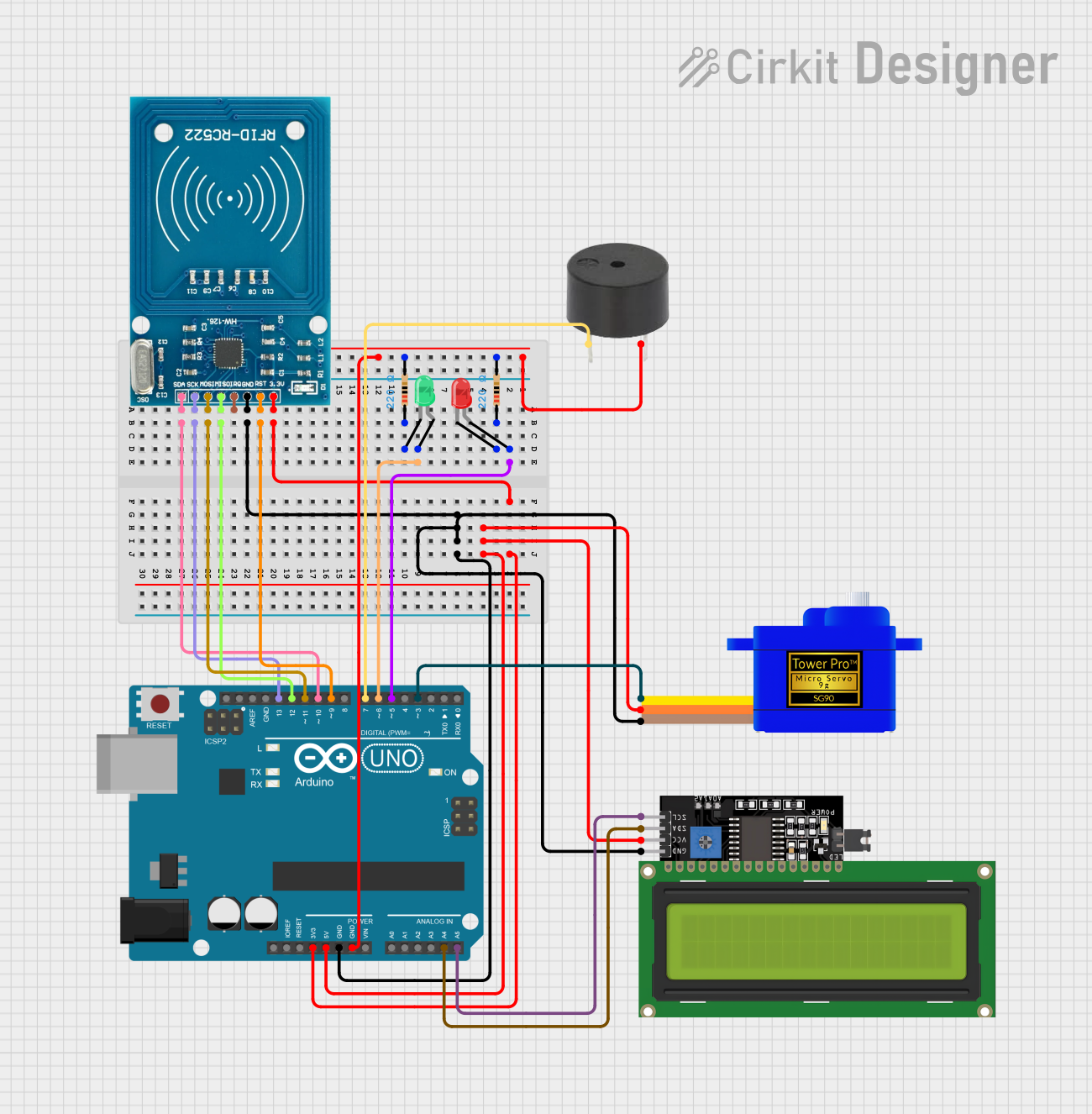
Circuit Documentation
Summary
This circuit integrates an Arduino UNO with an RFID-RC522 module, a servo motor, an LCD display, and several LEDs. The purpose of the circuit is to create an access control system that reads RFID tags, displays messages on the LCD, and controls a lock mechanism through a servo motor. The system provides visual feedback using LEDs: a red LED indicates access denied, and a green LED indicates access granted.
Component List
Arduino UNO
- Microcontroller board based on the ATmega328P
- It has 14 digital input/output pins, 6 analog inputs, a 16 MHz quartz crystal, a USB connection, a power jack, an ICSP header, and a reset button.
RFID-RC522
- An RFID reader/writer module that operates at 13.56 MHz
- It is used for contactless communication and can read and write to tags that are compatible with the Near Field Communication (NFC) standard.
LCD Display 16x4 I2C
- A 16-character, 4-line liquid crystal display with an I2C interface
- It is used to display messages to the user, such as "Place card/tag," "Access Granted," or "Access Denied."
LED: Two Pin (green)
- A basic green LED for visual indication
- It lights up to indicate that access has been granted.
LED: Two Pin (red)
- A basic red LED for visual indication
- It lights up to indicate that access has been denied.
Resistor (220 Ohms)
- Two resistors with a resistance of 220 Ohms
- They are used to limit the current through the LEDs to protect them from damage.
Servomotor SG90
- A small and lightweight servo motor
- It is used to actuate the locking mechanism of the access control system.
Buzzer
- A simple piezoelectric buzzer
- It can be used to provide audible feedback, although it is not utilized in the provided code.
Wiring Details
Arduino UNO
D5connected to the anode of the red LED3.3Vsupplies power to the RFID-RC522 module5Vsupplies power to the servo motor and the LCD displayGNDis a common ground for the servo motor, RFID-RC522, LCD display, and both LEDsD6connected to the anode of the green LEDD9connected to the RST pin of the RFID-RC522D12connected to the MISO pin of the RFID-RC522D11connected to the MOSI pin of the RFID-RC522D13connected to the SCK pin of the RFID-RC522D10connected to the SDA pin of the RFID-RC522A4connected to the SDA pin of the LCD displayA5connected to the SCL pin of the LCD displayD7connected to the buzzer (not used in the code)D3connected to the SIG pin of the servo motor
RFID-RC522
VCC (3.3V)receives power from the Arduino's 3.3V pinRSTconnected toD9on the ArduinoGNDconnected to the common groundIRQnot connectedMISOconnected toD12on the ArduinoMOSIconnected toD11on the ArduinoSCKconnected toD13on the ArduinoSDAconnected toD10on the Arduino
LCD Display 16x4 I2C
SCLconnected toA5on the ArduinoSDAconnected toA4on the ArduinoVCCreceives power from the Arduino's 5V pinGNDconnected to the common ground
LED: Two Pin (green)
anodeconnected toD6on the Arduinocathodeconnected to one of the 220 Ohm resistors
LED: Two Pin (red)
anodeconnected toD5on the Arduinocathodeconnected to the other 220 Ohm resistor
Resistor (220 Ohms)
- One resistor connected between the cathode of the green LED and ground
- Another resistor connected between the cathode of the red LED and ground
Servomotor SG90
SIGconnected toD3on the ArduinoVCCreceives power from the Arduino's 5V pinGNDconnected to the common ground
Buzzer
PINconnected toD7on the Arduino (not used in the code)GNDconnected to the common ground
Documented Code
#include <SPI.h>
#include <RFID.h>
#include <Servo.h>
#include <Wire.h>
#include <LiquidCrystal_I2C.h>

RFID rfid(10, 9);       // D10:pin of tag reader SDA. D9:pin of tag reader RST
unsigned char status;
unsigned char str[MAX_LEN]; // MAX_LEN is 16: size of the array

String accessGranted[2] = {"4121241702", "153310137212"};  // RFID serial numbers to grant access to
int accessGrantedSize = 2;                                // The number of serial numbers

Servo lockServo;                // Servo for locking mechanism
int lockPos = 15;               // Locked position limit
int unlockPos = 75;             // Unlocked position limit
boolean locked = true;

int redLEDPin = 5;
int greenLEDPin = 6;

// Initialize LCD with I2C address 0x27 (or check your display's address)
LiquidCrystal_I2C lcd(0x27, 16, 2);  // 16 characters, 2 lines

void setup() {
  Serial.begin(9600);     // Serial monitor is only required to get tag ID numbers and for troubleshooting
  SPI.begin();            // Start SPI communication with reader
  rfid.init();            // Initialization

  pinMode(redLEDPin, OUTPUT);     // LED startup sequence
  pinMode(greenLEDPin, OUTPUT);
  digitalWrite(redLEDPin, HIGH);
  delay(200);
  digitalWrite(greenLEDPin, HIGH);
  delay(200);
  digitalWrite(redLEDPin, LOW);
  delay(200);
  digitalWrite(greenLEDPin, LOW);
  lockServo.attach(3);
  lockServo.write(lockPos);         // Move servo into locked position

  // Initialize the LCD
  lcd.init();
  lcd.backlight();  // Turn on the backlight
  lcd.setCursor(0, 0);
  lcd.print("Place card/tag");

  Serial.println("Place card/tag near reader...");
}

void loop() {
  if (rfid.findCard(PICC_REQIDL, str) == MI_OK) { // Wait for a tag to be placed near the reader
    Serial.println("Card found");
    lcd.clear();
    lcd.setCursor(0, 0);
    lcd.print("Card found");

    String temp = "";                             // Temporary variable to store the read RFID number
    if (rfid.anticoll(str) == MI_OK) {           // Anti-collision detection, read tag serial number
      Serial.print("The card's ID number is : ");
      lcd.setCursor(0, 1);  // Move to the second row
      lcd.print("ID: ");
      for (int i = 0; i < 4; i++) {              // Record and display the tag serial number
        temp = temp + (0x0F & (str[i] >> 4));
        temp = temp + (0x0F & str[i]);
      }
      Serial.println(temp);
      lcd.print(temp);     // Display ID on the LCD
      checkAccess(temp);   // Check if the identified tag is allowed to open
    }
    rfid.selectTag(str); // Lock card to prevent a redundant read
  }
  rfid.halt();
}

void checkAccess(String temp) {  // Function to check if an identified tag is registered to allow access
  boolean granted = false;
  for (int i = 0; i <= (accessGrantedSize - 1); i++) {  // Runs through all tag ID numbers registered in the array
    if (accessGranted[i] == temp) {                      // If a tag is found, then open/close the lock
      Serial.println("Access Granted");
      lcd.clear();
      lcd.setCursor(0, 0);
      lcd.print("Access Granted");

      granted = true;
      if (locked == true) {          // If the lock is closed then open it
        lockServo.write(unlockPos);
        locked = false;
      } else if (locked == false) {  // If the lock is open then close it
        lockServo.write(lockPos);
        locked = true;
      }
      digitalWrite(greenLEDPin, HIGH);    // Green LED sequence
      delay(200);
      digitalWrite(greenLEDPin, LOW);