
Circuit Documentation
Summary
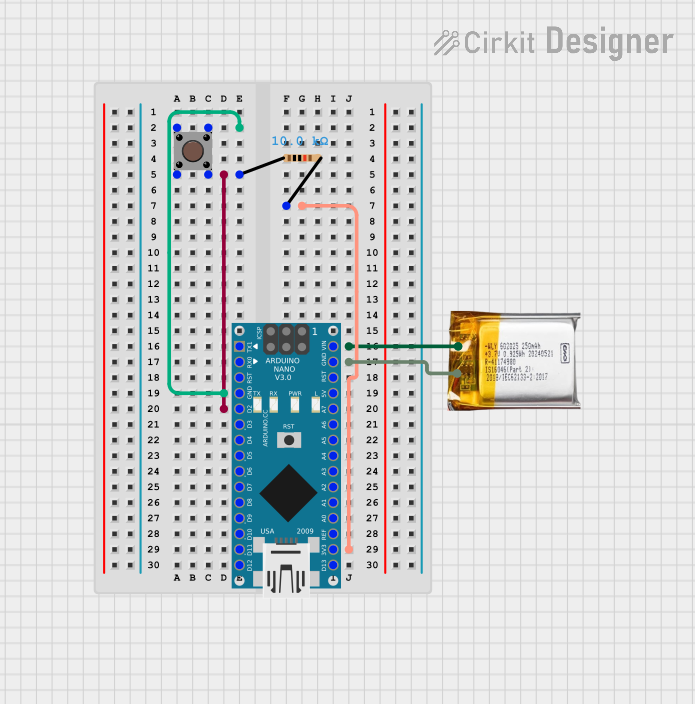
This document provides a detailed overview of a simple circuit involving an Arduino Nano, a pushbutton, a 3.7V LiPo battery, and a resistor. The circuit is designed to demonstrate basic input handling and power management using an Arduino microcontroller.
Component List
Arduino Nano
- Description: A small, complete, and breadboard-friendly board based on the ATmega328P.
- Pins: D1/TX, D0/RX, RESET, GND, D2, D3, D4, D5, D6, D7, D8, D9, D10, D11/MOSI, D12/MISO, VIN, 5V, A7, A6, A5, A4, A3, A2, A1, A0, AREF, 3V3, D13/SCK
Pushbutton
- Description: A simple pushbutton switch.
- Pins: Pin 3 (out), Pin 4 (out), Pin 1 (in), Pin 2 (in)
3.7V LiPo Battery
- Description: A rechargeable lithium polymer battery.
- Pins: +Ve, GND
Resistor
- Description: A 10k Ohm resistor.
- Pins: pin1, pin2
- Properties:
- Resistance: 10,000 Ohms
Wiring Details
Arduino Nano
- GND: Connected to Pushbutton Pin 3 (out) and Pin 1 (in)
- D2: Connected to Pushbutton Pin 4 (out) and Pin 2 (in), and Resistor pin1
- 3V3: Connected to Resistor pin2
- VIN: Connected to 3.7V LiPo +Ve
- GND: Connected to 3.7V LiPo GND
Pushbutton
- Pin 3 (out): Connected to Arduino Nano GND
- Pin 1 (in): Connected to Arduino Nano GND
- Pin 4 (out): Connected to Arduino Nano D2 and Resistor pin1
- Pin 2 (in): Connected to Arduino Nano D2 and Resistor pin1
3.7V LiPo Battery
- +Ve: Connected to Arduino Nano VIN
- GND: Connected to Arduino Nano GND
Resistor
- pin1: Connected to Arduino Nano D2 and Pushbutton Pin 4 (out) and Pin 2 (in)
- pin2: Connected to Arduino Nano 3V3
Code Documentation
Arduino Nano Code
void setup() {
  // put your setup code here, to run once:

}

void loop() {
  // put your main code here, to run repeatedly:

}
This code is a basic template for the Arduino Nano. The setup() function is where you initialize your settings, and the loop() function is where the main code runs repeatedly. Currently, both functions are empty and can be filled with the desired functionality for the circuit.
This document provides a comprehensive overview of the circuit, including the components used, their connections, and the initial code for the Arduino Nano.