
Arduino Uno-Based Digital Enigma Machine with OLED Display and Pushbutton Interface
View and Edit Project In Cirkit Designer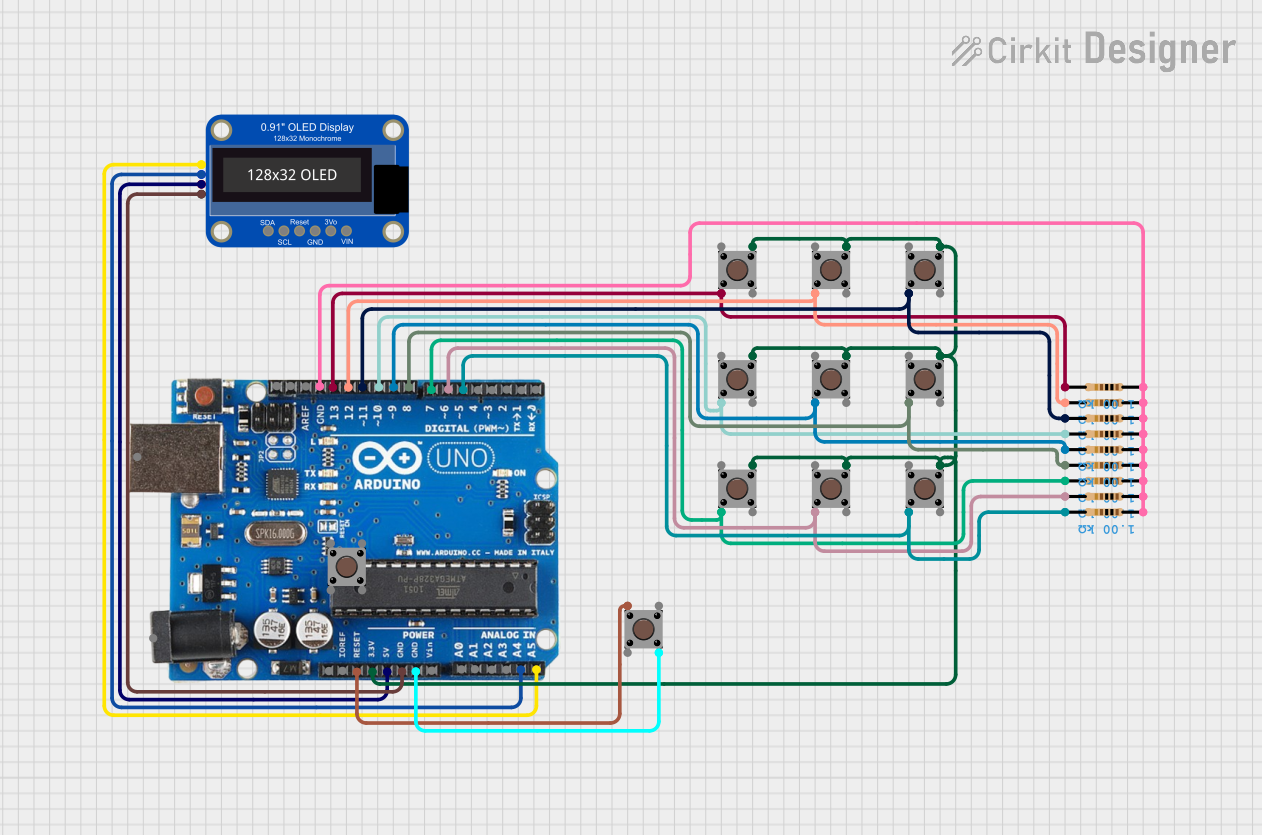
Circuit Documentation
Summary
This circuit consists of an Arduino Uno R3 microcontroller, an Adafruit OLED Monochrome 0.91in I2C display, multiple pushbuttons, and resistors. The circuit is designed to interface with the OLED display and handle multiple pushbutton inputs. The Arduino Uno is programmed to display information on the OLED screen and process input from the pushbuttons.
Component List
Adafruit OLED Monochrome 0.91in I2C with STEMMA QT
- Description: OLED display module with I2C interface.
- Pins: VCC, 3.3V, GND, RESET, SCL, SDA
Arduino Uno R3
- Description: Microcontroller board based on the ATmega328P.
- Pins: D8, D9, D10, D11, D12, D13, GND, AREF, SDA, SCL, D0/RX, D1/Tx, D2, D3, D4, D5, 6, D7, A5/SCL, A4/SDA, A3, A2, A1, A0, Vin, 5V, 3.3V, RESET, IOREF, NONE, USB Jack, Power Jack
Pushbutton
- Description: Momentary pushbutton switch.
- Pins: Pin 3 (out), Pin 4 (out), Pin 1 (in), Pin 2 (in)
Resistor
- Description: Resistor with a resistance of 1000 Ohms.
- Pins: pin1, pin2
Wiring Details
Adafruit OLED Monochrome 0.91in I2C with STEMMA QT
- GND connected to Arduino Uno R3 GND
- VCC connected to Arduino Uno R3 5V
- SDA connected to Arduino Uno R3 A4/SDA
- SCL connected to Arduino Uno R3 A5/SCL
Arduino Uno R3
- D8 connected to Resistor pin2 and Pushbutton Pin 2 (in)
- D9 connected to Resistor pin2 and Pushbutton Pin 2 (in)
- D10 connected to Resistor pin2 and Pushbutton Pin 2 (in)
- D11 connected to Resistor pin2 and Pushbutton Pin 2 (in)
- D12 connected to Resistor pin2 and Pushbutton Pin 2 (in)
- D13 connected to Resistor pin2 and Pushbutton Pin 2 (in)
- D5 connected to Resistor pin2 and Pushbutton Pin 2 (in)
- 6 connected to Resistor pin2 and Pushbutton Pin 2 (in)
- D7 connected to Resistor pin2 and Pushbutton Pin 2 (in)
- RESET connected to Pushbutton Pin 1 (in)
- 3.3V connected to Pushbutton Pin 3 (out)
- GND connected to Pushbutton Pin 4 (out)
Pushbutton
- Pin 2 (in) connected to Arduino Uno R3 D8 and Resistor pin2
- Pin 2 (in) connected to Arduino Uno R3 D9 and Resistor pin2
- Pin 2 (in) connected to Arduino Uno R3 D10 and Resistor pin2
- Pin 2 (in) connected to Arduino Uno R3 D11 and Resistor pin2
- Pin 2 (in) connected to Arduino Uno R3 D12 and Resistor pin2
- Pin 2 (in) connected to Arduino Uno R3 D13 and Resistor pin2
- Pin 2 (in) connected to Arduino Uno R3 D5 and Resistor pin2
- Pin 2 (in) connected to Arduino Uno R3 6 and Resistor pin2
- Pin 2 (in) connected to Arduino Uno R3 D7 and Resistor pin2
- Pin 1 (in) connected to Arduino Uno R3 RESET
- Pin 3 (out) connected to Arduino Uno R3 3.3V
- Pin 4 (out) connected to Arduino Uno R3 GND
Resistor
- pin2 connected to Arduino Uno R3 D8 and Pushbutton Pin 2 (in)
- pin2 connected to Arduino Uno R3 D9 and Pushbutton Pin 2 (in)
- pin2 connected to Arduino Uno R3 D10 and Pushbutton Pin 2 (in)
- pin2 connected to Arduino Uno R3 D11 and Pushbutton Pin 2 (in)
- pin2 connected to Arduino Uno R3 D12 and Pushbutton Pin 2 (in)
- pin2 connected to Arduino Uno R3 D13 and Pushbutton Pin 2 (in)
- pin2 connected to Arduino Uno R3 D5 and Pushbutton Pin 2 (in)
- pin2 connected to Arduino Uno R3 6 and Pushbutton Pin 2 (in)
- pin2 connected to Arduino Uno R3 D7 and Pushbutton Pin 2 (in)
- pin1 connected to Arduino Uno R3 GND
Code Documentation
#include <SPI.h>
#include <Wire.h>
#include <Adafruit_GFX.h>
#include <Adafruit_SSD1306.h>

#define SCREEN_WIDTH 128 // OLED display width, in pixels
#define SCREEN_HEIGHT 32 // OLED display height, in pixels
#define totalWheels 3
#define totalElements 26
#define debug false

#define OLED_RESET     -1 // Reset pin # (or -1 if sharing Arduino reset pin)
#define SCREEN_ADDRESS 0x3C ///< See datasheet for Address; 0x3D for 128x64, 0x3C for 128x32
Adafruit_SSD1306 display(SCREEN_WIDTH, SCREEN_HEIGHT, &Wire, OLED_RESET);

int wheels[3][26] = {
  { 0, 1, 2, 3, 4, 5, 6, 7, 8, 9, 10, 11, 12, 13, 14, 15, 16, 17, 18, 19, 20, 21, 22, 23, 24, 25 },
  { 0, 1, 2, 3, 4, 5, 6, 7, 8, 9, 10, 11, 12, 13, 14, 15, 16, 17, 18, 19, 20, 21, 22, 23, 24, 25 },
  { 0, 1, 2, 3, 4, 5, 6, 7, 8, 9, 10, 11, 12, 13, 14, 15, 16, 17, 18, 19, 20, 21, 22, 23, 24, 25 }
};

String seeds[3] = {
  "mantu",
  "loves",
  "girls"
};

int btED = 13;
int btABC = 12;
int btDEF = 11;
int btGHI = 10;
int btJKL = 9;
int btMNO = 8;
int btPQRS = 7;
int btTUV = 6;
int btWXYZ = 5;

int mode = 1;               // 1 - encode | 2 - decode
int lastButtonPressed = 0;  // time

int lastButtonNo = 0;
int buttonIndex = 0;

char alphabets[8][4] = {
  { 'A', 'B', 'C', '-' },  // 2
  { 'D', 'E', 'F', '-' },  // 3
  { 'G', 'H', 'I', '-' },  // 4
  { 'J', 'K', 'L', '-' },  // 5
  { 'M', 'N', 'O', '-' },  // 6
  { 'P', 'Q', 'R', 'S' },  // 7
  { 'T', 'U', 'V', '-' },  // 8
  { 'W', 'X', 'Y', 'Z' }   // 9
};

int buttonStatus = 0;
bool handlingISR = false;
int lastDisplayRefreshed = 0;
char lastResult = ' ';

void setup() {
  pinMode(btED, INPUT_PULLUP);
  pinMode(btABC, INPUT);
  pinMode(btDEF,