
ESP32-Based GPS Tracker with OLED Display and Firebase Integration
View and Edit Project In Cirkit Designer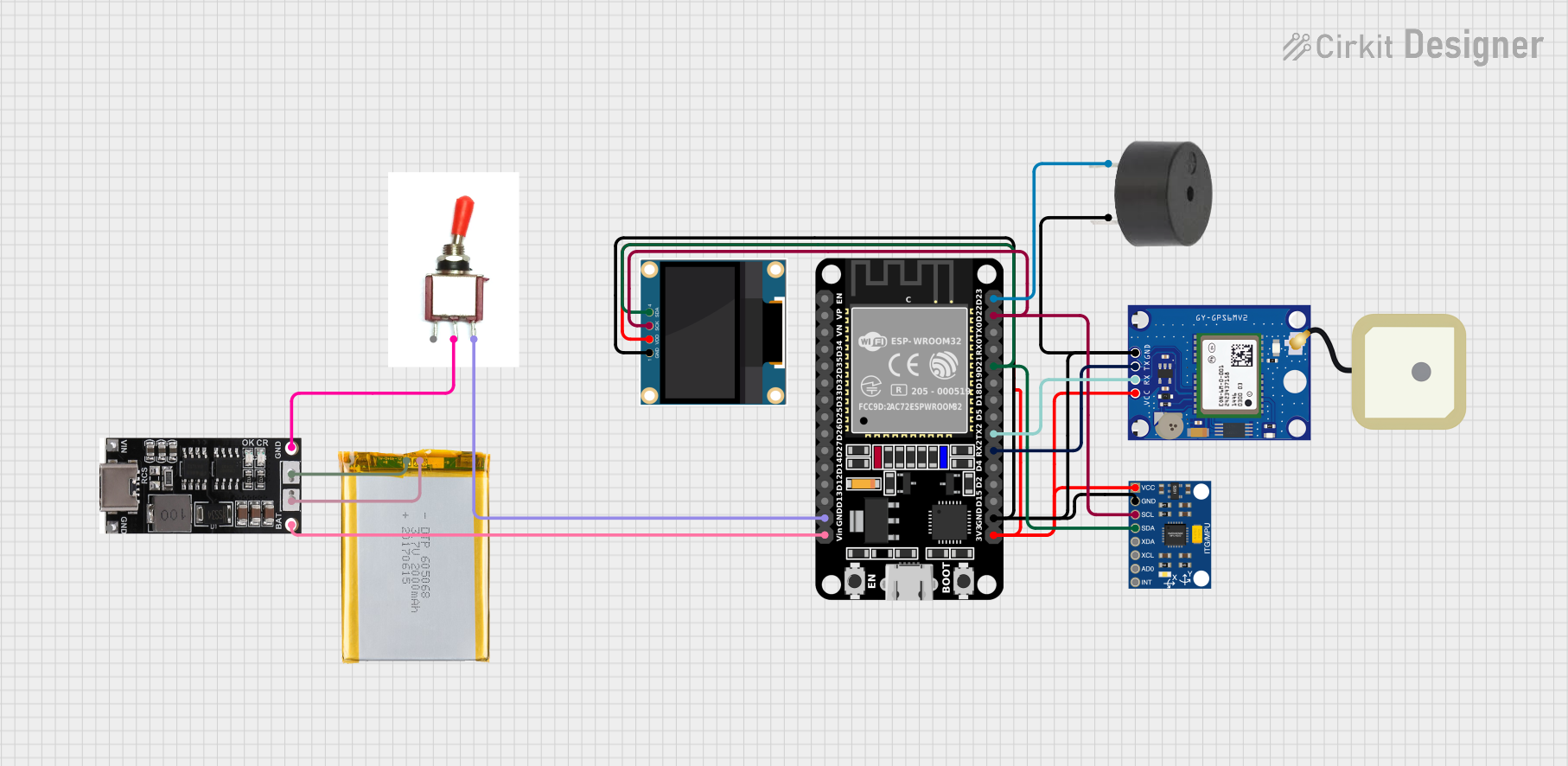
Circuit Documentation
Summary
This document provides a detailed overview of a circuit that integrates an ESP32 microcontroller with various sensors and modules, including an OLED display, MPU6050 accelerometer, GPS module, buzzer, toggle switch, and a lithium-ion battery charger. The circuit is designed to collect and transmit GPS data to Firebase using WiFi.
Component List
ESP32 (30 pin)
- Description: A powerful microcontroller with built-in WiFi and Bluetooth capabilities.
- Pins: EN, VP, VN, D34, D35, D32, D33, D25, D26, D27, D14, D12, D13, GND, Vin, D23, D22, TX0, RX0, D21, D19, D18, D5, TX2, RX2, D4, D2, D15, 3V3
0.96" OLED
- Description: A small OLED display for visual output.
- Pins: GND, VDD, SCK, SDA
18650 Lithium Ion Charger
- Description: A charger module for 18650 lithium-ion batteries.
- Pins: V IN, GND, OUT, IN, BAT IN, BAT GND
2000mAh Battery
- Description: A rechargeable 2000mAh lithium-ion battery.
- Pins: VCC, GND
InvenSense MPU6050
- Description: A 6-axis accelerometer and gyroscope sensor.
- Pins: VCC, GND, SCL, SDA, XDA, XCL, AD0, INT
GPS NEO-6M V2
- Description: A GPS module for location tracking.
- Pins: VCC, RX, TX, GND
Buzzer
- Description: An audio signaling device.
- Pins: PIN, GND
Toggle Switch
- Description: A switch to control the power state.
- Pins: Vcc, Sig, Gnd
Wiring Details
ESP32 (30 pin)
- GND: Connected to GND of Toggle Switch, InvenSense MPU6050, GPS NEO-6M V2, Buzzer, and 0.96" OLED.
- Vin: Connected to BAT IN of 18650 Lithium Ion Charger.
- D23: Connected to PIN of Buzzer.
- D22: Connected to SCL of InvenSense MPU6050 and SCK of 0.96" OLED.
- D21: Connected to SDA of InvenSense MPU6050 and SDA of 0.96" OLED.
- TX2: Connected to RX of GPS NEO-6M V2.
- RX2: Connected to TX of GPS NEO-6M V2.
- 3V3: Connected to VCC of InvenSense MPU6050, VCC of GPS NEO-6M V2, and VDD of 0.96" OLED.
0.96" OLED
- GND: Connected to GND of ESP32.
- VDD: Connected to 3V3 of ESP32.
- SCK: Connected to D22 of ESP32.
- SDA: Connected to D21 of ESP32.
18650 Lithium Ion Charger
- BAT IN: Connected to Vin of ESP32.
- OUT: Connected to GND of 2000mAh Battery.
- IN: Connected to VCC of 2000mAh Battery.
- BAT GND: Connected to Sig of Toggle Switch.
2000mAh Battery
- GND: Connected to OUT of 18650 Lithium Ion Charger.
- VCC: Connected to IN of 18650 Lithium Ion Charger.
InvenSense MPU6050
- GND: Connected to GND of ESP32.
- VCC: Connected to 3V3 of ESP32.
- SCL: Connected to D22 of ESP32.
- SDA: Connected to D21 of ESP32.
GPS NEO-6M V2
- GND: Connected to GND of ESP32.
- VCC: Connected to 3V3 of ESP32.
- RX: Connected to TX2 of ESP32.
- TX: Connected to RX2 of ESP32.
Buzzer
- GND: Connected to GND of ESP32.
- PIN: Connected to D23 of ESP32.
Toggle Switch
- Gnd: Connected to GND of ESP32.
- Sig: Connected to BAT GND of 18650 Lithium Ion Charger.
Documented Code
#include <TinyGPS++.h>
#include <FirebaseESP32.h>
#include <WiFi.h>

// Firebase project credentials
FirebaseConfig firebaseConfig;
FirebaseAuth firebaseAuth;

// WiFi credentials
#define WIFI_SSID "VITAP-HOSTEL2"
#define WIFI_PASSWORD "1234"

// Define the UART interface for NEO-6M GPS
HardwareSerial GPS_Serial(1);  // Use Serial1 for GPS communication

TinyGPSPlus gps;
FirebaseData firebaseData;

void setup() {
  Serial.begin(115200);

  // Start the GPS Serial communication
  GPS_Serial.begin(9600, SERIAL_8N1, 16, 17);  // GPS on pins 16 (RX), 17 (TX)

  // Connect to WiFi
  WiFi.begin(WIFI_SSID, WIFI_PASSWORD);
  while (WiFi.status() != WL_CONNECTED) {
    delay(1000);
    Serial.println("Connecting to WiFi...");
  }
  Serial.println("Connected to WiFi!");

  // Set up Firebase credentials
  firebaseConfig.host = "ecspro-268aa.firebaseapp.com";
  firebaseConfig.api_key = "AIzaSyA5uZccOcy9Lsm-3qJspgJ38KemMe5G54w";
  firebaseAuth.user.email = "mrdonxy1977@gmail.com";
  firebaseAuth.user.password = "don25232534x@";

  // Connect to Firebase
  Firebase.begin(&firebaseConfig, &firebaseAuth);
  Firebase.reconnectWiFi(true);
}

void loop() {
  while (GPS_Serial.available() > 0) {
    if (gps.encode(GPS_Serial.read())) {
      // If new GPS data is available
      if (gps.location.isValid()) {
        float latitude = gps.location.lat();
        float longitude = gps.location.lng();

        Serial.print("Latitude: ");
        Serial.println(latitude);
        Serial.print("Longitude: ");
        Serial.println(longitude);

        // Update the location in Firebase
        String path = "/patients/patient1/location";
        FirebaseJson json;
        json.set("latitude", latitude);
        json.set("longitude", longitude);

        if (Firebase.updateNode(firebaseData, path, json)) {
          Serial.println("Location updated successfully in Firebase.");
        } else {
          Serial.println("Failed to update location in Firebase: " + firebaseData.errorReason());
        }
      }
    }
  }
}
This code initializes the ESP32 to read GPS data from the NEO-6M module and upload the location data to Firebase. The ESP32 connects to a WiFi network and uses the Firebase ESP32 library to handle Firebase operations.