
Circuit Documentation
Summary
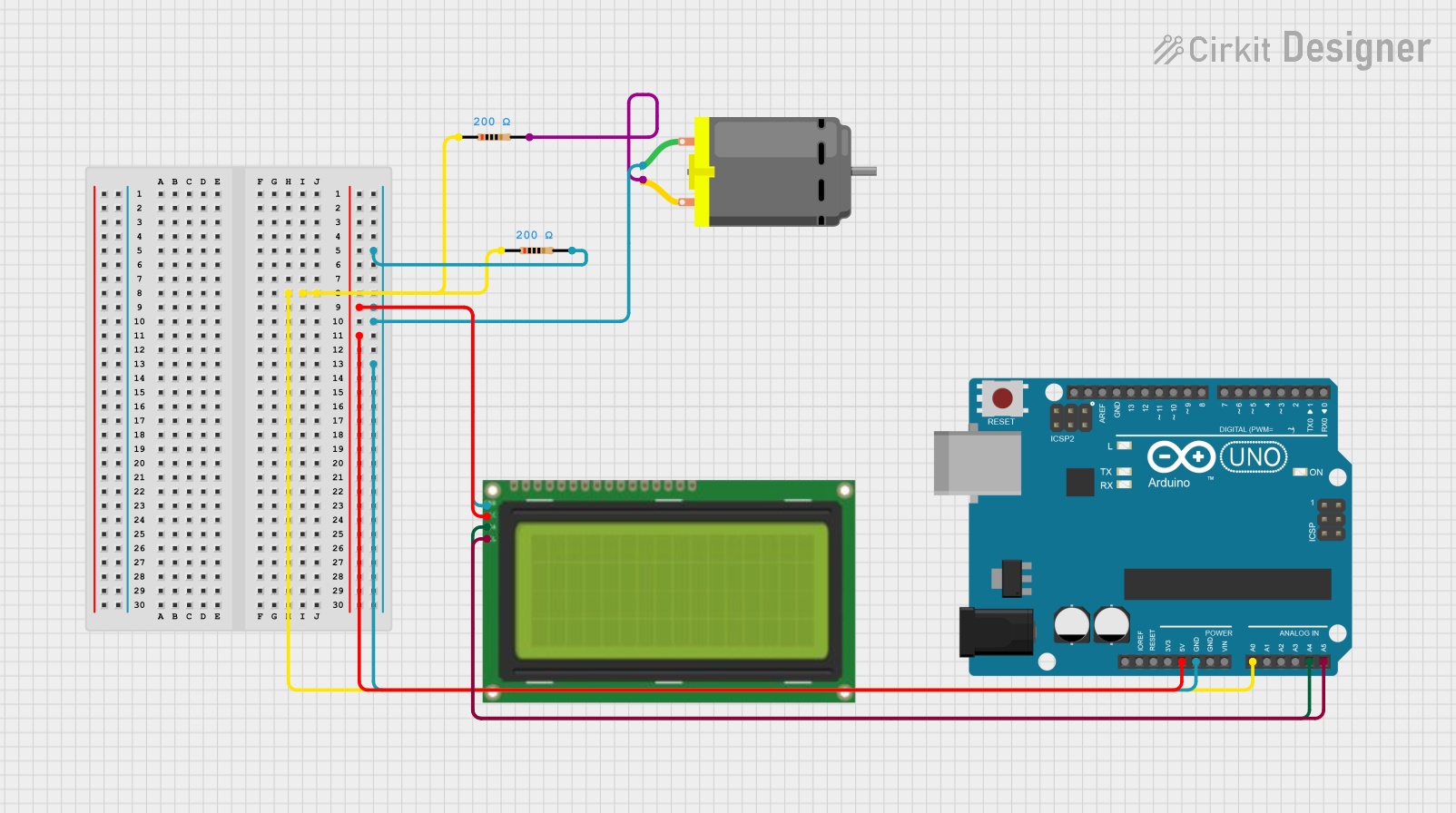
This document provides a detailed overview of a circuit that includes a DC motor, an Arduino UNO, an LCD display, and resistors. The circuit is designed to control the DC motor and display information on the LCD using the Arduino UNO. The document includes a component list, wiring details, and the embedded code used in the Arduino.
Component List
DC Motor
- Description: A DC motor used for mechanical movement.
- Pins: pin 1, pin 2
Arduino UNO
- Description: A microcontroller board based on the ATmega328P.
- Pins: UNUSED, IOREF, Reset, 3.3V, 5V, GND, Vin, A0, A1, A2, A3, A4, A5, SCL, SDA, AREF, D13, D12, D11, D10, D9, D8, D7, D6, D5, D4, D3, D2, D1, D0
LCD 20x4 I2C
- Description: A 20x4 character LCD display with I2C interface.
- Pins: GND, 5V, SCA, SCL
Resistor (200 Ohms)
- Description: A resistor with a resistance of 200 Ohms.
- Pins: pin1, pin2
Resistor (200 Ohms)
- Description: A resistor with a resistance of 200 Ohms.
- Pins: pin1, pin2
Wiring Details
DC Motor
pin 1 is connected to:
- Resistor pin2
- LCD 20x4 I2C GND
- Arduino UNO GND
pin 2 is connected to:
- Resistor pin2
Arduino UNO
GND is connected to:
- DC Motor pin 1
- LCD 20x4 I2C GND
5V is connected to:
- LCD 20x4 I2C 5V
A0 is connected to:
- Resistor pin1
A4 is connected to:
- LCD 20x4 I2C SCA
A5 is connected to:
- LCD 20x4 I2C SCL
LCD 20x4 I2C
GND is connected to:
- DC Motor pin 1
- Arduino UNO GND
5V is connected to:
- Arduino UNO 5V
SCA is connected to:
- Arduino UNO A4
SCL is connected to:
- Arduino UNO A5
Resistor (200 Ohms)
pin1 is connected to:
- Arduino UNO A0
- Resistor pin1
pin2 is connected to:
- DC Motor pin 1
Resistor (200 Ohms)
pin1 is connected to:
- Resistor pin1
pin2 is connected to:
- DC Motor pin 2
Code Documentation
Arduino UNO Code
File Name: sketch.ino
void setup() {
  // put your setup code here, to run once:

}

void loop() {
  // put your main code here, to run repeatedly:

}
File Name: documentation.txt
This concludes the documentation for the circuit. The provided information should help in understanding the components, their connections, and the code used in the Arduino UNO.