
Arduino UNO-Based Ultrasonic Distance Sensor with LED Indicators and Piezo Buzzer
View and Edit Project In Cirkit Designer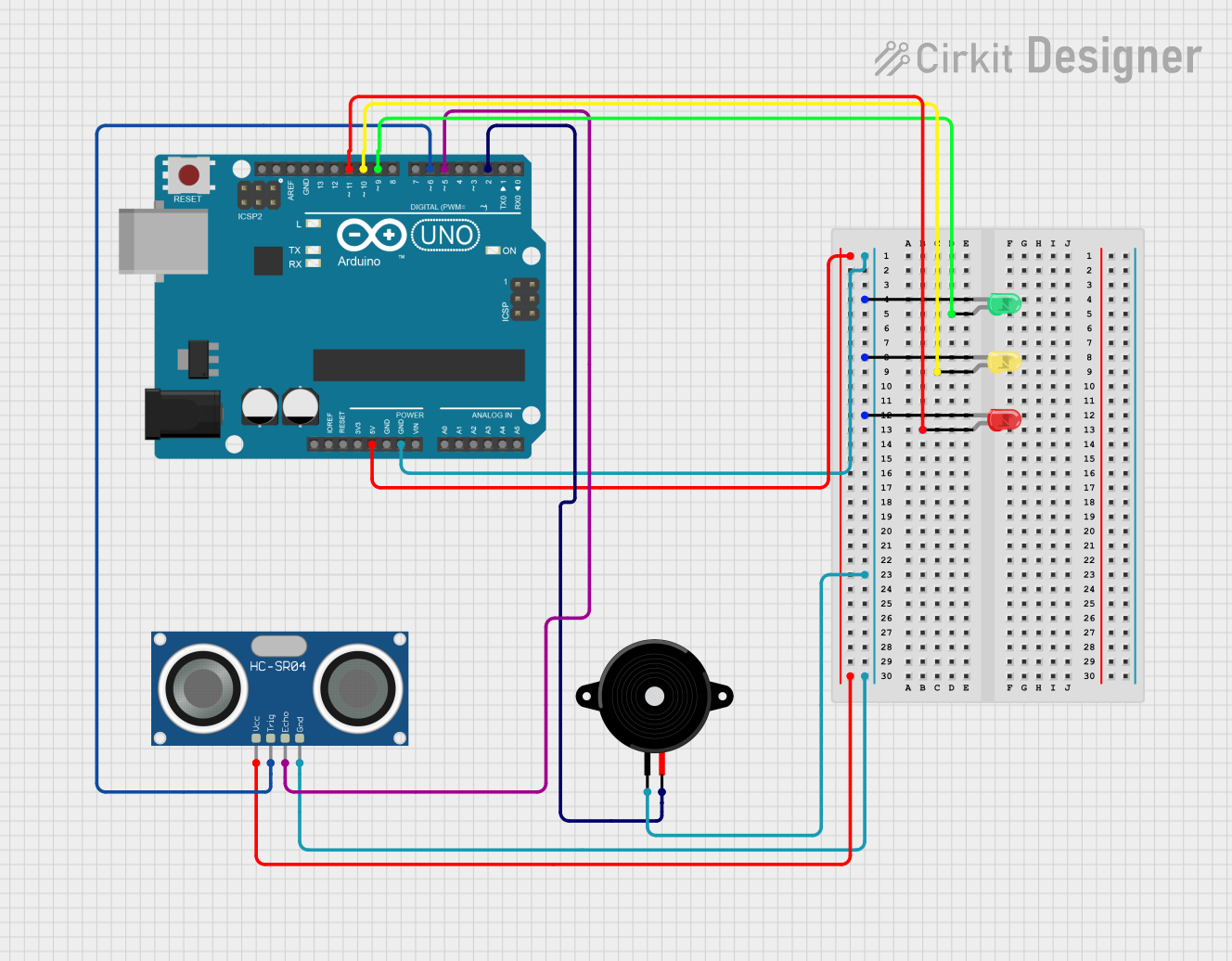
Circuit Documentation
Summary
This circuit consists of an Arduino UNO microcontroller, three LEDs (red, yellow, and green), an HC-SR04 Ultrasonic Sensor, and a Piezo Speaker. The Arduino UNO controls the LEDs and the Piezo Speaker, and it also interfaces with the Ultrasonic Sensor to measure distance.
Component List
Arduino UNO
- Description: A microcontroller board based on the ATmega328P.
- Pins: UNUSED, IOREF, Reset, 3.3V, 5V, GND, Vin, A0, A1, A2, A3, A4, A5, SCL, SDA, AREF, D13, D12, D11, D10, D9, D8, D7, D6, D5, D4, D3, D2, D1, D0
LED: Two Pin (red)
- Description: A red LED with two pins.
- Pins: cathode, anode
LED: Two Pin (yellow)
- Description: A yellow LED with two pins.
- Pins: cathode, anode
LED: Two Pin (green)
- Description: A green LED with two pins.
- Pins: cathode, anode
HC-SR04 Ultrasonic Sensor
- Description: An ultrasonic sensor used for distance measurement.
- Pins: VCC, TRIG, ECHO, GND
Piezo Speaker
- Description: A piezoelectric speaker used for sound output.
- Pins: pin1, pin2
Wiring Details
Arduino UNO
- 5V: Connected to VCC of HC-SR04 Ultrasonic Sensor
- GND: Connected to cathode of red LED, yellow LED, green LED, pin1 of Piezo Speaker, and GND of HC-SR04 Ultrasonic Sensor
- D9: Connected to anode of green LED
- D10: Connected to anode of yellow LED
- D11: Connected to anode of red LED
- D6: Connected to TRIG of HC-SR04 Ultrasonic Sensor
- D5: Connected to ECHO of HC-SR04 Ultrasonic Sensor
- D2: Connected to pin2 of Piezo Speaker
LED: Two Pin (red)
- anode: Connected to D11 of Arduino UNO
- cathode: Connected to GND of Arduino UNO
LED: Two Pin (yellow)
- anode: Connected to D10 of Arduino UNO
- cathode: Connected to GND of Arduino UNO
LED: Two Pin (green)
- anode: Connected to D9 of Arduino UNO
- cathode: Connected to GND of Arduino UNO
HC-SR04 Ultrasonic Sensor
- VCC: Connected to 5V of Arduino UNO
- TRIG: Connected to D6 of Arduino UNO
- ECHO: Connected to D5 of Arduino UNO
- GND: Connected to GND of Arduino UNO
Piezo Speaker
- pin1: Connected to GND of Arduino UNO
- pin2: Connected to D2 of Arduino UNO
Documented Code
Arduino UNO Code (sketch.ino)
void setup() {
  // put your setup code here, to run once:

}

void loop() {
  // put your main code here, to run repeatedly:

}
Additional Documentation (documentation.txt)
This documentation provides a comprehensive overview of the circuit, including a summary, detailed component list, wiring details, and the code used in the Arduino UNO.