
Arduino UNO-Based Stepper Motor Controller with Potentiometer Adjustment
View and Edit Project In Cirkit Designer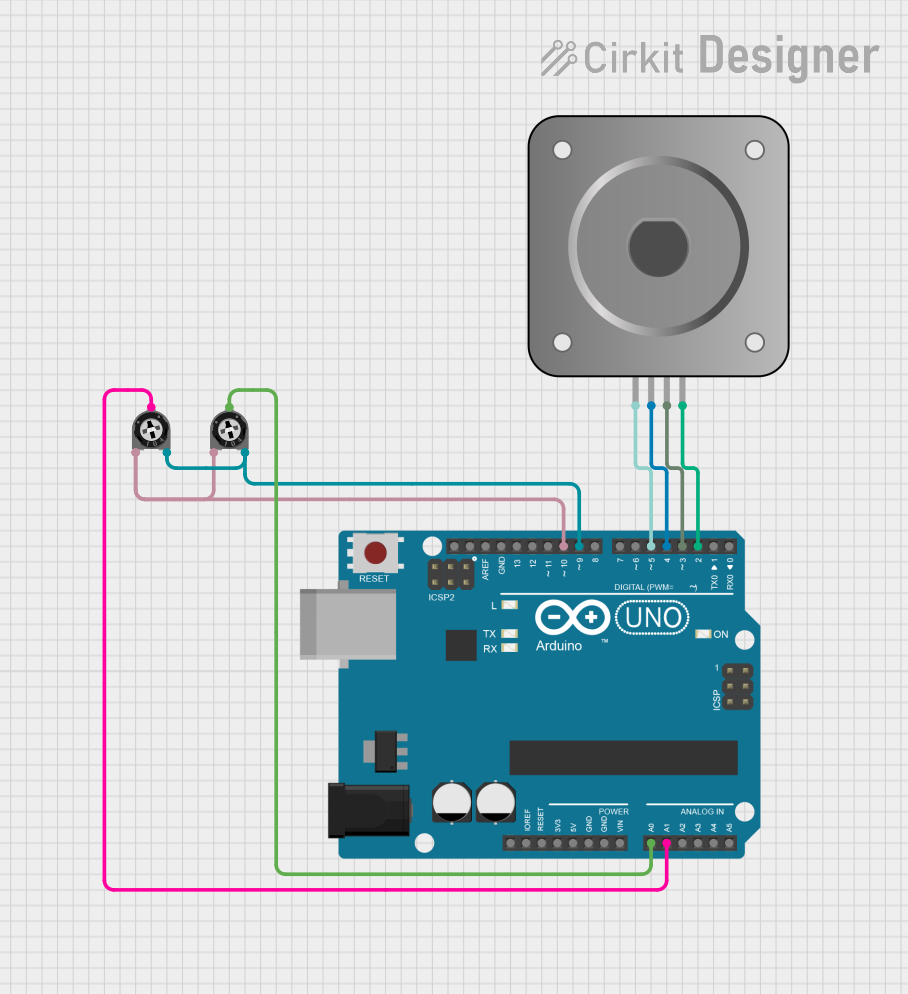
Circuit Documentation
Summary
This circuit involves an Arduino UNO microcontroller, a bipolar stepper motor (NEMA 17), and two trimmer potentiometers. The Arduino UNO reads analog values from the potentiometers to control the position and acceleration of the stepper motor. The stepper motor is driven by the digital pins of the Arduino UNO.
Component List
Arduino UNO
- Description: A microcontroller board based on the ATmega328P.
- Pins: UNUSED, IOREF, Reset, 3.3V, 5V, GND, Vin, A0, A1, A2, A3, A4, A5, SCL, SDA, AREF, D13, D12, D11, D10, D9, D8, D7, D6, D5, D4, D3, D2, D1, D0
Bipolar Stepper Motor (NEMA 17)
- Description: A type of stepper motor with four wires.
- Pins: A-, A+, B+, B-
Trimmer Potentiometer (10k Ohms)
- Description: A variable resistor used to adjust voltage levels.
- Pins: leg1, wiper, leg2
- Properties: Resistance: 10,000 Ohms
Trimmer Potentiometer (10k Ohms)
- Description: A variable resistor used to adjust voltage levels.
- Pins: leg1, wiper, leg2
- Properties: Resistance: 10,000 Ohms
Wiring Details
Arduino UNO
- A0: Connected to the wiper of the first trimmer potentiometer.
- A1: Connected to the wiper of the second trimmer potentiometer.
- D10: Connected to leg1 of both trimmer potentiometers.
- D9: Connected to leg2 of both trimmer potentiometers.
- D5: Connected to A- of the bipolar stepper motor.
- D4: Connected to A+ of the bipolar stepper motor.
- D3: Connected to B+ of the bipolar stepper motor.
- D2: Connected to B- of the bipolar stepper motor.
Bipolar Stepper Motor (NEMA 17)
- A-: Connected to D5 of the Arduino UNO.
- A+: Connected to D4 of the Arduino UNO.
- B+: Connected to D3 of the Arduino UNO.
- B-: Connected to D2 of the Arduino UNO.
Trimmer Potentiometer (10k Ohms)
First Potentiometer:
- leg1: Connected to D10 of the Arduino UNO.
- wiper: Connected to A0 of the Arduino UNO.
- leg2: Connected to D9 of the Arduino UNO.
Second Potentiometer:
- leg1: Connected to D10 of the Arduino UNO.
- wiper: Connected to A1 of the Arduino UNO.
- leg2: Connected to D9 of the Arduino UNO.
Documented Code
// ProportionalControl.pde
// -*- mode: C++ -*-
//
// Make a single stepper follow the analog value read from a pot or whatever
// The stepper will move smoothly using acceleration to each newly set posiiton,
// depending on the value of the pot.
//
// Copyright (C) 2012 Mike McCauley
// $Id: ProportionalControl.pde,v 1.1 2011/01/05 01:51:01 mikem Exp mikem $

// Code derived from: https://www.airspayce.com/mikem/arduino/AccelStepper/ProportionalControl_8pde-example.html
// Sim: https://wokwi.com/projects/327381547863769683
//  derived from https://wokwi.com/projects/327324886912467538
//         and:  https://wokwi.com/projects/327379142347588180
// Discussion: https://discord.com/channels/787627282663211009/787630013658824707/957769150556667954
//         and https://github.com/wokwi/wokwi-features/issues/191
// Docs:  https://docs.wokwi.com/parts/wokwi-stepper-motor
//    note the wokwi-stepper-motor attributes in diagram.json:
//   "attrs": { "display": "steps", "arrow": "white", "gearRatio": "200:1023"
//
//  See also: https://wokwi.com/projects/327613078439985746 MultiStepper
//            https://wokwi.com/projects/330649945363186260 stepper pot, and servo
//
#include <AccelStepper.h>

// Define a stepper and the pins it will use
AccelStepper stepper; // Defaults to AccelStepper::FULL4WIRE (4 pins) on 2, 3, 4, 5

// This defines the analog input pin for reading the control voltage
// Tested with a 10k linear pot between 5v and GND
const byte PositionPot = A0;
const byte AccelerationPot = A1;

void setup()
{
    pinMode(9, OUTPUT);
    pinMode(10, OUTPUT);
    digitalWrite(9, LOW);
    digitalWrite(10, HIGH);
    stepper.setMaxSpeed(1000);
    stepper.setAcceleration(35);
}

void loop()
{
    // Read new position
    int analog_in = analogRead(PositionPot);
    stepper.setAcceleration(analogRead(AccelerationPot));
    stepper.moveTo(analog_in);
    stepper.run();
}
This code reads the analog values from the two potentiometers connected to the Arduino UNO and uses these values to control the position and acceleration of the stepper motor. The AccelStepper library is used to handle the stepper motor control.