
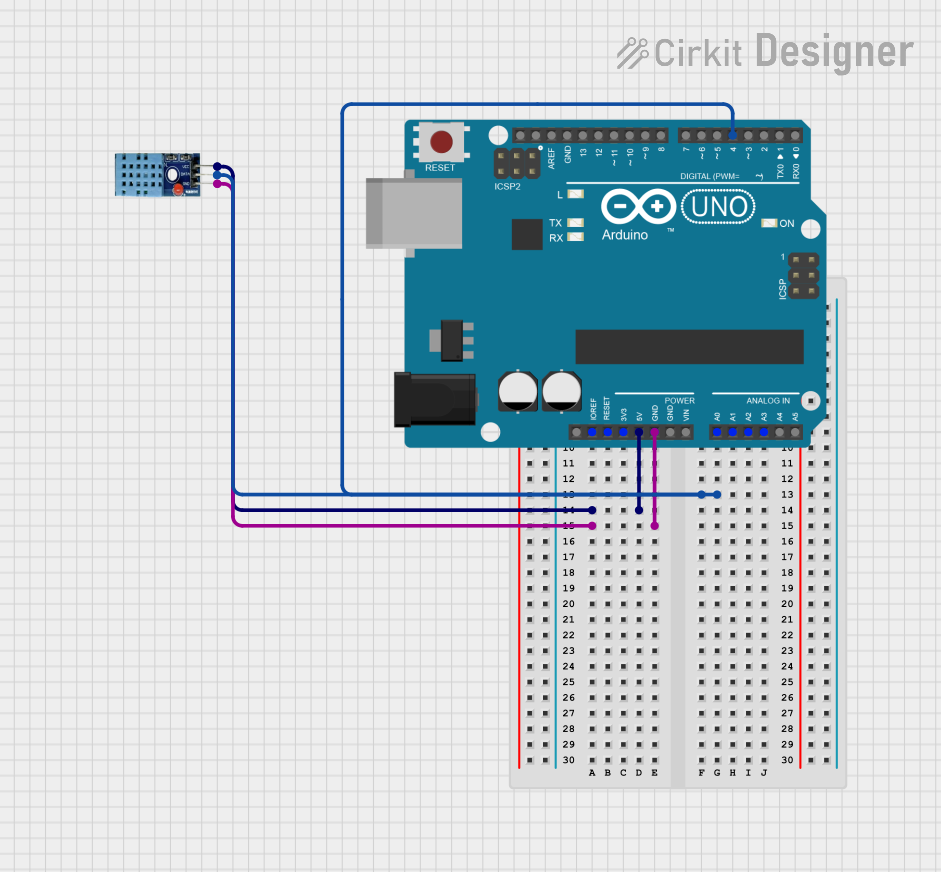
Circuit Documentation
Summary
This circuit involves an Arduino UNO microcontroller interfaced with a DHT11 temperature and humidity sensor. The Arduino UNO reads data from the DHT11 sensor and outputs the temperature and humidity readings via the serial monitor.
Component List
Arduino UNO
- Description: A microcontroller board based on the ATmega328P.
- Pins: UNUSED, IOREF, Reset, 3.3V, 5V, GND, Vin, A0, A1, A2, A3, A4, A5, SCL, SDA, AREF, D13, D12, D11, D10, D9, D8, D7, D6, D5, D4, D3, D2, D1, D0
DHT11
- Description: A basic, low-cost digital temperature and humidity sensor.
- Pins: VCC, GND, DATA
Wiring Details
Arduino UNO
- 5V: Connected to VCC of DHT11
- GND: Connected to GND of DHT11
- D4: Connected to DATA of DHT11
DHT11
- VCC: Connected to 5V of Arduino UNO
- GND: Connected to GND of Arduino UNO
- DATA: Connected to D4 of Arduino UNO
Code Documentation
Arduino UNO Code
#include "DHT.h"

DHT dht11(4, DHT11);

void setup() {
  Serial.begin(9600);
  dht11.begin();
  pinMode(4, INPUT);
}

void loop() {
  delay(6000);
  float hum = dht11.readHumidity();
  float tempc = dht11.readTemperature();
  float tempf = dht11.readTemperature(true);

  if (isnan(hum) || isnan(tempc) || isnan(tempf)) {
    Serial.println("Can't read from dht11 sensor");
  } else {
    Serial.print("Humidity: ");
    Serial.print(hum);
    Serial.println("%");
    Serial.print("Temperature: ");
    Serial.print(tempc);
    Serial.println("deg.C");
    Serial.print(tempf);
    Serial.println("deg.F");
  }
}
This code initializes the DHT11 sensor on pin D4 of the Arduino UNO. It reads the humidity and temperature (in both Celsius and Fahrenheit) every 6 seconds and prints the values to the serial monitor. If the sensor readings are not available, it outputs an error message.