
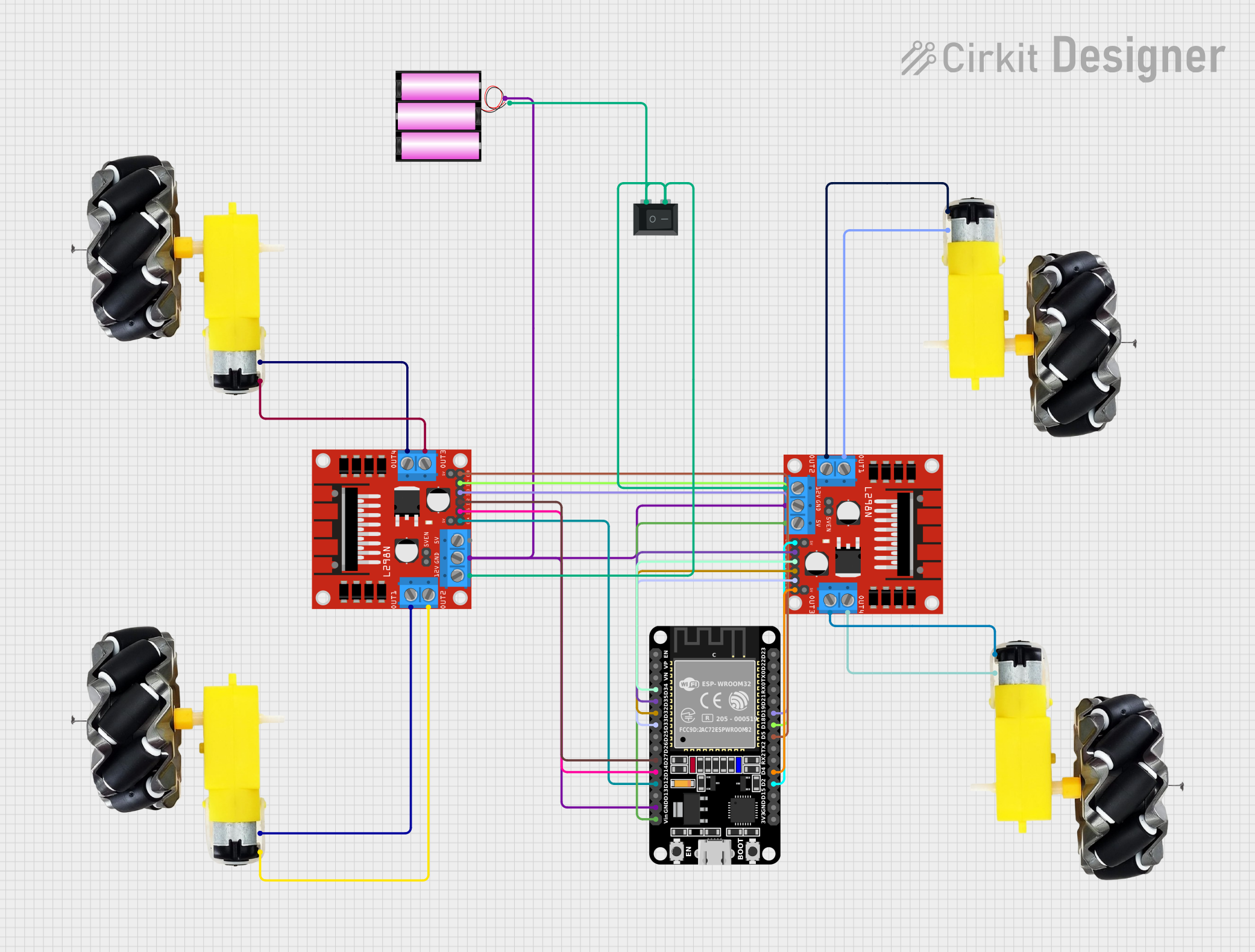
Circuit Documentation
Summary
This circuit is designed to control multiple DC motors using an ESP32 microcontroller and L298N motor drivers. The motors are powered by a 12V battery and can be controlled via the ESP32, which is programmed to manage the motor speeds and directions.
Component List
Motor and Wheels
- Description: DC motor with attached wheels.
- Pins:
vcc,GND
Rocker Switch (SPST)
- Description: Single Pole Single Throw (SPST) rocker switch.
- Pins:
1,2
Battery 12V
- Description: 12V battery for powering the circuit.
- Pins:
+,-
L298N DC Motor Driver
- Description: Dual H-Bridge motor driver for controlling DC motors.
- Pins:
OUT1,OUT2,12V,GND,5V,OUT3,OUT4,5V-ENA-JMP-I,5V-ENA-JMP-O,+5V-J1,+5V-J2,ENA,IN1,IN2,IN3,IN4,ENB
ESP32 (30 pin)
- Description: ESP32 microcontroller with 30 pins.
- Pins:
EN,VP,VN,D34,D35,D32,D33,D25,D26,D27,D14,D12,D13,GND,Vin,D23,D22,TX0,RX0,D21,D19,D18,D5,TX2,RX2,D4,D2,D15,3V3
Wiring Details
Motor and Wheels
Motor 1:
vccconnected toOUT2of L298N DC Motor Driver 1GNDconnected toOUT1of L298N DC Motor Driver 1
Motor 2:
vccconnected toOUT3of L298N DC Motor Driver 1GNDconnected toOUT4of L298N DC Motor Driver 1
Motor 3:
vccconnected toOUT2of L298N DC Motor Driver 2GNDconnected toOUT1of L298N DC Motor Driver 2
Motor 4:
vccconnected toOUT3of L298N DC Motor Driver 2GNDconnected toOUT4of L298N DC Motor Driver 2
Rocker Switch (SPST)
1connected to12Vof L298N DC Motor Driver 1 and L298N DC Motor Driver 22connected to-of Battery 12V
Battery 12V
+connected toGNDof L298N DC Motor Driver 1, L298N DC Motor Driver 2, and ESP32-connected to1of Rocker Switch (SPST)
L298N DC Motor Driver
Driver 1:
OUT1connected toGNDof Motor 1OUT2connected tovccof Motor 1OUT3connected tovccof Motor 2OUT4connected toGNDof Motor 2ENAconnected toD12of ESP32IN1connected toD14of ESP32IN2connected toD27of ESP32IN3connected toD19of ESP32IN4connected toD18of ESP32ENBconnected toD5of ESP32
Driver 2:
OUT1connected toGNDof Motor 3OUT2connected tovccof Motor 3OUT3connected tovccof Motor 4OUT4connected toGNDof Motor 4ENAconnected toD2of ESP32IN1connected toD35of ESP32IN2connected toD34of ESP32IN3connected toD32of ESP32IN4connected toD33of ESP32ENBconnected toD4of ESP325Vconnected toVinof ESP32
ESP32 (30 pin)
GNDconnected to+of Battery 12VVinconnected to5Vof L298N DC Motor Driver 2D12connected toENAof L298N DC Motor Driver 1D14connected toIN1of L298N DC Motor Driver 1D27connected toIN2of L298N DC Motor Driver 1D19connected toIN3of L298N DC Motor Driver 1D18connected toIN4of L298N DC Motor Driver 1D5connected toENBof L298N DC Motor Driver 1D2connected toENAof L298N DC Motor Driver 2D35connected toIN1of L298N DC Motor Driver 2D34connected toIN2of L298N DC Motor Driver 2D32connected toIN3of L298N DC Motor Driver 2D33connected toIN4of L298N DC Motor Driver 2D4connected toENBof L298N DC Motor Driver 2
Code Documentation
sketch.ino
#define ENA 12
#define ENB 5
#define ln1 14
#define ln2 27
#define ln3 17
#define ln4 18
#define ENA1 2
#define ENB1 4
#define ln11 35
#define ln21 34
#define ln31 33
#define ln41 32

int a[12] = {ENA, ENB, ln1, ln2, ln3, ln4, ENA1, ENB1, ln11, ln21, ln31, ln41};
int speed = 255;

const int freq = 5000;
const int resolution = 8;

void setup() {
  Serial.begin(115200);
  for (int i = 0; i < 12; i++) {
    pinMode(a[i], OUTPUT);
  }

  // Setup PWM channels
  ledcSetup(0, freq, resolution);
  ledcAttachPin(ENA, 0);
  ledcAttachPin(ENB, 1);
  ledcAttachPin(ENA1, 2);
  ledcAttachPin(ENB1, 3);
}

void loop() {
  ledcWrite(0, speed);
  ledcWrite(1, speed);
  ledcWrite(2, speed);
  ledcWrite(3, speed);

  digitalWrite(ln1, HIGH);
  digitalWrite(ln2, LOW);
  digitalWrite(ln3, HIGH);
  digitalWrite(ln4, LOW);
  digitalWrite(ln11, HIGH);
  digitalWrite(ln21, LOW);
  digitalWrite(ln31, HIGH);
  digitalWrite(ln41, LOW);
}
documentation.txt
This file is empty and does not contain any code.