
Arduino UNO Controlled Interface with TFT Display and Feedback Indicators
View and Edit Project In Cirkit Designer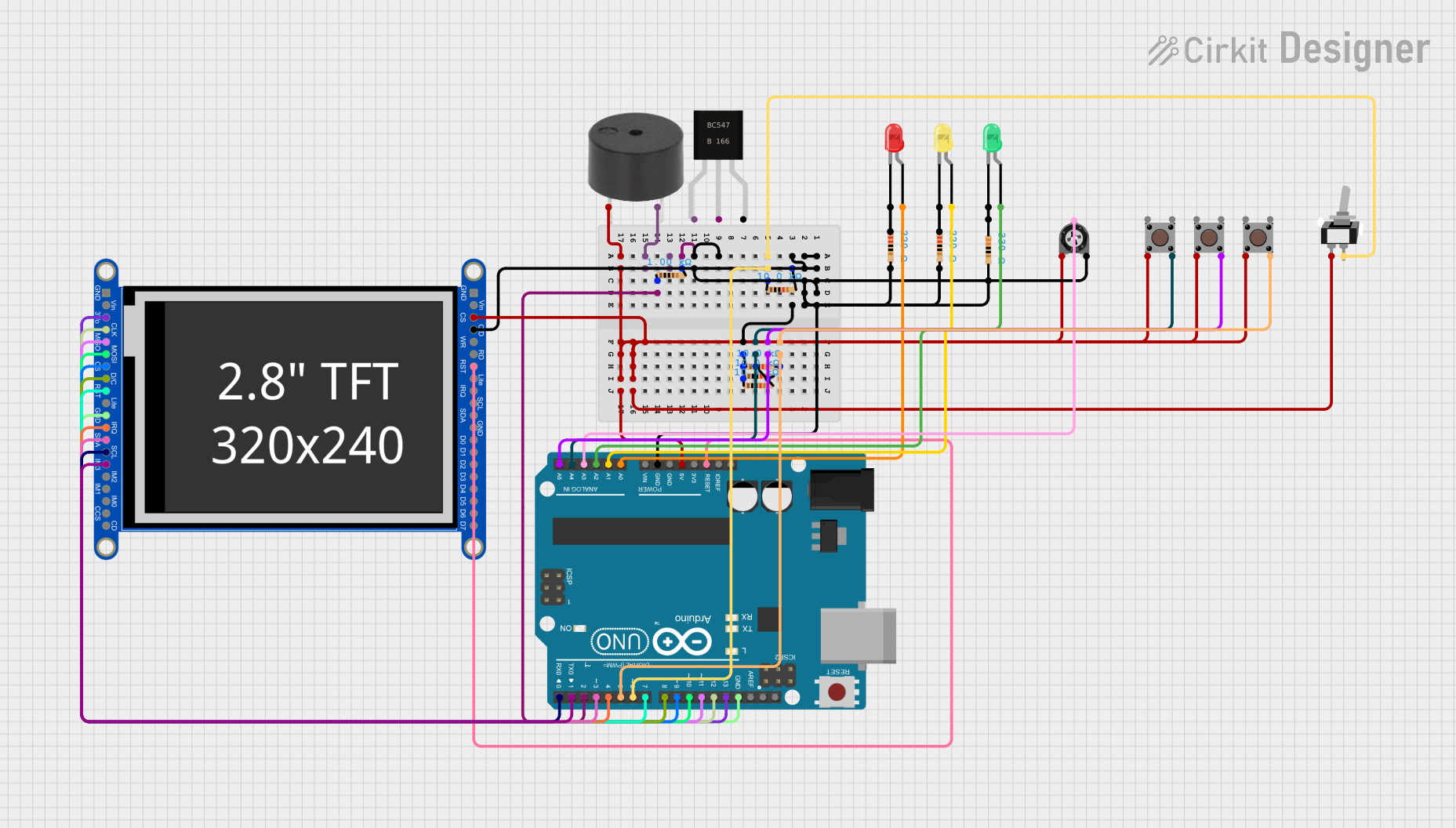
Circuit Documentation
Summary
This circuit appears to be a microcontroller-based system with various input and output devices. The core of the circuit is an Arduino UNO microcontroller, which interfaces with a capacitive touch TFT display, multiple LEDs, a buzzer, a trimmer potentiometer, and several pushbuttons and switches. The circuit likely serves as a user interface panel with visual feedback (LEDs and display) and audible alerts (buzzer).
Component List
LEDs
- LED (Red): A two-pin red LED used for visual indication.
- LED (Green): A two-pin green LED used for visual indication.
- LED (Yellow): A two-pin yellow LED used for visual indication.
Resistors
- Resistor (1k Ohm): Limits current to protect components or create voltage drops.
- Resistor (220 Ohm): Limits current to protect components or create voltage drops.
- Resistor (330 Ohm): Limits current to protect components or create voltage drops.
- Resistor (10k Ohm): Often used as a pull-up or pull-down resistor.
Potentiometer
- Trimmer Potentiometer (10k Ohm): An adjustable resistor used to set a specific resistance value.
Switches
- Toggle Switch (SPST): A single-pole single-throw switch used to open or close a circuit.
- Pushbutton: Momentary switches that close a circuit when pressed.
Display
- Adafruit 2.8 inch Captouch TFT: A touchscreen display with capacitive touch sensing.
Transistor
- BC547: An NPN transistor used for switching or amplification.
Buzzer
- Buzzer: An electromechanical component that emits sound when energized.
Microcontroller
- Arduino UNO: A microcontroller board based on the ATmega328P, used for controlling the components in the circuit.
Wiring Details
LEDs
- LED (Red): Anode connected to Arduino UNO A0, cathode connected to a 220 Ohm resistor.
- LED (Green): Anode connected to Arduino UNO A2, cathode connected to a 330 Ohm resistor.
- LED (Yellow): Anode connected to Arduino UNO A1, cathode connected to a 220 Ohm resistor.
Resistors
- Resistor (1k Ohm): Connected to the base of the BC547 transistor.
- Resistor (220 Ohm): Connected to the cathode of the red LED.
- Resistor (330 Ohm): Connected to the cathode of the green LED.
- Resistor (10k Ohm): Multiple 10k Ohm resistors are used, likely as pull-up or pull-down resistors for various components.
Potentiometer
- Trimmer Potentiometer (10k Ohm): Wiper connected to Arduino UNO A3, one leg connected to a network of 10k Ohm resistors and GND, other leg connected to 5V through a pushbutton.
Switches
- Toggle Switch (SPST): One terminal connected to a network of 10k Ohm resistors and GND, other terminal connected to Arduino UNO D6.
- Pushbutton: Various pushbuttons connected between 5V and GND, with their output pins connected to different Arduino UNO pins (D5, A5, A4).
Display
- Adafruit 2.8 inch Captouch TFT: Connected to various digital and analog pins on the Arduino UNO for control and data transfer.
Transistor
- BC547: Emitter connected to GND, base connected to a 1k Ohm resistor, collector connected to the buzzer.
Buzzer
- Buzzer: One terminal connected to the collector of the BC547 transistor, other terminal connected to GND.
Microcontroller
- Arduino UNO: Central controller of the circuit, interfaced with all other components.
Documented Code
Arduino UNO Code (sketch.ino)
void setup() {
  // put your setup code here, to run once:

}

void loop() {
  // put your main code here, to run repeatedly:

}
Additional Notes (documentation.txt)
No additional code documentation was provided.