
Arduino UNO Based Obstacle Avoiding and Line Following Robot
View and Edit Project In Cirkit Designer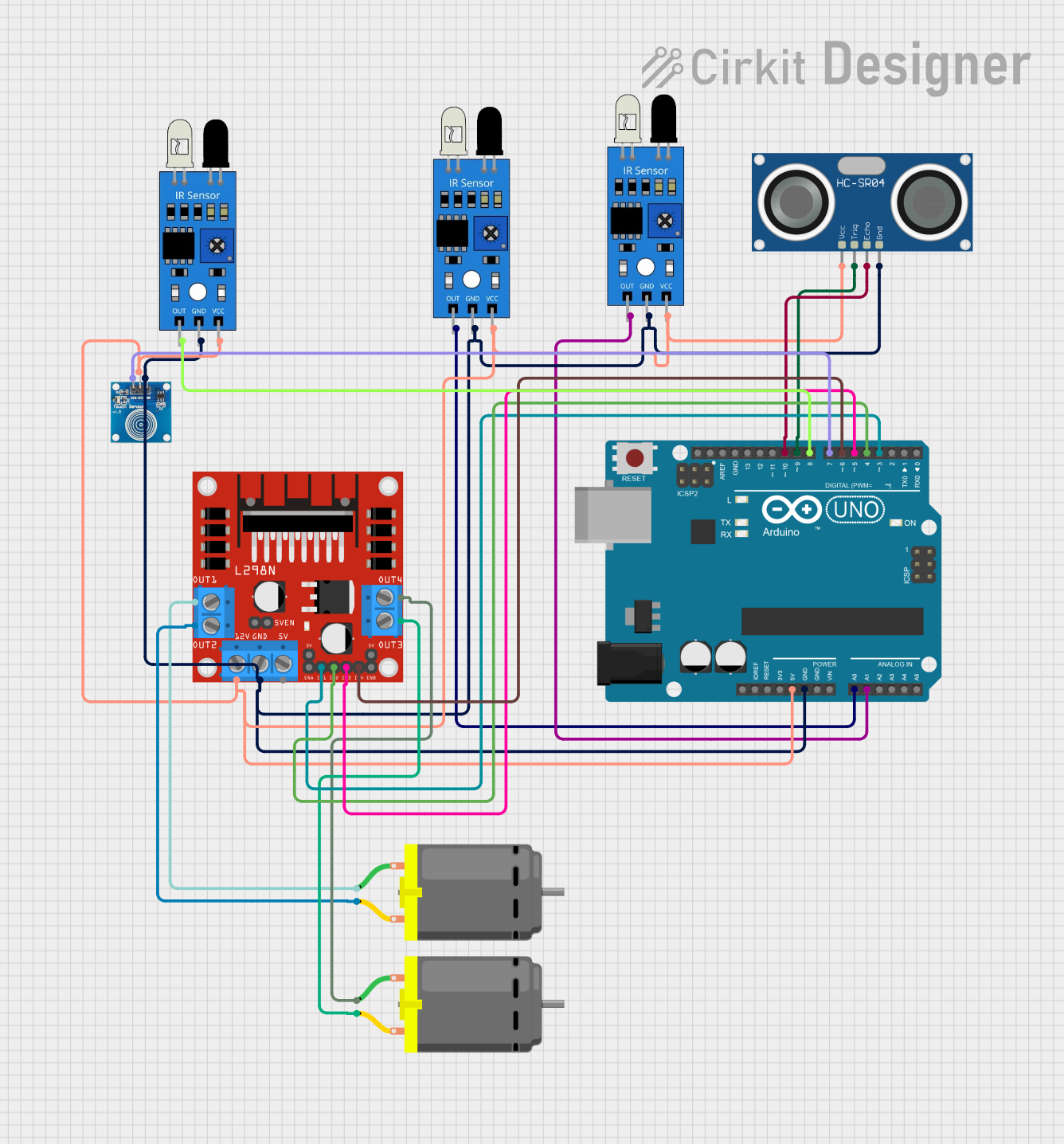
Circuit Documentation
Summary
This circuit is designed to control a car that can avoid obstacles using an ultrasonic sensor and follow a line using infrared sensors. The car's behavior can be switched between obstacle avoidance and line following modes using a toggle switch. The Arduino UNO serves as the central microcontroller, interfacing with the IR sensors, the ultrasonic sensor, and the L298N DC motor driver, which in turn controls the DC motors for movement. The circuit is powered through the Arduino's 5V output, which is distributed to the other components.
Component List
Arduino UNO
- Description: A microcontroller board based on the ATmega328P.
- Purpose: Acts as the central processing unit for the circuit, reading sensor inputs and controlling the motors accordingly.
IR Sensors (3 units)
- Description: Infrared sensors used for line detection.
- Purpose: Detects the presence of a line or an obstacle depending on the mode of operation.
HC-SR04 Ultrasonic Sensor
- Description: An ultrasonic ranging module that measures distance.
- Purpose: Used for obstacle detection by measuring the distance to objects in front of the car.
L298N DC Motor Driver
- Description: A motor driver module capable of driving two DC motors.
- Purpose: Controls the direction and speed of the DC motors based on commands from the Arduino.
DC Motors (2 units)
- Description: Electric motors that convert electrical energy into mechanical rotation.
- Purpose: Provides the movement for the car.
Touch Sensor
- Description: A sensor that detects touch or proximity.
- Purpose: Used as a mode switch to toggle between obstacle avoidance and line following modes.
Wiring Details
Arduino UNO
- 5V: Provides power to IR sensors, ultrasonic sensor, touch sensor, and motor driver.
- GND: Common ground for all components.
- A0: Connected to the left IR sensor output.
- A1: Connected to the right IR sensor output.
- D3-D6: Control signals for the L298N motor driver.
- D7: Input from the touch sensor.
- D8: Connected to the third IR sensor output.
- D9: Trigger pin for the ultrasonic sensor.
- D10: Echo pin for the ultrasonic sensor.
IR Sensors
- VCC: Connected to 5V power.
- GND: Connected to common ground.
- OUT: Output signal connected to the Arduino (A0, A1, D8).
HC-SR04 Ultrasonic Sensor
- VCC: Connected to 5V power.
- GND: Connected to common ground.
- TRIG: Trigger pin connected to Arduino D9.
- ECHO: Echo pin connected to Arduino D10.
L298N DC Motor Driver
- 12V: Connected to an external power supply for motor operation.
- GND: Connected to common ground.
- IN1-IN4: Control signals from Arduino (D3-D6).
- OUT1-OUT4: Outputs connected to the DC motors.
DC Motors
- Pin 1 and Pin 2: Connected to the motor driver outputs (OUT1-OUT4).
Touch Sensor
- VCC: Connected to 5V power.
- GND: Connected to common ground.
- IO: Output signal connected to Arduino D7.
Documented Code
/*
 * Arduino Sketch for Obstacle Avoiding Car and Line Following
 * This code controls a car to avoid obstacles using an ultrasonic sensor
 * and follow a line using infrared sensors. The mode can be changed by
 * a switch. In line following mode, when the third IR sensor is high,
 * the car should stop moving.
 */

// Pin definitions
const int trigPin = 9; // Ultrasonic sensor trigger pin
const int echoPin = 10; // Ultrasonic sensor echo pin
const int leftMotorForward = 3; // Left motor forward pin
const int leftMotorBackward = 4; // Left motor backward pin
const int rightMotorForward = 5; // Right motor forward pin
const int rightMotorBackward = 6; // Right motor backward pin
const int leftIRSensor = A0; // Left infrared sensor pin
const int rightIRSensor = A1; // Right infrared sensor pin
const int thirdIRSensor = 8; // Third infrared sensor pin
const int modeSwitch = 7; // Mode toggle switch pin

void setup() {
  // Set motor pins as outputs
  pinMode(leftMotorForward, OUTPUT);
  pinMode(leftMotorBackward, OUTPUT);
  pinMode(rightMotorForward, OUTPUT);
  pinMode(rightMotorBackward, OUTPUT);
  // Set ultrasonic sensor pins
  pinMode(trigPin, OUTPUT);
  pinMode(echoPin, INPUT);
  // Set IR sensor pins
  pinMode(leftIRSensor, INPUT);
  pinMode(rightIRSensor, INPUT);
  pinMode(thirdIRSensor, INPUT);
  // Set mode switch pin
  pinMode(modeSwitch, INPUT);
}

void loop() {
  // Read mode switch
  int mode = digitalRead(modeSwitch);
  if (mode == HIGH) {
    obstacleAvoidanceMode();
  } else {
    lineFollowingMode();
  }
}

void obstacleAvoidanceMode() {
  // Read distance from ultrasonic sensor
  long duration, distance;
  digitalWrite(trigPin, LOW);
  delayMicroseconds(2);
  digitalWrite(trigPin, HIGH);
  delayMicroseconds(10);
  digitalWrite(trigPin, LOW);
  duration = pulseIn(echoPin, HIGH);
  distance = (duration / 2) / 29.1;

  // Obstacle avoidance logic
  if (distance < 20) {
    // Stop and turn
    stopCar();
    delay(500);
    turnRight();
    delay(500);
  } else {
    // Move forward
    moveForward();
  }
}

void lineFollowingMode() {
  // Read IR sensors
  int leftIRValue = analogRead(leftIRSensor);
  int rightIRValue = analogRead(rightIRSensor);
  int thirdIRValue = digitalRead(thirdIRSensor);

  // Line following logic
  if (thirdIRValue == HIGH) {
    // Stop if third IR sensor is high
    stopCar();
  } else if (leftIRValue < 500 && rightIRValue < 500) {
    // Move forward
    moveForward();
  } else if (leftIRValue < 500) {
    // Turn left
    turnLeft();
  } else if (rightIRValue < 500) {
    // Turn right
    turnRight();
  } else {
    // Stop
    stopCar();
  }
}

void moveForward() {
  digitalWrite(leftMotorForward, HIGH);
  digitalWrite(leftMotorBackward, LOW);
  digitalWrite(rightMotorForward, HIGH);
  digitalWrite(rightMotorBackward, LOW);
}

void turnLeft() {
  digitalWrite(leftMotorForward, LOW);
  digitalWrite(leftMotorBackward, HIGH);
  digitalWrite(rightMotorForward, HIGH);
  digitalWrite(rightMotorBackward, LOW);
}

void turnRight() {
  digitalWrite(leftMotorForward, HIGH);
  digitalWrite(leftMotorBackward, LOW);
  digitalWrite(rightMotorForward, LOW);
  digitalWrite(rightMotorBackward, HIGH);
}

void stopCar() {
  digitalWrite(leftMotorForward, LOW);
  digitalWrite(leftMotorBackward, LOW);
  digitalWrite(rightMotorForward, LOW);
  digitalWrite(rightMotorBackward, LOW);
}
This code is responsible for controlling the car's movement based on sensor inputs. It defines the necessary pin connections, initializes the pins in the setup() function, and contains the main logic in the loop() function to switch between modes and control the car accordingly. The helper functions moveForward(), turnLeft(), turnRight(), and stopCar() are used to control the motors' states to achieve the desired movement.