
Arduino Nano Controlled Automatic Pet Feeder with OLED Display and RTC
View and Edit Project In Cirkit Designer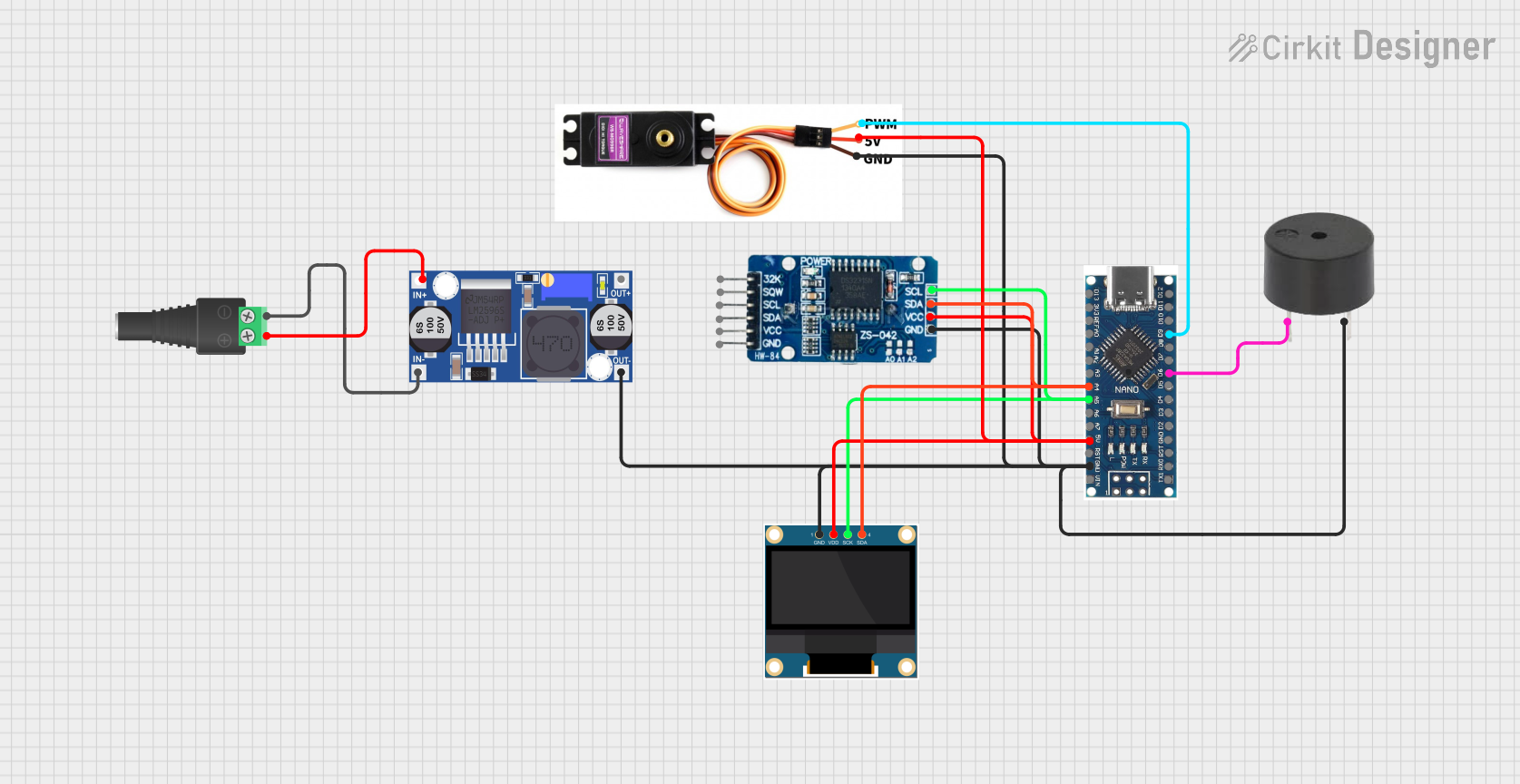
Circuit Documentation
Summary
This circuit is designed to interface a microcontroller with various peripherals including a real-time clock (RTC), an OLED display, a servo motor, and a buzzer. The microcontroller used is a Nano 3.0 ATmega328P with a Type-C USB and CH340 controller board. The RTC module is a DS3231, which provides accurate timekeeping. The OLED display is a 0.96" screen for user interface. The servo motor, an MG996R, is controlled by the microcontroller to perform mechanical actions. A buzzer is included for audio feedback. Power is supplied through a 2.1mm Barrel Jack connected to a Buck converter to regulate the voltage. The microcontroller is programmed to manage the servo motor based on the time from the RTC and user input, display information on the OLED, and provide audio feedback through the buzzer.
Component List
Microcontroller
- Nano 3.0 ATmega328P Type-C USB CH340 Controller Board: A compact microcontroller board based on the ATmega328P, equipped with digital and analog I/O pins, communication interfaces, and a Type-C USB connection for programming and power.
Real-Time Clock (RTC)
- RTC DS3231: A highly accurate I2C real-time clock with an integrated temperature-compensated crystal oscillator (TCXO) and crystal.
Servo Motor
- Servo Motor MG996R: A high-torque digital servo motor that can be controlled via PWM signal.
Buzzer
- Buzzer: An electronic buzzer for generating simple tones and beeps.
OLED Display
- 0.96" OLED: A small OLED display for showing text and graphics, interfaced via I2C.
Power Components
- 2.1mm Barrel Jack with Terminal Block: A power connector for attaching an external power source.
- Buck Converter: A DC-DC converter to step down voltage to a regulated output.
Wiring Details
Nano 3.0 ATmega328P Type-C USB CH340 Controller Board
A4(SDA) connected to RTC DS3231 SDA and OLED SDAA5(SCL) connected to RTC DS3231 SCL and OLED SCK5Vconnected to RTC DS3231 VCC, OLED VDD, and Servo Motor MG996R VCC 5VGNDconnected to Buzzer GND, RTC DS3231 GND, OLED GND, and Servo Motor MG996R GNDD9connected to Servo Motor MG996R PMWD6connected to Buzzer PIN
RTC DS3231
SDAconnected to Nano A4 and OLED SDASCLconnected to Nano A5 and OLED SCKVCCconnected to Nano 5VGNDconnected to common ground
Servo Motor MG996R
PMWconnected to Nano D9VCC 5Vconnected to Nano 5VGNDconnected to common ground
Buzzer
PINconnected to Nano D6GNDconnected to common ground
0.96" OLED
SDAconnected to Nano A4 and RTC DS3231 SDASCKconnected to Nano A5 and RTC DS3231 SCLVDDconnected to Nano 5VGNDconnected to common ground
2.1mm Barrel Jack with Terminal Block
POSconnected to Buck Converter IN+NEGconnected to Buck Converter IN-
Buck Converter
IN+connected to Barrel Jack POSIN-connected to Barrel Jack NEGOUT+andOUT-provide regulated voltage to the circuit
Documented Code
#include <Servo.h>
Servo servo_mot;

#include <Adafruit_GFX.h>                       //Download here: https://electronoobs.com/eng_arduino_Adafruit_GFX.php
#include <Adafruit_SSD1306.h>                   //Download here: https://electronoobs.com/eng_arduino_ds3231.php
#define OLED_RESET 7
Adafruit_SSD1306 display(OLED_RESET);

#include <DS3231.h>                             //Download here: https://electronoobs.com/eng_arduino_ds3231.php
// Init the DS3231 using the hardware interface
DS3231  rtc(SDA, SCL);
Time  t;

#include <EEPROM.h>

//Inputs/Outputs
int but1 = 2;
int but2 = 5;
int but3 = 4;
int servo_pin = 9;
int Buzzer = 6;

//Variables
bool state_but1 = true;
bool state_but2 = true;
bool state_but3 = true;
int stop_angle = 92;                //Please test values around 90 till the motor is not rotating anymore
int rotate_angle = 180;
int portions = 5;
int interval = 8;
unsigned int millis_before = 0;     //We use these to create the loop refresh rate
unsigned int millis_now = 0;
int OLED_refresh_rate = 200;
int max_portions = 20;
int min_portions = 3;
int Hour, Minute;
int last_feed_hour = 1;
int next_feed_hour = 1;
bool feed_active = true;
int portion_delay = 500;

void setup() {
  pinMode(but1, INPUT_PULLUP);
  pinMode(but2, INPUT_PULLUP);
  pinMode(but3, INPUT_PULLUP);
  servo_mot.attach(servo_pin);
  servo_mot.write(stop_angle);
  pinMode(Buzzer, OUTPUT);
  digitalWrite(Buzzer, LOW);
  Serial.begin(9600);

  display.begin(SSD1306_SWITCHCAPVCC, 0x3C);  // initialize with the I2C addr 0x3C (for the 128x32)
  delay(100);
  display.clearDisplay();
  display.setTextSize(1);
  display.setTextColor(WHITE);
  display.display();

  rtc.begin();
  //rtc.setDOW(TUESDAY);            // Set Day-of-Week to SUNDAY
  //rtc.setTime(18, 03, 0);         // Set the time to 12:00:00 (24hr format)
  //rtc.setDate(2, 11, 2021);       // Set the date to January 1st, 2014

  last_feed_hour = EEPROM.read(2);  //We store the last feeding hour on address 2
  next_feed_hour = EEPROM.read(3);  //We store the next feeding hour on address 3

  millis_before = millis();
  millis_now = millis();
}

void loop() {
  millis_now = millis();                                  //Get actual millis values each loop
  if(millis_now - millis_before > OLED_refresh_rate){     //Refresh rate of the OLED
    millis_before = millis();                             //Save "before value" for next loop
    display.clearDisplay();
    display.setCursor(0,0);
    display.print(portions);
    display.print(" portions");

    display.setCursor(90,9);
    display.print(Hour);
    display.print(":");
    display.print(Minute);

    display.setCursor(0,16);
    display.print("Each ");
    display.print(interval);
    display.print(" hours");
    display.display();
  }

  t = rtc.getTime();                          //Get time from DS3232
  Hour = t.hour;                              //Get the hour in 0h-23h format
  Minute = t.min;                             //Get minute as well just in case
  Serial.println(Hour);                       //Print hour for debug

  if(Hour == next_feed_hour){                 //If the time is the "next_feed_hour",we activate feeding
    feed_active = true;
    last_feed_hour = Hour;
    next_feed_hour = Hour + interval;         //Increase next feeding time by the interval
    if(next_feed_hour >= 23){                 //if we pass 23 hours, we start back at 00 hours
      next_feed_hour = next_feed_hour - 24;   //That's why we substract 24 hours which is maximum
    }
    EEPROM.write(2, last_feed_hour);          //Write on memory when was the last feeding
    EEPROM.write(3, next_feed_hour);          //Also when will be the next feeding process
    analogWrite(Buzzer, 200);
    delay(200);
    digitalWrite(Buzzer, LOW);
  }

  if(feed_active){                            //If this is active, we rotate the motor
    int i = 0;
    while(i<portions){                        //Rotate the motor according to the portions value
      servo_mot.write(rotate_angle);          //START the motor
      i++;
      display.clearDisplay();
      display.setCursor(48,11);
      display.print("FEEDING");
      display.display();
      delay(portion_delay);                   //Delay for each portion is milliseconds
    }
    servo_mot.write(stop_angle);              //STOP the motor
    feed_active = false;                      //Set "feed_active" back to false
  }

  //Button1 (increase portions)
  if(!digitalRead(but1) && state_but1){
    portions++;