
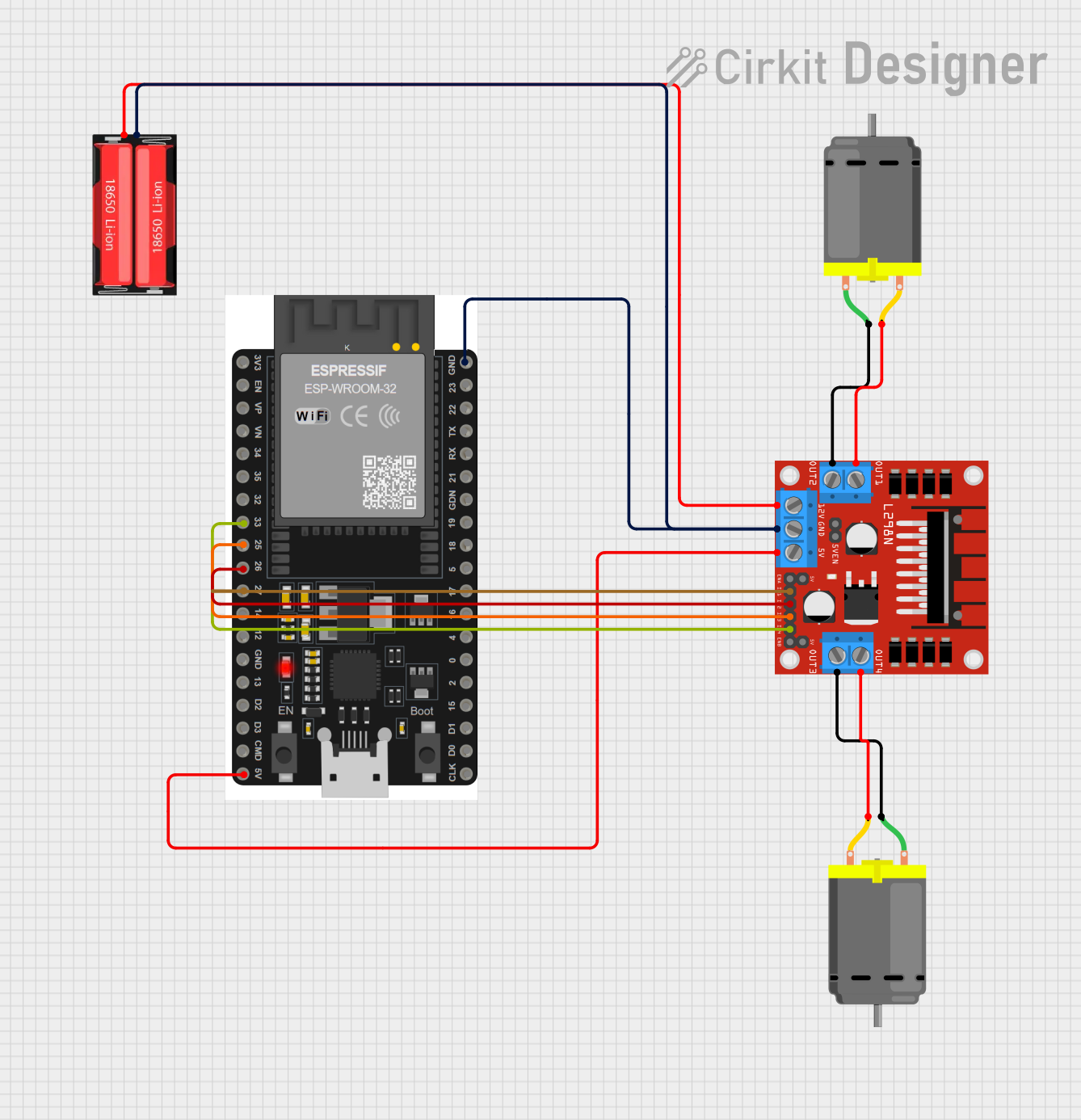
Circuit Documentation
Summary
This document provides a detailed overview of a circuit designed to control two DC motors using an ESP32 microcontroller and an L298N motor driver. The circuit is powered by a 18650 Li-Ion battery and can be controlled via Bluetooth using the ESP32. The document includes a component list, wiring details, and the embedded code used for motor control.
Component List
L298N DC Motor Driver
- Description: A dual H-Bridge motor driver that allows control of two DC motors.
- Pins: OUT1, OUT2, 12V, GND, 5V, OUT3, OUT4, 5V-ENA-JMP-I, 5V-ENA-JMP-O, +5V-J1, +5V-J2, ENA, IN1, IN2, IN3, IN4, ENB
DC Motor (Motor 1)
- Description: A standard DC motor.
- Pins: pin 1, pin 2
DC Motor (Motor 2)
- Description: A standard DC motor.
- Pins: pin 1, pin 2
18650 Li-Ion Battery
- Description: A rechargeable lithium-ion battery.
- Pins: Positive, Negative
ESP32 38 PINS
- Description: A microcontroller with built-in Wi-Fi and Bluetooth capabilities.
- Pins: GND, 23, 22/SCL, 1, 2, 21/SDA, 19, 18, 5, 17/TX2, 16/RX2, 4, 0, 15, D1, D0, CLK, 3V3, EN, VP, VN, 34, 35, 32, 33, 25, 26, 27, 14, 12, 13, D2, D3, 11, 5V/VIN
Wiring Details
L298N DC Motor Driver
- OUT1 connected to pin 2 of DC Motor (Motor 1)
- OUT2 connected to pin 1 of DC Motor (Motor 1)
- 12V connected to Positive of 18650 Li-Ion Battery
- GND connected to GND of ESP32 38 PINS and Negative of 18650 Li-Ion Battery
- 5V connected to 5V/VIN of ESP32 38 PINS
- OUT3 connected to pin 1 of DC Motor (Motor 2)
- OUT4 connected to pin 2 of DC Motor (Motor 2)
- IN1 connected to 27 of ESP32 38 PINS
- IN2 connected to 26 of ESP32 38 PINS
- IN3 connected to 25 of ESP32 38 PINS
- IN4 connected to 33 of ESP32 38 PINS
DC Motor (Motor 1)
- pin 2 connected to OUT1 of L298N DC Motor Driver
- pin 1 connected to OUT2 of L298N DC Motor Driver
DC Motor (Motor 2)
- pin 1 connected to OUT3 of L298N DC Motor Driver
- pin 2 connected to OUT4 of L298N DC Motor Driver
18650 Li-Ion Battery
- Positive connected to 12V of L298N DC Motor Driver
- Negative connected to GND of L298N DC Motor Driver and GND of ESP32 38 PINS
ESP32 38 PINS
- GND connected to GND of L298N DC Motor Driver and Negative of 18650 Li-Ion Battery
- 5V/VIN connected to 5V of L298N DC Motor Driver
- 27 connected to IN1 of L298N DC Motor Driver
- 26 connected to IN2 of L298N DC Motor Driver
- 25 connected to IN3 of L298N DC Motor Driver
- 33 connected to IN4 of L298N DC Motor Driver
Code Documentation
#include "BluetoothSerial.h" // Include the BluetoothSerial library

BluetoothSerial SerialBT; // Create a BluetoothSerial object

// Pin definitions for ESP32
const int leftMotor1 = 26;  // LEFT MOTOR forward
const int leftMotor2 = 27;  // LEFT MOTOR backward
const int rightMotor1 = 25; // RIGHT MOTOR forward
const int rightMotor2 = 33; // RIGHT MOTOR backward

// Motor speed (PWM value between 0 and 255 for future flexibility)
const int motorSpeed = 255; // Full speed

void setup() {
  Serial.begin(9600); // For Serial Monitor
  SerialBT.begin("ESP32Test"); // Bluetooth device name

  // Set motor pins as outputs
  pinMode(leftMotor1, OUTPUT);
  pinMode(leftMotor2, OUTPUT);
  pinMode(rightMotor1, OUTPUT);
  pinMode(rightMotor2, OUTPUT);

  // Stop motors initially
  stopMotors();

  Serial.println("ESP32 Bluetooth Robot Ready");
}

void loop() {
  if (SerialBT.available()) {
    char command = SerialBT.read(); // Read Bluetooth command
    handleCommand(command);
  }
}

// Function to handle movement commands
void handleCommand(char command) {
  stopMotors(); // Immediately stop the car before changing direction
  delay(2000);   // Short delay to ensure motors fully stop

  switch (command) {
    case 'w': // Move forward
      Serial.println("ROBOT IS MOVING FORWARD");
      moveForward();
      break;
    case 's': // Move backward
      Serial.println("ROBOT IS MOVING BACKWARD");
      moveBackward();
      break;
    case 'd': // Turn right
      Serial.println("ROBOT IS TURNING RIGHT");
      turnRight();
      break;
    case 'a': // Turn left
      Serial.println("ROBOT IS TURNING LEFT");
      turnLeft();
      break;
    case 'x': // Stop
      Serial.println("ROBOT HAS STOPPED");
      stopMotors();
      break;
    default:
      Serial.println("INVALID COMMAND");
      break;
  }
}

// Movement functions
void moveForward() {
  analogWrite(leftMotor1, motorSpeed);
  digitalWrite(leftMotor2, LOW);
  analogWrite(rightMotor1, motorSpeed);
  digitalWrite(rightMotor2, LOW);
}

void moveBackward() {
  digitalWrite(leftMotor1, LOW);
  analogWrite(leftMotor2, motorSpeed);
  digitalWrite(rightMotor1, LOW);
  analogWrite(rightMotor2, motorSpeed);
}

void turnRight() {
  analogWrite(leftMotor1, motorSpeed);
  digitalWrite(leftMotor2, LOW);
  digitalWrite(rightMotor1, LOW);
  analogWrite(rightMotor2, motorSpeed);
}

void turnLeft() {
  digitalWrite(leftMotor1, LOW);
  analogWrite(leftMotor2, motorSpeed);
  analogWrite(rightMotor1, motorSpeed);
  digitalWrite(rightMotor2, LOW);
}

void stopMotors() {
  digitalWrite(leftMotor1, HIGH); // Engage brake mode
  digitalWrite(leftMotor2, HIGH); // Engage brake mode
  digitalWrite(rightMotor1, HIGH); // Engage brake mode
  digitalWrite(rightMotor2, HIGH); // Engage brake mode
  delay(50); // Optional short brake delay
}
This code initializes the ESP32 for Bluetooth communication and sets up the motor control pins. It listens for Bluetooth commands to control the movement of the robot, including moving forward, backward, turning left, and turning right. The stopMotors function is used to stop the motors immediately.