
Arduino Nano Controlled Ambient Light Sensing and NeoPixel Display
View and Edit Project In Cirkit Designer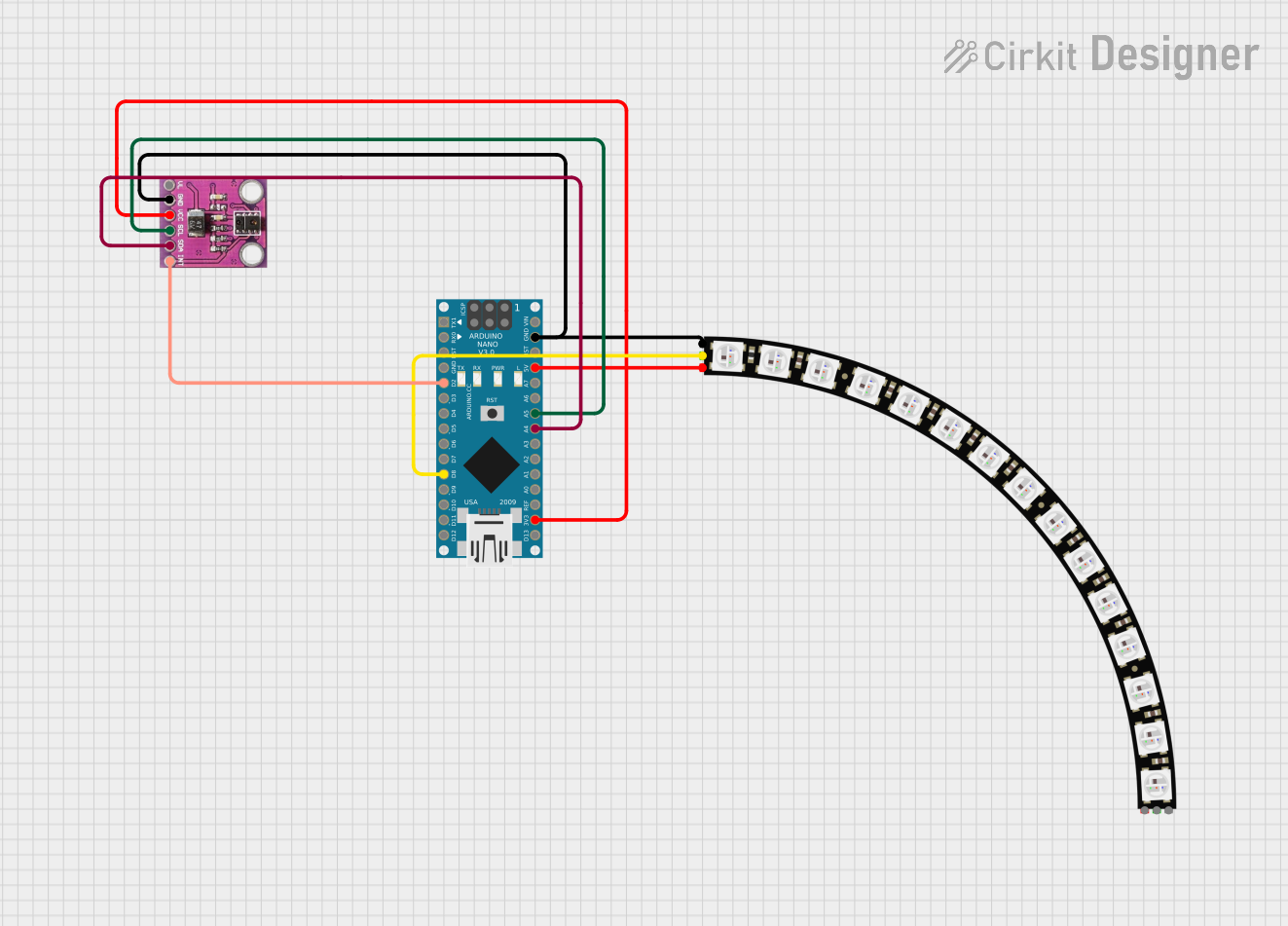
Circuit Documentation
Summary
This circuit integrates an APDS-9930 Proximity and Ambient Light Sensor, an Adafruit Quarter 60 NeoPixel Ring, and an Arduino Nano microcontroller. The APDS-9930 sensor is used for detecting ambient light and proximity, while the NeoPixel Ring is an LED display that can be controlled by the Arduino Nano. The Arduino Nano serves as the central processing unit, interfacing with the sensor and controlling the LED ring based on sensor inputs.
Component List
APDS-9930 Proximity and Ambient Light Sensor
- Description: A sensor that can measure ambient light intensity and detect proximity of objects.
- Pins: INT (not used), SDA, SCL, VCC (3.3V), GND, VL (not used)
Adafruit Quarter 60 NeoPixel Ring
- Description: A circular LED display consisting of 60 individually addressable RGB LEDs.
- Pins: VDD, DATAIN, GND, DATAOUT
Arduino Nano
- Description: A small, complete, and breadboard-friendly board based on the ATmega328 (Arduino Nano 3.x).
- Pins: D1/TX, D0/RX, RESET, GND, D2, D3, D4, D5, D6, D7, D8, D9, D10, D11/MOSI, D12/MISO, VIN, 5V, A7, A6, A5, A4, A3, A2, A1, A0, AREF, 3V3, D13/SCK
Wiring Details
APDS-9930 Proximity and Ambient Light Sensor
- SDA connected to Arduino Nano A4
- SCL connected to Arduino Nano A5
- VCC (3.3V) connected to Arduino Nano 3V3
- GND connected to common ground with Arduino Nano and NeoPixel Ring
Adafruit Quarter 60 NeoPixel Ring
- VDD connected to Arduino Nano 5V
- DATAIN connected to Arduino Nano D8
- GND connected to common ground with Arduino Nano and APDS-9930 Sensor
Arduino Nano
- A4 connected to APDS-9930 Sensor SDA
- A5 connected to APDS-9930 Sensor SCL
- 3V3 connected to APDS-9930 Sensor VCC (3.3V)
- 5V connected to NeoPixel Ring VDD
- D8 connected to NeoPixel Ring DATAIN
- GND connected to common ground with APDS-9930 Sensor and NeoPixel Ring
Documented Code
Arduino Nano Code (sketch.ino)
void setup() {
  // put your setup code here, to run once:

}

void loop() {
  // put your main code here, to run repeatedly:

}
Note: The provided code is a template and does not include specific functionality. It should be populated with initialization code in setup() and operational code in loop() to interact with the APDS-9930 sensor and control the NeoPixel Ring based on the sensor's readings.