
ESP8266 NodeMCU Based Soil Moisture and Temperature Monitoring System
View and Edit Project In Cirkit Designer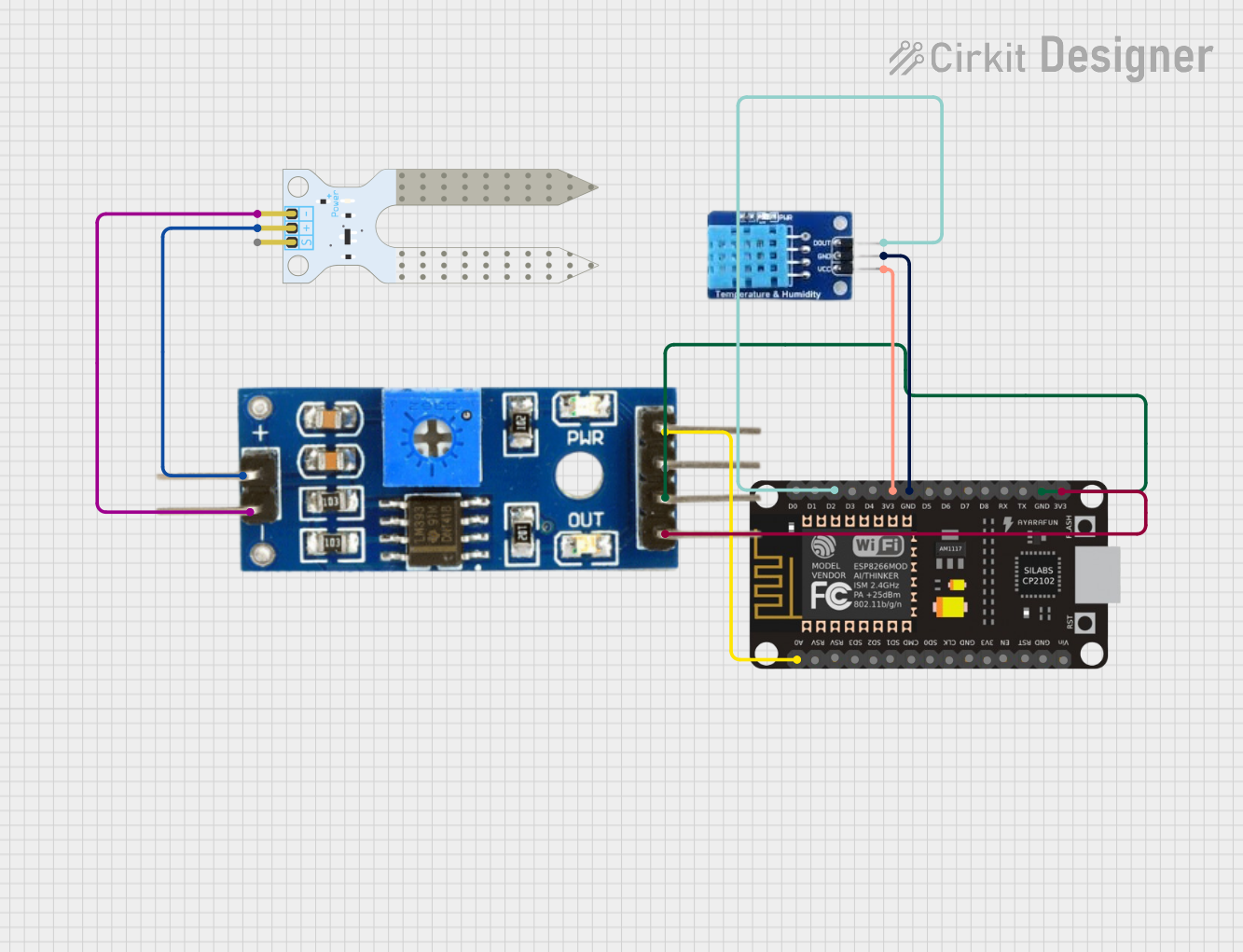
Circuit Documentation
Summary
The circuit in question is designed to monitor soil moisture levels and ambient temperature and humidity. It utilizes an ESP8266 NodeMCU microcontroller as the central processing unit, interfaced with a DHT11 temperature and humidity sensor and a soil moisture sensor module. The ESP8266 NodeMCU reads analog data from the soil moisture sensor and digital data from the DHT11 sensor. The collected data is then processed and output through the serial interface.
Component List
ESP8266 NodeMCU
- Description: A WiFi-enabled microcontroller module that can be programmed using the Arduino IDE.
- Pins: D0, D1, D2, D3, D4, 3V3, GND, D5, D6, D7, D8, RX, TX, A0, RSV, SD3, SD2, SD1, CMD, SD0, CLK, EN, RST, VIN
Soil Moisture Module
- Description: An electronic module that measures the moisture level in the soil.
- Pins: positive, negative, Analog, Digital, Ground, VCC
Soil Moisture Sensor
- Description: A sensor that detects the moisture content in the soil.
- Pins: VCC, GND, SIG
DHT11
- Description: A basic, ultra low-cost digital temperature and humidity sensor.
- Pins: DATA, GND, VCC
Wiring Details
ESP8266 NodeMCU
- D2 connected to DHT11 DATA
- 3V3 connected to DHT11 VCC and Soil Moisture Module VCC
- GND connected to DHT11 GND and Soil Moisture Module Ground
- A0 connected to Soil Moisture Module Analog
Soil Moisture Module
- positive connected to Soil Moisture Sensor VCC
- negative connected to Soil Moisture Sensor GND
- Analog connected to ESP8266 NodeMCU A0
- VCC connected to ESP8266 NodeMCU 3V3
- Ground connected to ESP8266 NodeMCU GND
Soil Moisture Sensor
- VCC connected to Soil Moisture Module positive
- GND connected to Soil Moisture Module negative
DHT11
- DATA connected to ESP8266 NodeMCU D2
- VCC connected to ESP8266 NodeMCU 3V3
- GND connected to ESP8266 NodeMCU GND
Documented Code
#include <DHT.h>
#include <DHT_U.h>
#include <Adafruit_ESP8266.h>

#define DHTPIN 4 // Connect Out pin to D2 in NODE MCU
#define DHTTYPE DHT11
DHT dht(DHTPIN, DHTTYPE);

void setup()
{
    Serial.begin(115200);
    dht.begin();
}

void loop()
{
    delay(1000);
    int value = analogRead(A0);
    value = map(value, 400, 1023, 100, 0); // Map the value from the sensor to a 0-100% scale
    float h = dht.readHumidity(); // Read humidity
    float t = dht.readTemperature(); // Read temperature

    // Print the soil moisture, temperature, and humidity to the serial monitor
    Serial.print("Soil Moisture : ");
    Serial.print(value);
    Serial.print("   Temperature : ");
    Serial.print(t);
    Serial.print("    Humidity : ");
    Serial.println(h);
}
This code is designed to be uploaded to the ESP8266 NodeMCU. It initializes the DHT11 sensor and reads the soil moisture level from the analog pin A0. The soil moisture value is mapped to a percentage scale for easier interpretation. The temperature and humidity are read from the DHT11 sensor and all the data is printed to the serial monitor at a one-second interval.