
ESP32-Based Motion Tracking System with MPU6050 and ESP-NOW Communication
View and Edit Project In Cirkit Designer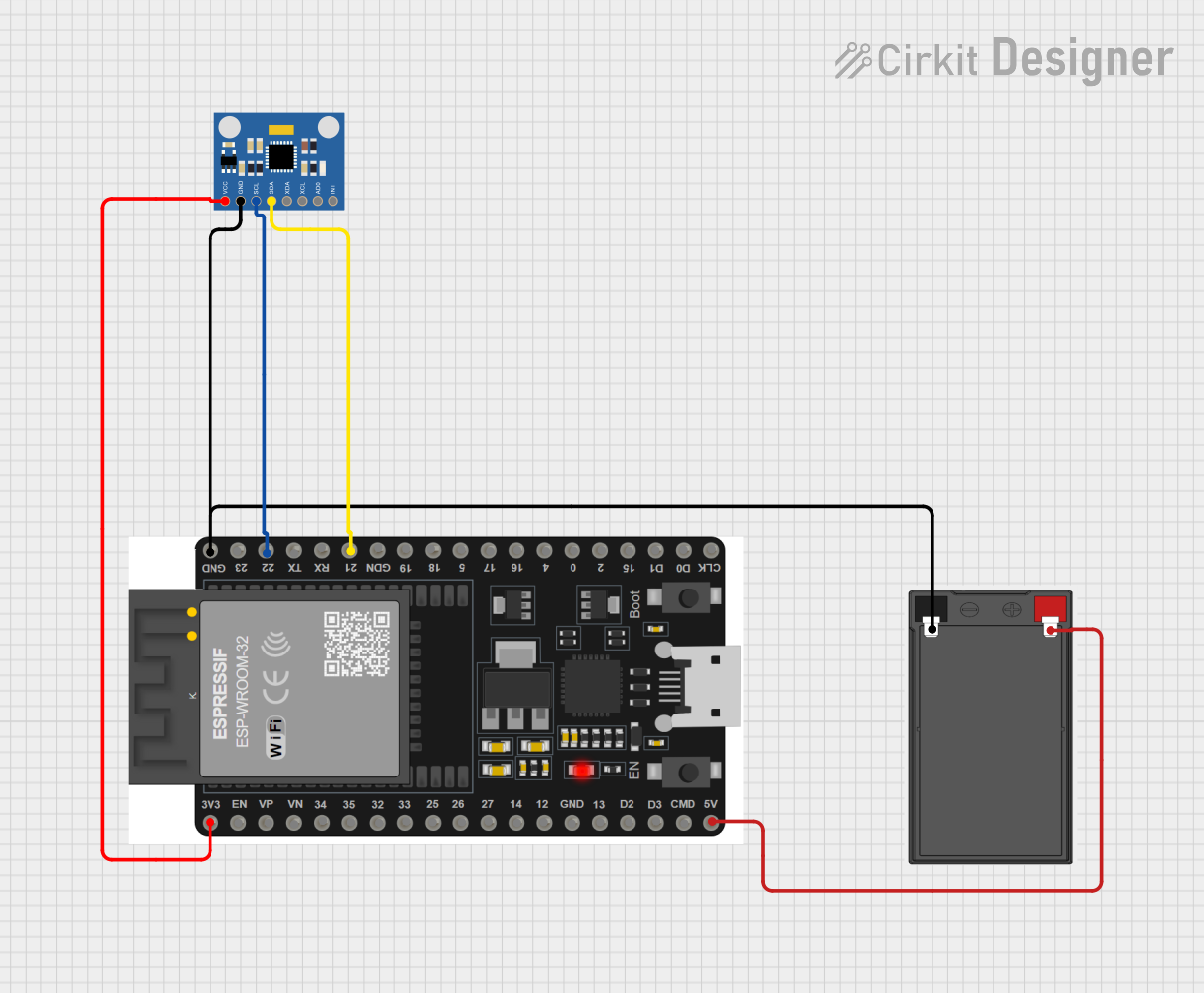
Circuit Documentation
Summary of the Circuit
This circuit is designed to interface an ESP32 microcontroller with an MPU6050 accelerometer and gyroscope sensor. The ESP32 reads motion data from the MPU6050 and transmits it wirelessly using ESP-NOW protocol. The circuit is powered by a battery, and the ESP32 regulates the voltage for the MPU6050 sensor. The ESP32 communicates with the MPU6050 over I2C communication protocol.
Component List
ESP32 38 PINS
- Description: A microcontroller with Wi-Fi and Bluetooth capabilities, featuring a wide range of GPIO pins.
- Purpose: Acts as the central processing unit of the circuit, reads sensor data, and handles wireless communication.
MPU6050 Accelerometer + Gyroscope (Wokwi Compatible)
- Description: A motion tracking device that combines a 3-axis gyroscope and a 3-axis accelerometer.
- Purpose: Provides real-time acceleration and angular rate (gyroscope) data to the ESP32.
Battery
- Description: A power source for the circuit.
- Purpose: Supplies electrical power to the ESP32 and MPU6050 sensor.
Wiring Details
ESP32 38 PINS
- GND: Connected to the negative terminal of the battery and GND of MPU6050.
- 22/SCL: Connected to the SCL pin of MPU6050 for I2C communication.
- 21/SDA: Connected to the SDA pin of MPU6050 for I2C communication.
- 3V3: Supplies power to the VCC pin of MPU6050.
- 5V/VIN: Connected to the positive terminal of the battery.
MPU6050 Accelerometer + Gyroscope (Wokwi Compatible)
- GND: Connected to the GND pin of ESP32 and negative terminal of the battery.
- SCL: Connected to pin 22/SCL of ESP32 for I2C communication.
- SDA: Connected to pin 21/SDA of ESP32 for I2C communication.
- VCC: Powered by the 3V3 pin of ESP32.
Battery
- - (Negative): Connected to the GND pin of ESP32 and GND of MPU6050.
- + (Positive): Connected to the 5V/VIN pin of ESP32.
Documented Code
#include <esp_now.h>
#include <WiFi.h>

// These are needed for MPU
#include "I2Cdev.h"
#include "MPU6050_6Axis_MotionApps20.h"
#if I2CDEV_IMPLEMENTATION == I2CDEV_ARDUINO_WIRE
    #include "Wire.h"
#endif

// MPU control/status vars
MPU6050 mpu;
bool dmpReady = false;  // set true if DMP init was successful
uint8_t devStatus;      // return status after each device operation (0 = success, !0 = error)
uint8_t fifoBuffer[64]; // FIFO storage buffer
Quaternion q;           // [w, x, y, z]         quaternion container
VectorFloat gravity;    // [x, y, z]            gravity vector
float ypr[3];           // [yaw, pitch, roll]   yaw/pitch/roll container and gravity vector

// RECEIVER MAC Address
uint8_t receiverMacAddress[] = {0xAC,0x67,0xB2,0x36,0x7F,0x28};  //AC:67:B2:36:7F:28

struct PacketData
{
  byte xAxisValue;
  byte yAxisValue;
  byte zAxisValue;
};
PacketData data;

// callback when data is sent
void OnDataSent(const uint8_t *mac_addr, esp_now_send_status_t status)
{
  //Serial.println(status == ESP_NOW_SEND_SUCCESS ? "Message sent" : "Message failed");
}

void setupMPU()
{
  // join I2C bus (I2Cdev library doesn't do this automatically)
  #if I2CDEV_IMPLEMENTATION == I2CDEV_ARDUINO_WIRE
      Wire.begin();
      Wire.setClock(400000); // 400kHz I2C clock. Comment this line if having compilation difficulties
  #elif I2CDEV_IMPLEMENTATION == I2CDEV_BUILTIN_FASTWIRE
      Fastwire::setup(400, true);
  #endif

  mpu.initialize();
  devStatus = mpu.dmpInitialize();
  // make sure it worked (returns 0 if so)
  if (devStatus == 0)
  {
      // Calibration Time: generate offsets and calibrate our MPU6050
      mpu.CalibrateAccel(6);
      mpu.CalibrateGyro(6);
      mpu.setDMPEnabled(true);
      dmpReady = true;
  }
}

void setup()
{
  Serial.begin(115200);
  WiFi.mode(WIFI_STA);
  // Init ESP-NOW
  if (esp_now_init() != ESP_OK)
  {
    Serial.println("Error initializing ESP-NOW");
    return;
  }
  else
  {
    Serial.println("Succes: Initialized ESP-NOW");
  }

  esp_now_register_send_cb(OnDataSent);

  // Register peer
  esp_now_peer_info_t peerInfo;
  memcpy(peerInfo.peer_addr, receiverMacAddress, 6);
  peerInfo.channel = 0;
  peerInfo.encrypt = false;

  // Add peer
  if (esp_now_add_peer(&peerInfo) != ESP_OK)
  {
    Serial.println("Failed to add peer");
    return;
  }
  else
  {
    Serial.println("Succes: Added peer");
  }

  //This is to set up MPU6050 sensor
  setupMPU();
}

void loop()
{
  // if programming failed, don't try to do anything
  if (!dmpReady) return;
  // read a packet from FIFO. Get the Latest packet
  if (mpu.dmpGetCurrentFIFOPacket(fifoBuffer))
  {
    mpu.dmpGetQuaternion(&q, fifoBuffer);
    mpu.dmpGetGravity(&gravity, &q);
    mpu.dmpGetYawPitchRoll(ypr, &q, &gravity);

    int xAxisValue = constrain(ypr[2] * 180/M_PI, -90, 90);
    int yAxisValue = constrain(ypr[1] * 180/M_PI, -90, 90);
    int zAxisValue = constrain(ypr[0] * 180/M_PI, -90, 90);
    data.xAxisValue = map(xAxisValue, -90, 90, 0, 254);
    data.yAxisValue = map(yAxisValue, -90, 90, 0, 254);
    data.zAxisValue = map(zAxisValue, -90, 90, 0, 254);

    esp_err_t result = esp_now_send(receiverMacAddress, (uint8_t *) &data, sizeof(data));

    String inputData  = inputData + "values " + xAxisValue + "  " + yAxisValue + "  " + zAxisValue;
    Serial.println(inputData);
    delay(50);
  }
}
This code initializes the ESP32 and MPU6050, calibrates the MPU6050, and sets up ESP-NOW for wireless communication. In the loop, it reads the motion data from the MPU6050 and sends it to a predefined receiver using ESP-NOW. The data includes the yaw, pitch, and roll values mapped to a byte range for transmission.