
ESP32-Based Sensor Interface with Alert System and Battery Charging
View and Edit Project In Cirkit Designer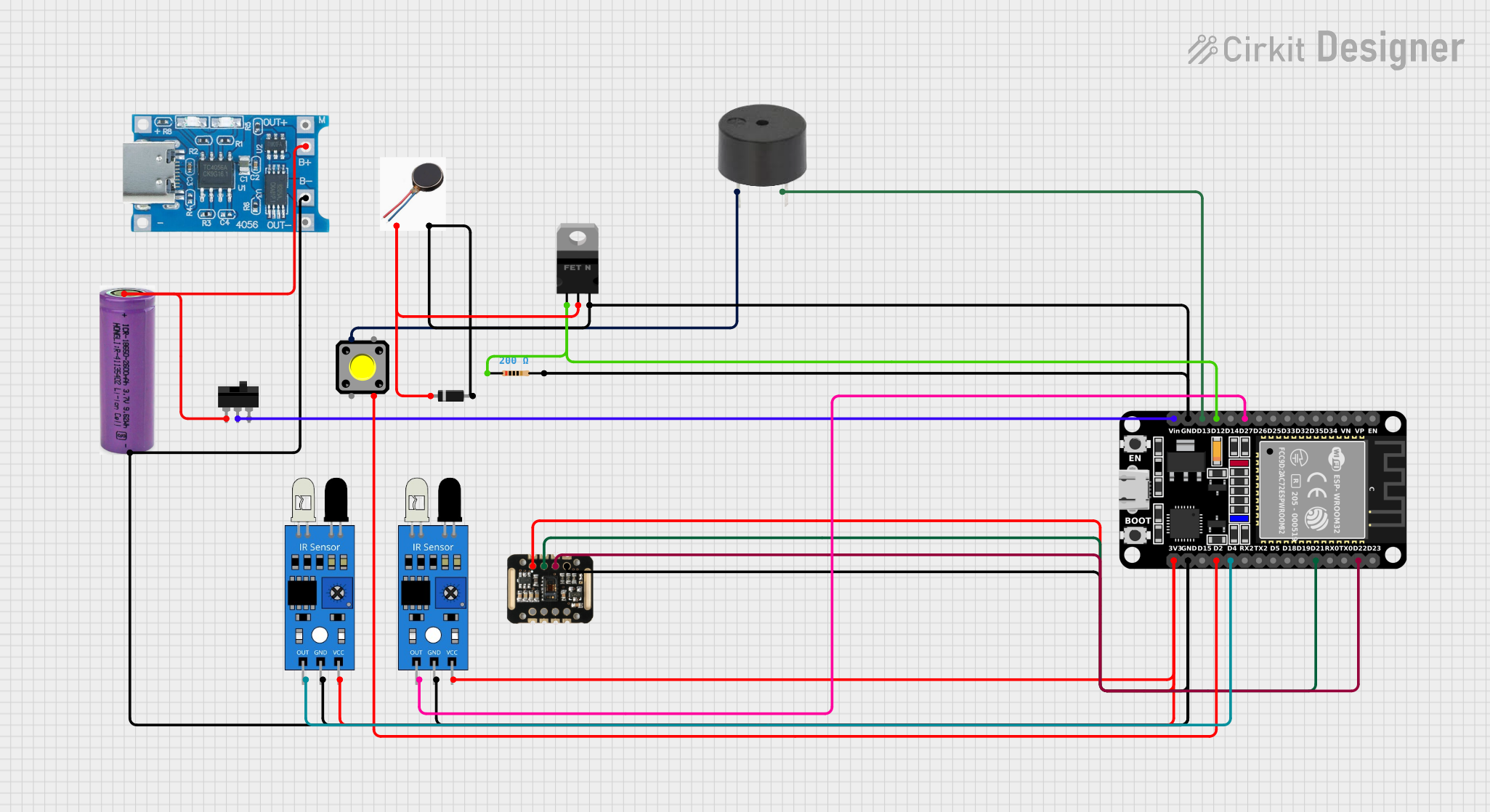
Circuit Documentation
Summary
The circuit in question appears to be a sensor-based system with an ESP32 microcontroller at its core. The ESP32 is interfaced with various components including IR sensors, a MAX30100 sensor module, a buzzer, a pushbutton, a toggle switch, a vibration motor, a diode, an nMOS transistor, and a resistor. The circuit is powered by a 3.3V battery, which is managed by a TP4056 Type-C charging module. The ESP32 reads inputs from the IR sensors and the pushbutton, controls the buzzer and vibration motor through the nMOS transistor, and communicates with the MAX30100 sensor module via I2C. The toggle switch is likely used to control the power supply to the ESP32.
Component List
ESP32 (30 pin)
- A 30-pin microcontroller with WiFi and Bluetooth capabilities.
- Pins: EN, VP, VN, D34, D35, D32, D33, D25, D26, D27, D14, D12, D13, GND, Vin, D23, D22, TX0, RX0, D21, D19, D18, D5, TX2, RX2, D4, D2, D15, 3V3
3.3V Battery
- A power source for the circuit.
- Pins: +, -
TP4056 Type-C Charging Module
- A charging module for lithium batteries with a USB Type-C input.
- Pins: B+, B-, OUT+, OUT-
MAX30100
- A pulse oximetry and heart-rate sensor module.
- Pins: VIN, SDA, SCL, GND, RD, IRD, INT
Buzzer
- An audible signaling device.
- Pins: PIN, GND
Pushbutton
- A momentary switch that can be used to trigger actions when pressed.
- Pins: Pin 2, Pin 1, Pin 3, Pin 4
Toggle Switch
- A switch with a lever that can be toggled between positions to open or close a circuit.
- Pins: L1, COM, L2
IR Sensor
- A sensor that detects infrared light, often used for proximity or motion detection.
- Pins: out, gnd, vcc
Diode
- A semiconductor device that allows current to flow in one direction only.
- Pins: cathode, anode
nMOS Transistor (MOSFET)
- A type of field-effect transistor used for switching electronic signals.
- Pins: gate, drain, source
Resistor (200 Ohms)
- A passive electrical component that provides resistance in an electrical circuit.
- Pins: pin1, pin2
FIT0774 Vibration Motor
- A small motor that provides haptic feedback through vibration.
- Pins: POS, GND
Wiring Details
ESP32 (30 pin)
- D27 connected to IR sensor (out)
- D12 connected to nMOS Transistor (gate) and Resistor (pin1)
- D13 connected to Buzzer (GND)
- GND connected to nMOS Transistor (source), Diode (anode), Resistor (pin2), Vibration Motor (GND), IR sensor (gnd), MAX30100 (GND)
- Vin connected to Toggle Switch (COM)
- D22 connected to MAX30100 (SCL)
- D21 connected to MAX30100 (SDA)
- D4 connected to IR sensor (out)
- D2 connected to Pushbutton (Pin 1)
- 3V3 connected to IR sensor (vcc) and MAX30100 (VIN)
3.3V Battery
-
- connected to Toggle Switch (L1) and TP4056 Type-C Charging Module (B+)
-
- connected to ESP32 (GND), IR sensor (gnd), TP4056 Type-C Charging Module (B-)
TP4056 Type-C Charging Module
- B+ connected to 3.3V Battery (+)
- B- connected to 3.3V Battery (-)
MAX30100
- VIN connected to ESP32 (3V3)
- SDA connected to ESP32 (D21)
- SCL connected to ESP32 (D22)
- GND connected to ESP32 (GND)
Buzzer
- PIN connected to Pushbutton (Pin 3)
- GND connected to ESP32 (D13)
Pushbutton
- Pin 1 connected to ESP32 (D2)
- Pin 3 connected to Buzzer (PIN)
Toggle Switch
- L1 connected to 3.3V Battery (+)
- COM connected to ESP32 (Vin)
IR Sensor
- out connected to ESP32 (D27) and ESP32 (D4)
- gnd connected to ESP32 (GND)
- vcc connected to ESP32 (3V3)
Diode
- cathode connected to nMOS Transistor (drain) and Vibration Motor (POS)
- anode connected to ESP32 (GND)
nMOS Transistor (MOSFET)
- gate connected to ESP32 (D12) and Resistor (pin1)
- drain connected to Diode (cathode) and Vibration Motor (POS)
- source connected to ESP32 (GND)
Resistor (200 Ohms)
- pin1 connected to nMOS Transistor (gate) and ESP32 (D12)
- pin2 connected to ESP32 (GND)
FIT0774 Vibration Motor
- POS connected to Diode (cathode) and nMOS Transistor (drain)
- GND connected to ESP32 (GND)
Documented Code
No code was provided for the microcontrollers in the circuit. If code is available, it should be documented here with explanations for each function and how it interacts with the connected components.