
Circuit Documentation
Summary
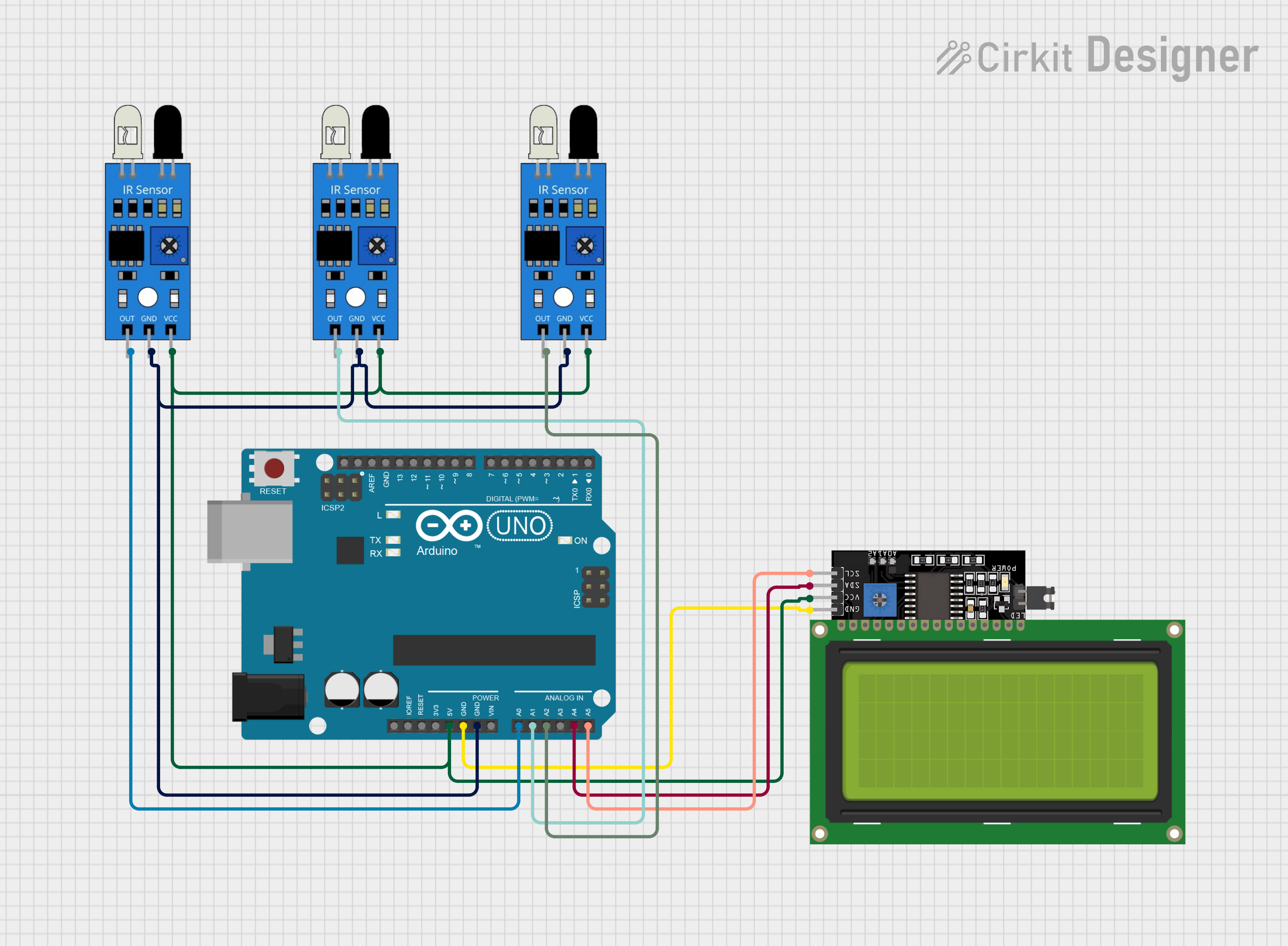
The circuit in question is designed to interface an Arduino UNO microcontroller with multiple IR sensors and an LCD Display (20x4 characters) that uses an I2C interface. The IR sensors are used to detect objects or motion, and their outputs are connected to the analog inputs of the Arduino UNO. The LCD Display is powered by the 5V output from the Arduino and communicates via the I2C protocol using the SCL and SDA lines. The ground and power lines are shared among the components, establishing a common reference point and power supply.
Component List
Arduino UNO
- Description: A microcontroller board based on the ATmega328P.
- Purpose: Acts as the central processing unit of the circuit, reading sensor data and controlling the LCD display.
- Pins: UNUSED, IOREF, Reset, 3.3V, 5V, GND, Vin, A0-A5, SCL, SDA, AREF, D0-D13.
IR Sensor
- Description: An infrared sensor capable of detecting object presence or motion.
- Purpose: To provide input signals to the Arduino UNO based on the detection of objects or motion.
- Pins: out, gnd, vcc.
LCD Display 20x4 I2C
- Description: A 20x4 character LCD display with an I2C interface.
- Purpose: To display information processed by the Arduino UNO.
- Pins: SCL, SDA, VCC, GND.
Wiring Details
Arduino UNO
- A2: Connected to the 'out' pin of one IR sensor.
- A0: Connected to the 'out' pin of another IR sensor.
- A1: Connected to the 'out' pin of the third IR sensor.
- 5V: Supplies power to the LCD Display and all IR sensors.
- GND: Common ground for the LCD Display and all IR sensors.
- A4 (SDA): Connected to the 'SDA' pin of the LCD Display for I2C data.
- A5 (SCL): Connected to the 'SCL' pin of the LCD Display for I2C clock.
IR Sensors
- out: Each sensor's output is connected to a separate analog input on the Arduino UNO (A0, A1, A2).
- gnd: All sensors share a common ground with the Arduino UNO.
- vcc: All sensors are powered by the 5V output from the Arduino UNO.
LCD Display 20x4 I2C
- SCL: Connected to the 'A5' pin of the Arduino UNO for I2C clock.
- SDA: Connected to the 'A4' pin of the Arduino UNO for I2C data.
- VCC: Powered by the 5V output from the Arduino UNO.
- GND: Shares a common ground with the Arduino UNO.
Documented Code
Arduino UNO Code (sketch.ino)
void setup() {
  // put your setup code here, to run once:

}

void loop() {
  // put your main code here, to run repeatedly:

}
Note: The provided code is a template and does not include specific functionality. It should be populated with the logic for reading the IR sensors and controlling the LCD Display.
Additional Documentation (documentation.txt)
No additional documentation code was provided.