
Arduino UNO and DFPlayer Mini-Based Smart Glove with LCD Display and Flex Sensors
View and Edit Project In Cirkit Designer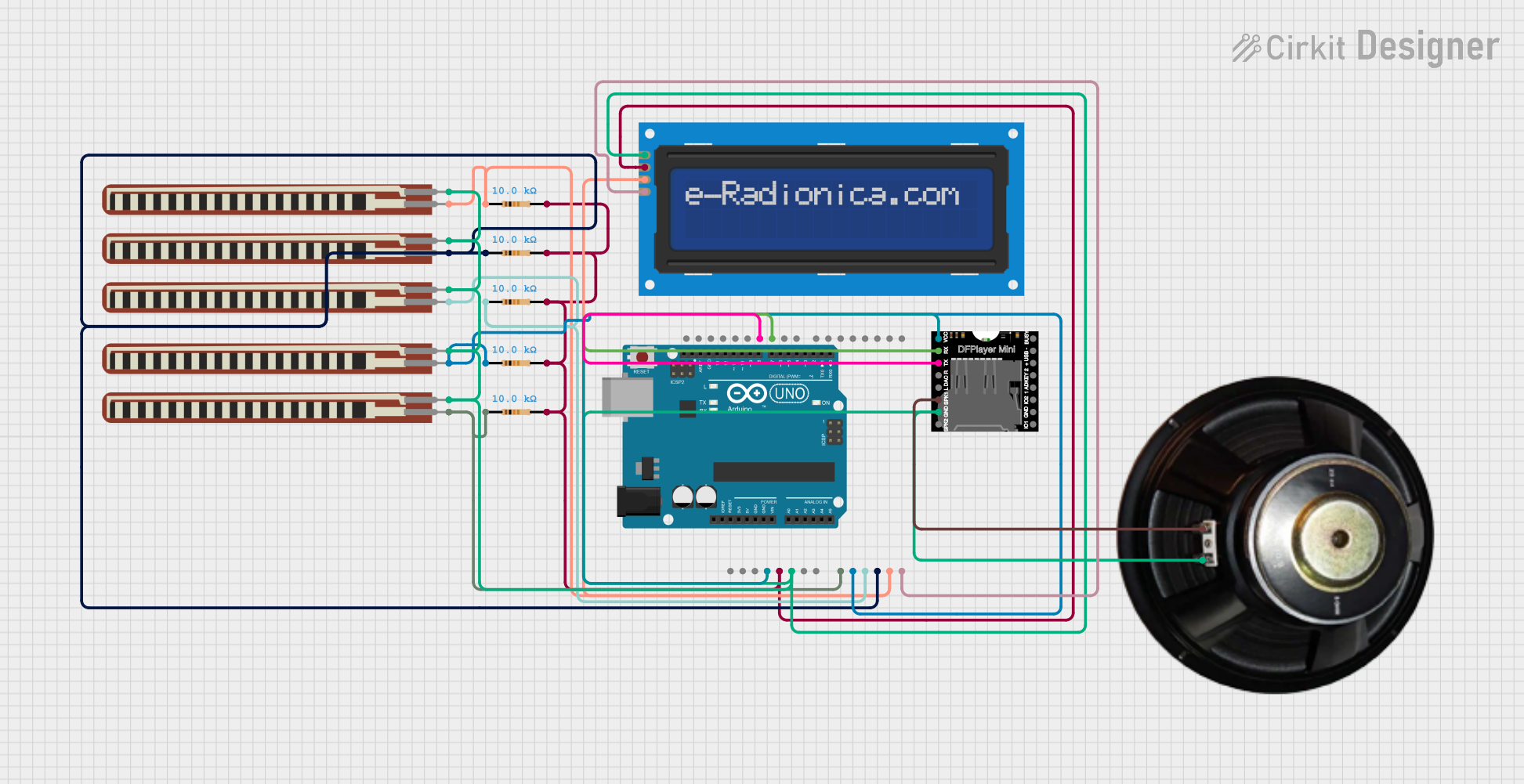
Circuit Documentation
Summary
This circuit is a "Smart Glove" system designed to detect finger movements using flex sensors and provide audio feedback through a DFPlayer Mini module and a speaker. The system also includes an LCD screen to display messages corresponding to the detected gestures. The entire setup is controlled by an Arduino UNO microcontroller.
Component List
DFPlayer MINI
- Description: Audio player module capable of playing MP3 files from a microSD card.
- Pins: VCC, BUSY, RX, USB -, TX, USB +, DAC_R, K2/ADC_KEY, DAC_L, K1/ADC_KEY, SPK1, IO 2, GND, SPK2, IO 1
Arduino UNO
- Description: Microcontroller board based on the ATmega328P.
- Pins: UNUSED, IOREF, Reset, 3.3V, 5V, GND, Vin, A0, A1, A2, A3, A4, A5, SCL, SDA, AREF, D13, D12, D11, D10, D9, D8, D7, D6, D5, D4, D3, D2, D1, D0
LCD screen 16x2 I2C
- Description: 16x2 character LCD display with I2C interface.
- Pins: SCL, SDA, VCC, GND
2.2 inch Basic Flex Resistor
- Description: Flex sensor used to detect bending.
- Pins: Pin 2, pin 1
Resistor
- Description: 10k Ohm resistor.
- Pins: pin1, pin2
Speaker
- Description: Audio output device.
- Pins: +, -
Wiring Details
DFPlayer MINI
- VCC connected to 3.3V of Arduino UNO
- RX connected to D10 of Arduino UNO
- TX connected to D11 of Arduino UNO
- SPK1 connected to + of Speaker
- GND connected to GND of Arduino UNO
Arduino UNO
- 3.3V connected to VCC of DFPlayer MINI
- D10 connected to RX of DFPlayer MINI
- D11 connected to TX of DFPlayer MINI
- GND connected to GND of DFPlayer MINI, GND of LCD screen 16x2 I2C, pin 1 of all 2.2 inch Basic Flex Resistors, and - of Speaker
- 5V connected to VCC of LCD screen 16x2 I2C through pin2 of all Resistors
- A0 connected to Pin 2 of 2.2 inch Basic Flex Resistor
- A1 connected to Pin 2 of 2.2 inch Basic Flex Resistor
- A2 connected to Pin 2 of 2.2 inch Basic Flex Resistor
- A3 connected to Pin 2 of 2.2 inch Basic Flex Resistor
- A4 connected to SDA of LCD screen 16x2 I2C and Pin 2 of 2.2 inch Basic Flex Resistor
- A5 connected to SCL of LCD screen 16x2 I2C
LCD screen 16x2 I2C
- SCL connected to A5 of Arduino UNO
- SDA connected to A4 of Arduino UNO and Pin 2 of 2.2 inch Basic Flex Resistor
- VCC connected to 5V of Arduino UNO through pin2 of all Resistors
- GND connected to GND of Arduino UNO and pin 1 of all 2.2 inch Basic Flex Resistors
2.2 inch Basic Flex Resistor
- Pin 1 connected to GND of Arduino UNO
- Pin 2 connected to A0, A1, A2, A3, and A4 of Arduino UNO respectively
Resistor
- pin1 connected to Pin 2 of 2.2 inch Basic Flex Resistor
- pin2 connected to 5V of Arduino UNO and VCC of LCD screen 16x2 I2C
Speaker
- + connected to SPK1 of DFPlayer MINI
- - connected to GND of Arduino UNO
Code Documentation
#include <Wire.h>
#include <LiquidCrystal_I2C.h>
#include "SoftwareSerial.h"
#include "DFRobotDFPlayerMini.h"

LiquidCrystal_I2C lcd(0x20, 16, 2);

// Pin definitions for DFPlayer Mini
SoftwareSerial mySerial(10, 11); // RX, TX
DFRobotDFPlayerMini myDFPlayer;

int flexSensor1 = A0; // Thumb
int flexSensor2 = A1; // Index finger
int flexSensor3 = A2; // Middle finger
int flexSensor4 = A3; // Ring finger
int flexSensor5 = A4; // Pinky finger

int threshold = 950;

void setup() {
  Serial.begin(9600);
  mySerial.begin(9600); // DFPlayer Mini baud rate

  // Initialize LCD
  lcd.init();
  lcd.backlight();
  lcd.clear();
  lcd.setCursor(0, 0);
  lcd.print("Smart Glove");
  delay(2000);

  // Initialize DFPlayer Mini
  if (!myDFPlayer.begin(mySerial)) {
    Serial.println("DFPlayer Mini initialization failed!");
    while (true);
  }
  myDFPlayer.volume(20); // Set volume level (0 to 30)
  Serial.println("DFPlayer Mini initialized.");
}

void loop() {
  int thumbValue = analogRead(flexSensor1);
  int indexValue = analogRead(flexSensor2);
  int middleValue = analogRead(flexSensor3);
  int ringValue = analogRead(flexSensor4);
  int pinkyValue = analogRead(flexSensor5);

  // Consider printing sensor values only when needed for debugging
  // Serial.print("Thumb: "); Serial.println(thumbValue);
  // ...

  checkFlexSensor(thumbValue, indexValue, middleValue, ringValue, pinkyValue);

  delay(500);
}

void checkFlexSensor(int thumb, int index, int middle, int ring, int pinky) {
  String message = "";
  int trackNumber = 0;

  if (thumb > threshold) {
    message = "I am Himanshi";
    trackNumber = 1;
  } else if (index > threshold) {
    message = "I want water";
    trackNumber = 2;
  } else if (middle > threshold) {
    message = "Can you be my friend?";
    trackNumber = 3;
  } else if (ring > threshold) {
    message = "Time for medicine";
    trackNumber = 4;
  } else if (pinky > threshold) {
    message = "Good night";
    trackNumber = 5;
  } else {
    message = "No gesture";
  }

  lcd.clear();
  lcd.setCursor(0, 0);
  lcd.print(message);

  Serial.println("Message: " + message); // Fixed error

  if (trackNumber > 0) {
    myDFPlayer.play(trackNumber); // Play the corresponding audio track
    delay(1000); // Allow time for the audio to play
  }
}
This code initializes the LCD and DFPlayer Mini, reads values from the flex sensors, and displays corresponding messages on the LCD. It also plays audio tracks based on the detected gestures. The checkFlexSensor function determines which message and audio track to play based on the sensor values.