
Arduino UNO Controlled Servo Array with Temperature Sensing and Buzzer Alert
View and Edit Project In Cirkit Designer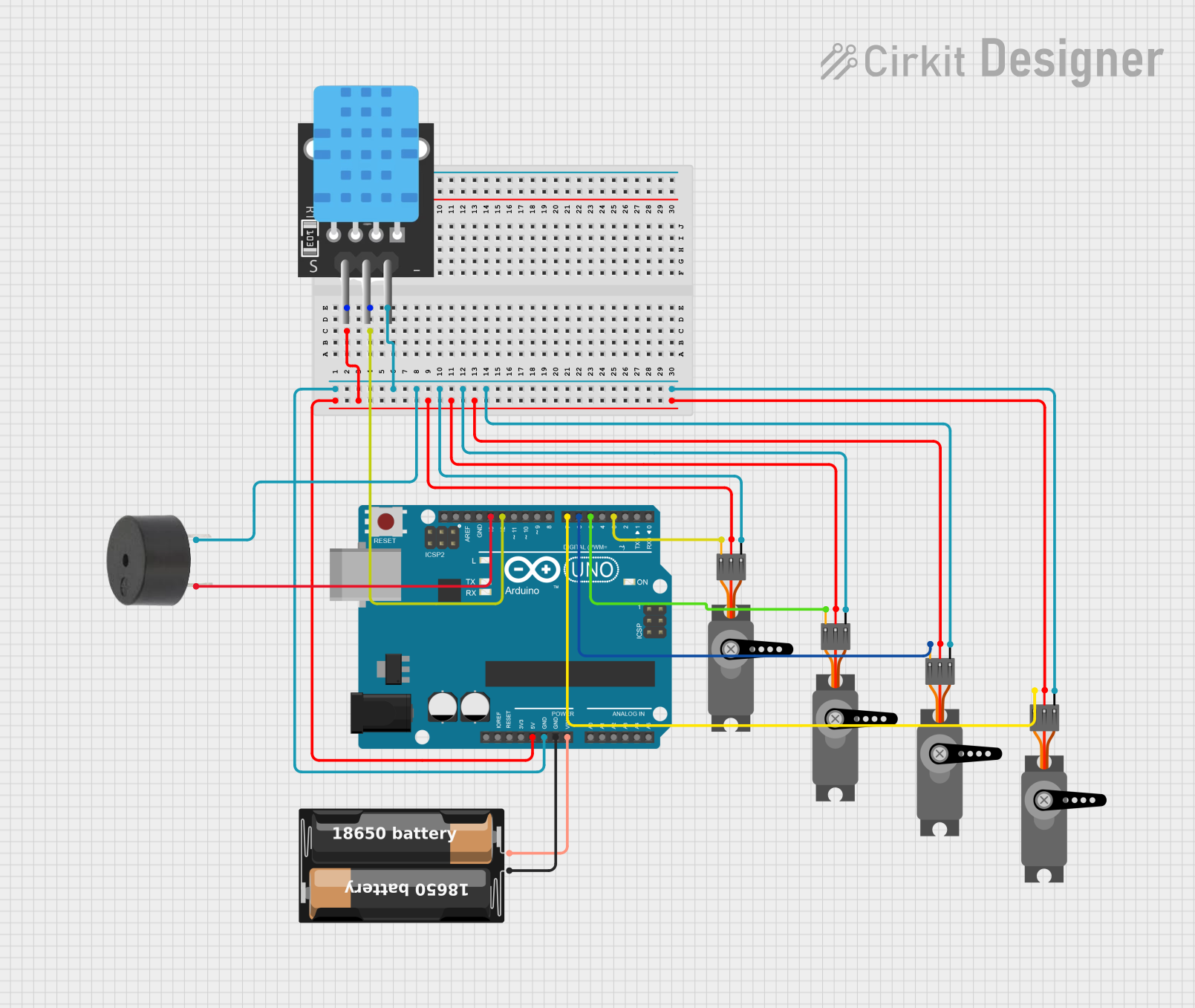
Circuit Documentation
Summary
The circuit in question is designed around an Arduino UNO microcontroller, which serves as the central processing unit. The circuit includes multiple peripheral components, including four servo motors, a temperature sensor (TEMP), a buzzer, and a battery case to provide power. The Arduino UNO controls the servos and reads data from the temperature sensor, while the buzzer is used for audible notifications. The battery case supplies power to the Arduino and, through it, to other components.
Component List
Arduino UNO
- Description: A microcontroller board based on the ATmega328P.
- Pins: UNUSED, IOREF, Reset, 3.3V, 5V, GND, Vin, A0-A5, SCL, SDA, AREF, D0-D13
Servo Motor
- Description: A rotary actuator or linear actuator that allows for precise control of angular or linear position.
- Pins: GND, VCC, PWM
Temperature Sensor (TEMP)
- Description: A sensor that measures ambient temperature.
- Pins: 5V, D3, GND
Buzzer
- Description: An electronic device that emits sound.
- Pins: PIN, GND
Battery Case
- Description: A case that holds batteries to provide power to the circuit.
- Pins: +, -
Wiring Details
Arduino UNO
- 5V: Connected to the VCC of all servos and the 5V of the temperature sensor.
- GND: Common ground with the temperature sensor, buzzer, servos, and battery case.
- Vin: Connected to the positive terminal of the battery case.
- D12: Connected to the D3 pin of the temperature sensor.
- D13: Connected to the PIN of the buzzer.
- D3, D5, D6, D7: Each connected to the PWM pin of a different servo motor.
Servo Motors
- GND: Connected to the common ground.
- VCC: Connected to the 5V output from the Arduino UNO.
- PWM: Each servo's PWM pin is connected to a unique digital pin on the Arduino UNO (D3, D5, D6, D7).
Temperature Sensor (TEMP)
- 5V: Powered by the 5V output from the Arduino UNO.
- D3: Signal pin connected to the D12 pin on the Arduino UNO.
- GND: Connected to the common ground.
Buzzer
- PIN: Connected to the D13 pin on the Arduino UNO.
- GND: Connected to the common ground.
Battery Case
- +: Connected to the Vin pin on the Arduino UNO.
- -: Connected to the common ground.
Documented Code
Arduino UNO Code (sketch.ino)
void setup() {
  // put your setup code here, to run once:

}

void loop() {
  // put your main code here, to run repeatedly:

}
Additional Notes
- The provided code for the Arduino UNO is a template with empty
setup()andloop()functions. Actual functionality needs to be implemented based on the requirements of the circuit's application. - The
documentation.txtfile is empty and does not contain any additional information about the code or circuit.