
Arduino UNO-Based Ultrasonic Distance Detection with Servo Control and TFT Display Feedback
View and Edit Project In Cirkit Designer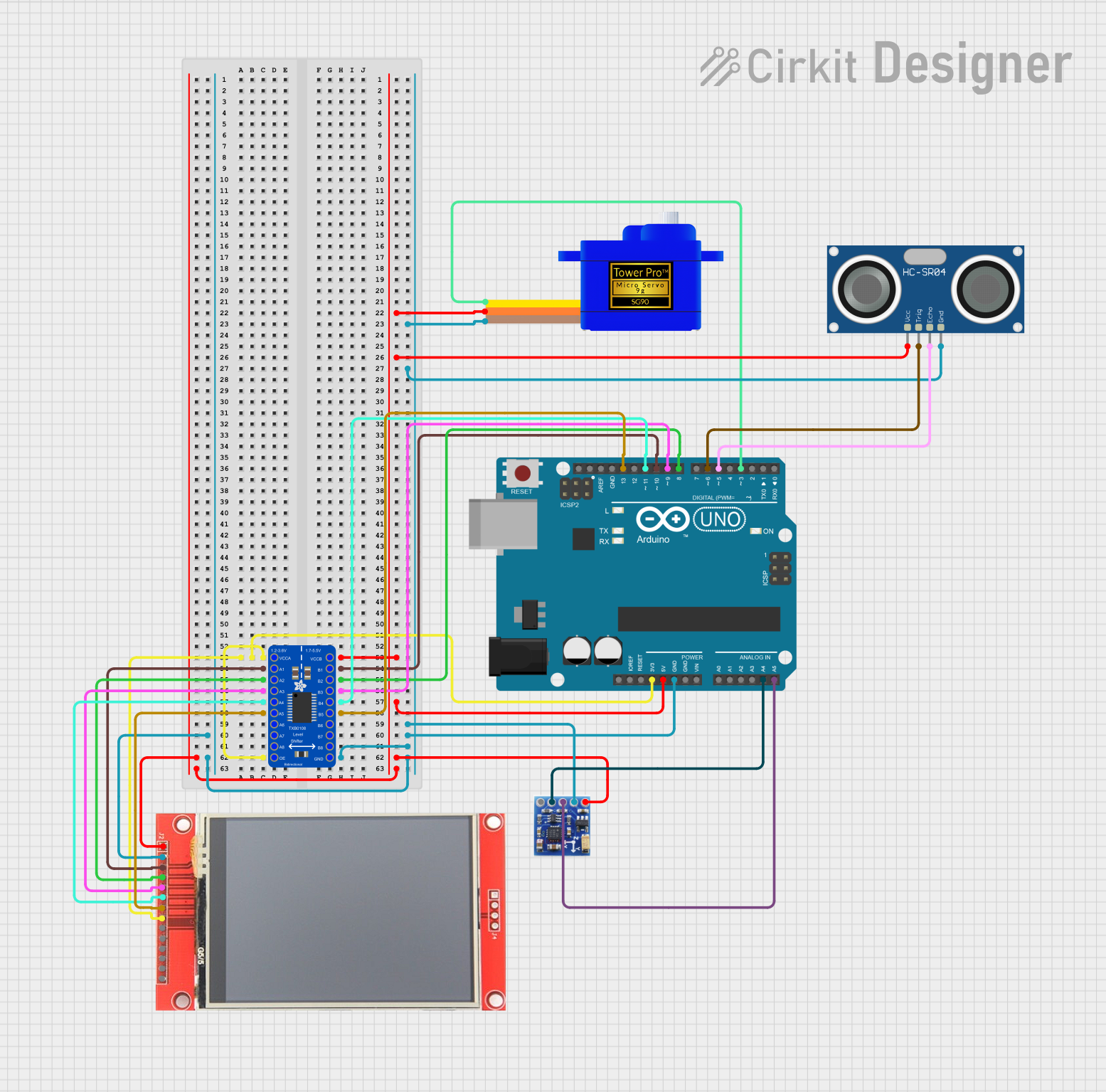
Circuit Documentation
Summary
This circuit integrates various components to perform a range of functions including logic level conversion, distance measurement, magnetic field detection, and visual display. The core of the circuit is an Arduino UNO microcontroller, which interfaces with an HC-SR04 Ultrasonic Sensor for distance measurement, a QMC5883L Magnetometer for magnetic field detection, an ili9341 TFT display for visual output, and a Servomotor SG90 for actuation. A logic level converter (Adafruit TXB0108) is used to safely interface devices with different voltage levels.
Component List
Adafruit TXB0108 8-channel Bi-directional Logic Level Converter
- Description: A device that safely steps down 5V signals to 3.3V and steps up 3.3V to 5V at the same time.
- Pins: VCCB, B1-B8, GND, OE, A8-A1, VCCA
Arduino UNO
- Description: A microcontroller board based on the ATmega328P, commonly used for building digital devices and interactive objects.
- Pins: UNUSED, IOREF, Reset, 3.3V, 5V, GND, Vin, A0-A5, SCL, SDA, AREF, D0-D13
ili9341 TFT Display
- Description: A 320x240 pixel color display with a SPI interface.
- Pins: VCC, GND, CS, RESET, DC/RS, SDI, SCK, LED, SDO, T_CLK, T_CS, T_DIN, T_DO, T_IRQ
QMC5883L Magnetometer
- Description: A sensor for measuring magnetic fields, often used as a digital compass.
- Pins: VCC, GND, SCL, SDA, DRDY
HC-SR04 Ultrasonic Sensor
- Description: A sensor for measuring distances using ultrasonic sound waves.
- Pins: VCC, TRIG, ECHO, GND
Servomotor SG90
- Description: A small and lightweight servo motor capable of precise control.
- Pins: SIG, VCC, GND
Wiring Details
Adafruit TXB0108 8-channel Bi-directional Logic Level Converter
- VCCA connected to Arduino UNO 3.3V
- OE connected to Arduino UNO 3.3V
- VCCB connected to Arduino UNO 5V
- GND connected to common ground
- A1 connected to ili9341 TFT Display CS
- B1 connected to Arduino UNO D10
- A2 connected to ili9341 TFT Display RESET
- B2 connected to Arduino UNO D8
- A3 connected to ili9341 TFT Display DC/RS
- B3 connected to Arduino UNO D9
- A4 connected to ili9341 TFT Display SDI
- B4 connected to Arduino UNO D11
- A5 connected to ili9341 TFT Display SCK
- B5 connected to Arduino UNO D13
Arduino UNO
- 3.3V connected to Adafruit TXB0108 OE and VCCA
- 5V connected to Adafruit TXB0108 VCCB, Servomotor SG90 VCC, HC-SR04 VCC, QMC5883L VCC, ili9341 TFT Display VCC
- GND connected to common ground
- A4 (SDA) connected to QMC5883L SDA
- A5 (SCL) connected to QMC5883L SCL
- D6 connected to HC-SR04 TRIG
- D5 connected to HC-SR04 ECHO
- D3 connected to Servomotor SG90 SIG
ili9341 TFT Display
- VCC connected to Arduino UNO 5V
- GND connected to common ground
- CS connected to Adafruit TXB0108 A1
- RESET connected to Adafruit TXB0108 A2
- DC/RS connected to Adafruit TXB0108 A3
- SDI connected to Adafruit TXB0108 A4
- SCK connected to Adafruit TXB0108 A5
- LED connected to Arduino UNO 3.3V
QMC5883L Magnetometer
- VCC connected to Arduino UNO 5V
- GND connected to common ground
- SCL connected to Arduino UNO A5
- SDA connected to Arduino UNO A4
HC-SR04 Ultrasonic Sensor
- VCC connected to Arduino UNO 5V
- GND connected to common ground
- TRIG connected to Arduino UNO D6
- ECHO connected to Arduino UNO D5
Servomotor SG90
- SIG connected to Arduino UNO D3
- VCC connected to Arduino UNO 5V
- GND connected to common ground
Documented Code
/*
 * This Arduino Sketch uses an HC-SR04 Ultrasonic Sensor to measure distance.
 * If an object is detected within 10 cm, a buzzer sounds and an LED lights up.
 */

#define TRIG_PIN 9
#define ECHO_PIN 10
#define BUZZER_PIN 11
#define LED_PIN 11
#define DISTANCE_THRESHOLD 10 // Distance threshold in cm

void setup() {
  pinMode(TRIG_PIN, OUTPUT);
  pinMode(ECHO_PIN, INPUT);
  pinMode(BUZZER_PIN, OUTPUT);
  pinMode(LED_PIN, OUTPUT);
  Serial.begin(9600);
}

void loop() {
  long duration, distance;
  digitalWrite(TRIG_PIN, LOW);
  delayMicroseconds(2);
  digitalWrite(TRIG_PIN, HIGH);
  delayMicroseconds(10);
  digitalWrite(TRIG_PIN, LOW);
  duration = pulseIn(ECHO_PIN, HIGH);
  distance = (duration / 2) / 29.1;
  Serial.print("Distance: ");
  Serial.print(distance);
  Serial.println(" cm");
  if (distance < DISTANCE_THRESHOLD) {
    digitalWrite(BUZZER_PIN, HIGH);
    digitalWrite(LED_PIN, HIGH);
  } else {
    digitalWrite(BUZZER_PIN, LOW);
    digitalWrite(LED_PIN, LOW);
  }
  delay(500);
}
Note: The code provided has a minor issue with pin definitions. BUZZER_PIN and LED_PIN are both defined as pin 11, which may not be the intended behavior. This should be reviewed and corrected as necessary.