
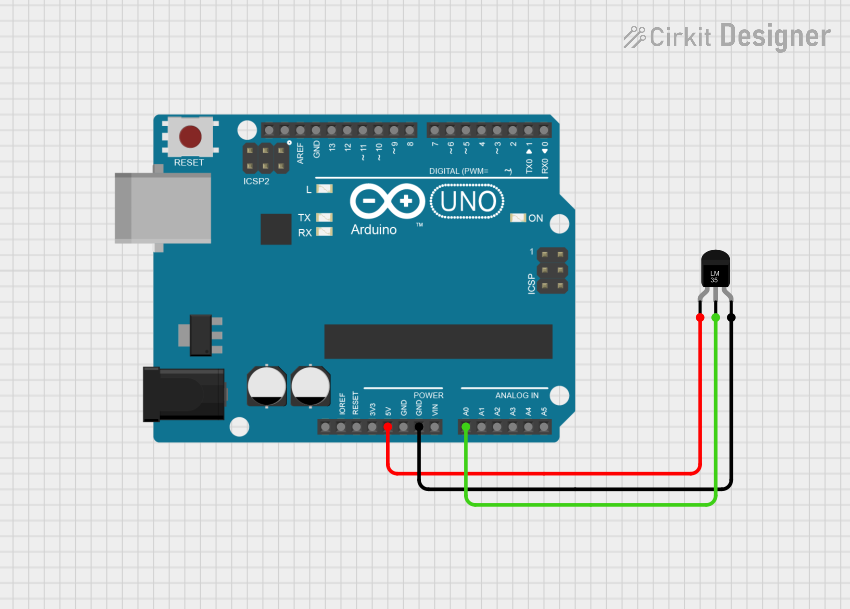
Circuit Documentation
Summary of the Circuit
This circuit integrates an Arduino UNO microcontroller with an LM35 temperature sensor to measure ambient temperature. The LM35 sensor outputs an analog voltage proportional to the temperature, which is read by one of the Arduino's analog input pins. The Arduino is programmed to convert this reading into a temperature value in degrees Celsius and Fahrenheit, which is then output to the serial monitor.
Component List
Arduino UNO
- Description: A microcontroller board based on the ATmega328P.
- Purpose: Acts as the central processing unit of the circuit, reads sensor data, performs calculations, and outputs the temperature readings to the serial monitor.
- Pins: UNUSED, IOREF, Reset, 3.3V, 5V, GND, Vin, A0-A5, SCL, SDA, AREF, D0-D13.
Temperature Sensor (LM35)
- Description: A precision integrated-circuit temperature device with an output voltage linearly proportional to the Centigrade temperature.
- Purpose: Measures the ambient temperature and provides an analog voltage output that is proportional to the temperature.
- Pins: +Vs, Vout, GND.
Wiring Details
Arduino UNO
- 5V: Provides power to the LM35 temperature sensor.
- GND: Common ground with the LM35 temperature sensor.
- A0: Receives the analog voltage output from the LM35 temperature sensor.
Temperature Sensor (LM35)
- +Vs: Connected to the 5V output from the Arduino UNO.
- Vout: Connected to the A0 analog input on the Arduino UNO.
- GND: Connected to the ground (GND) on the Arduino UNO.
Documented Code
/*
  Temperature Sensor Reading with LM35 and Arduino UNO
  This code reads the analog voltage from the LM35 temperature sensor, converts
  it to a temperature in degrees Celsius, and then converts that to Fahrenheit.
  The results are printed to the serial monitor. The LM35 sensor provides an
  output voltage linearly proportional to the Celsius temperature. The scale
  factor is 10.0 mV/°C.

  Circuit connections:
  - LM35 +Vs pin to Arduino 5V
  - LM35 GND pin to Arduino GND
  - LM35 Vout pin to Arduino A0

  The analog reading from the sensor is converted to a voltage by considering
  the reference voltage (5V) and resolution of the ADC (10 bits). The
  temperature in Celsius is calculated by multiplying the voltage by 100, as
  each degree Celsius corresponds to 10mV. The temperature in Fahrenheit is
  calculated by converting the Celsius temperature using the formula
  F = C * 9/5 + 32.
*/

// Define the analog pin, the LM35's Vout pin is connected to
#define sensorPin A0

void setup() {
  // Begin serial communication at 9600 baud rate
  Serial.begin(9600);
}

void loop() {
  // Get the voltage reading from the LM35
  int reading = analogRead(sensorPin);

  // Convert that reading into voltage
  float voltage = reading * (5.0 / 1024.0);

  // Convert the voltage into the temperature in Celsius
  float temperatureC = voltage * 100;

  // Print the temperature in Celsius
  Serial.print("Temperature: ");
  Serial.print(temperatureC);
  Serial.print("°C  |  ");

  // Print the temperature in Fahrenheit
  float temperatureF = (temperatureC * 9.0 / 5.0) + 32.0;
  Serial.print(temperatureF);
  Serial.print("°F");
  Serial.println();

  // Wait a second between readings
  delay(1000);
}
This code is designed to be uploaded to the Arduino UNO microcontroller. It initializes the serial communication, reads the analog voltage from the LM35 temperature sensor, converts the reading to temperatures in Celsius and Fahrenheit, and prints the results to the serial monitor.