
Arduino UNO and DHT11 Temperature and Humidity Sensor with Buzzer Alert System
View and Edit Project In Cirkit Designer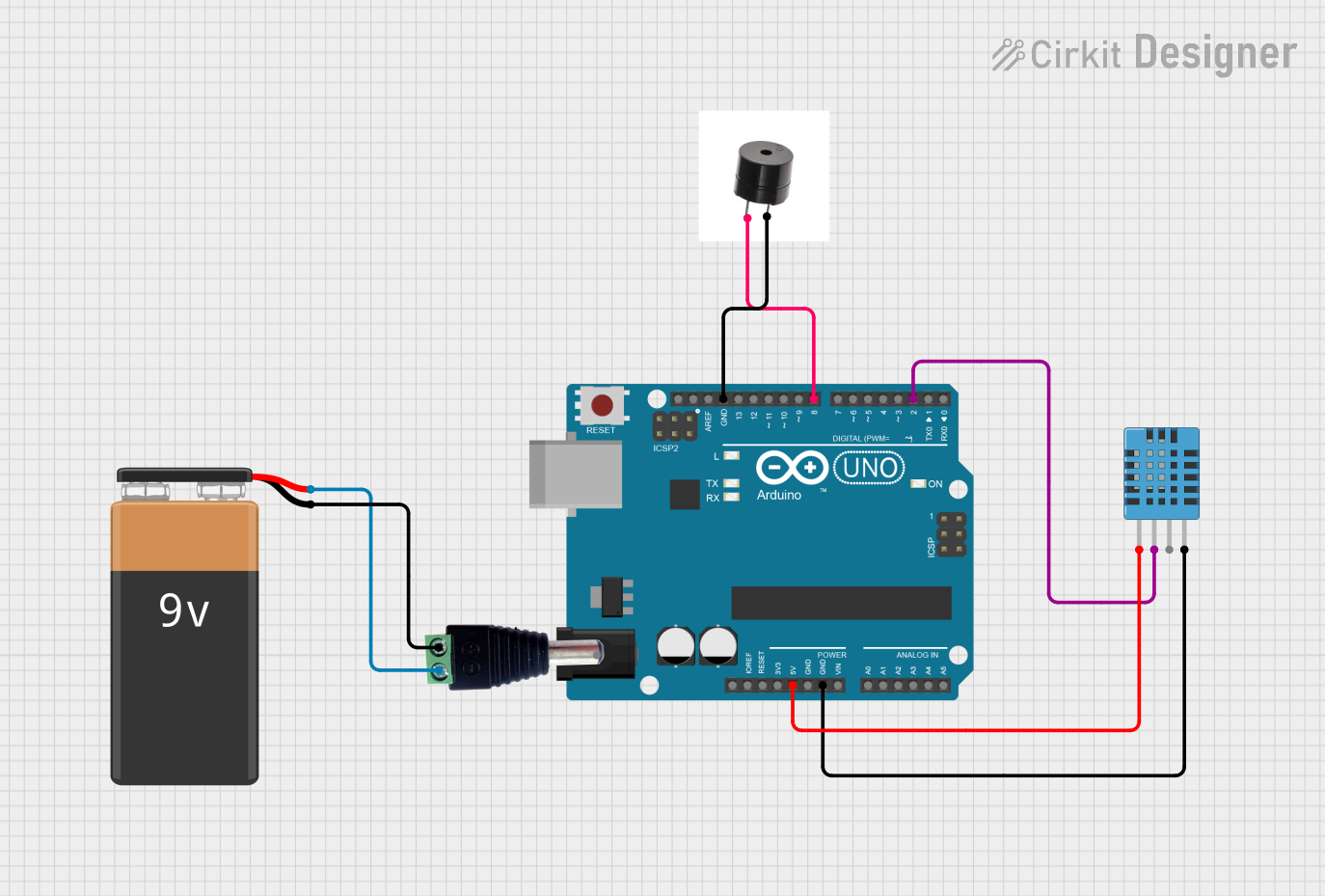
Circuit Documentation
Summary
This circuit is designed to monitor temperature and humidity using a DHT11 sensor and an Arduino UNO. The Arduino reads data from the DHT11 sensor and activates a buzzer if the temperature exceeds 30°C. The circuit is powered by a 9V battery connected through a universal barrel jack.
Component List
DHT11 Humidity and Temperature Sensor
- Description: Measures humidity and temperature.
- Pins: VDD, DATA, NULL, GND
Arduino UNO
- Description: Microcontroller board based on the ATmega328P.
- Pins: UNUSED, IOREF, Reset, 3.3V, 5V, GND, Vin, A0, A1, A2, A3, A4, A5, SCL, SDA, AREF, D13, D12, D11, D10, D9, D8, D7, D6, D5, D4, D3, D2, D1, D0
Buzzer
- Description: Emits sound when activated.
- Pins: +, GND
Universal Barrel Jack Male
- Description: Connects the 9V battery to the circuit.
- Pins: Power Out, V+, V-
9V Battery
- Description: Provides power to the circuit.
- Pins: -, +
Wiring Details
DHT11 Humidity and Temperature Sensor
- VDD connected to 5V on Arduino UNO
- DATA connected to D2 on Arduino UNO
- GND connected to GND on Arduino UNO
Arduino UNO
- 5V connected to VDD on DHT11 Humidity and Temperature Sensor
- D2 connected to DATA on DHT11 Humidity and Temperature Sensor
- GND connected to GND on DHT11 Humidity and Temperature Sensor
- GND connected to GND on Buzzer
- D8 connected to + on Buzzer
Buzzer
- GND connected to GND on Arduino UNO
- + connected to D8 on Arduino UNO
Universal Barrel Jack Male
- V+ connected to + on 9V Battery
- V- connected to - on 9V Battery
9V Battery
- + connected to V+ on Universal Barrel Jack Male
- - connected to V- on Universal Barrel Jack Male
Code Documentation
#include "DHT.h"

#define DHTPIN 2     // Digital pin connected to the DHT sensor
#define DHTTYPE DHT11   // DHT 11

DHT dht(DHTPIN, DHTTYPE);

void setup() {
  pinMode(8, OUTPUT);
  Serial.begin(9600);
  Serial.println(F("DHTxx test!"));

  dht.begin();
}

void loop() {
  // Wait a few seconds between measurements.
  delay(2000);

  // Reading temperature or humidity takes about 250 milliseconds!
  // Sensor readings may also be up to 2 seconds 'old' (its a very slow sensor)
  float h = dht.readHumidity();
  // Read temperature as Celsius (the default)
  float t = dht.readTemperature();
  // Read temperature as Fahrenheit (isFahrenheit = true)
  float f = dht.readTemperature(true);

  // Check if any reads failed and exit early (to try again).
  if (isnan(h) || isnan(t) || isnan(f)) {
    Serial.println(F("Failed to read from DHT sensor!"));
    return;
  }

  if(t > 30){
    digitalWrite(8, HIGH);
  }else{
    digitalWrite(8, LOW);
  }

  float hif = dht.computeHeatIndex(f, h);
  float hic = dht.computeHeatIndex(t, h, false);

  Serial.print(F("Humidity: "));
  Serial.print(h);
  Serial.print(F("%  Temperature: "));
  Serial.print(t);
  Serial.print(F("°C "));
  Serial.print(f);
  Serial.print(F("°F  Heat index: "));
  Serial.print(hic);
  Serial.print(F("°C "));
  Serial.print(hif);
  Serial.println(F("°F"));
}
This code initializes the DHT11 sensor and reads the temperature and humidity every 2 seconds. If the temperature exceeds 30°C, the buzzer is activated. The temperature, humidity, and heat index are printed to the serial monitor.