
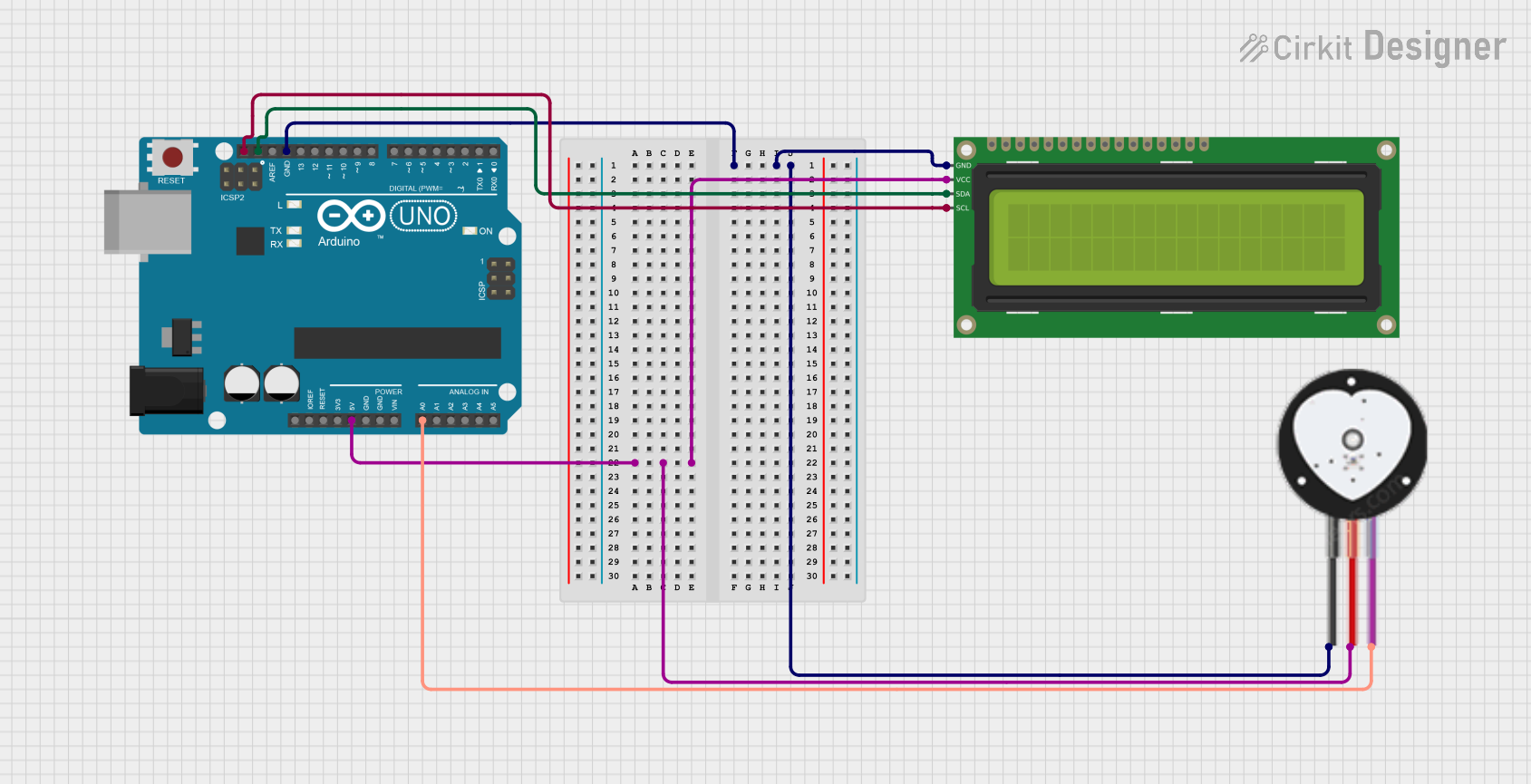
Circuit Documentation
Summary
This circuit is designed to monitor heartbeats using a pulse sensor and display the beats per minute (BPM) on a 16x2 I2C LCD. The circuit uses an Arduino UNO microcontroller to read the pulse sensor data, process it, and control the display and an LED indicator.
Component List
Arduino UNO
- Description: A microcontroller board based on the ATmega328P.
- Pins: UNUSED, IOREF, Reset, 3.3V, 5V, GND, Vin, A0, A1, A2, A3, A4, A5, SCL, SDA, AREF, D13, D12, D11, D10, D9, D8, D7, D6, D5, D4, D3, D2, D1, D0
16x2 I2C LCD
- Description: A 16x2 character LCD display with I2C interface.
- Pins: GND, VCC, SDA, SCL
Heart Pulse Sensor
- Description: A sensor to detect heartbeats.
- Pins: GND, VCC, SIGNAL
Wiring Details
Arduino UNO
GND connected to:
- Heart Pulse Sensor GND
- 16x2 I2C LCD GND
5V connected to:
- Heart Pulse Sensor VCC
- 16x2 I2C LCD VCC
A0 connected to:
- Heart Pulse Sensor SIGNAL
SCL connected to:
- 16x2 I2C LCD SCL
SDA connected to:
- 16x2 I2C LCD SDA
16x2 I2C LCD
GND connected to:
- Arduino UNO GND
VCC connected to:
- Arduino UNO 5V
SDA connected to:
- Arduino UNO SDA
SCL connected to:
- Arduino UNO SCL
Heart Pulse Sensor
GND connected to:
- Arduino UNO GND
VCC connected to:
- Arduino UNO 5V
SIGNAL connected to:
- Arduino UNO A0
Code Documentation
#include <Wire.h>
#include <LiquidCrystal_I2C.h>

LiquidCrystal_I2C lcd(0x27, 16, 2); // Adjust if necessary
const int sensorPin = A0;      // Pulse sensor input
const int enableButton = 2;    // Button input for AND gate
const int ledPin = 13;         // LED output via OR gate
const int threshold = 550;     // Threshold for pulse detection

int bpm = 0;
int lastReading = 0;
int currentReading = 0;
unsigned long lastBeatTime = 0;
bool heartbeatDetected = false;

void setup() {
  lcd.begin(16, 2);
  lcd.backlight();
  lcd.print("Heartbeat Monitor");

  pinMode(sensorPin, INPUT);
  pinMode(enableButton, INPUT_PULLUP);
  pinMode(ledPin, OUTPUT);
  Serial.begin(9600);
}

void loop() {
  // Read pulse sensor
  currentReading = analogRead(sensorPin);
  heartbeatDetected = (currentReading > threshold && lastReading <= threshold);

  if (heartbeatDetected) {
    unsigned long currentTime = millis();
    if (lastBeatTime != 0) {
      int beatInterval = currentTime - lastBeatTime;
      bpm = 60000 / beatInterval;
    }
    lastBeatTime = currentTime;
    digitalWrite(ledPin, HIGH); // OR gate LED indication

    // AND gate for LCD display
    if (digitalRead(enableButton) == LOW) {
      lcd.setCursor(0, 1);
      lcd.print("BPM: ");
      lcd.print(bpm);
    }
  } else {
    digitalWrite(ledPin, LOW);
  }

  lastReading = currentReading;
  delay(10); // Smooth signal
}
This code initializes the LCD and sets up the pins for the pulse sensor, button, and LED. In the loop function, it reads the pulse sensor data, detects heartbeats, calculates BPM, and updates the LCD and LED accordingly. The button is used to enable or disable the BPM display on the LCD.