
Arduino UNO-Based TDS Sensor with I2C LCD Display for Water Quality Monitoring
View and Edit Project In Cirkit Designer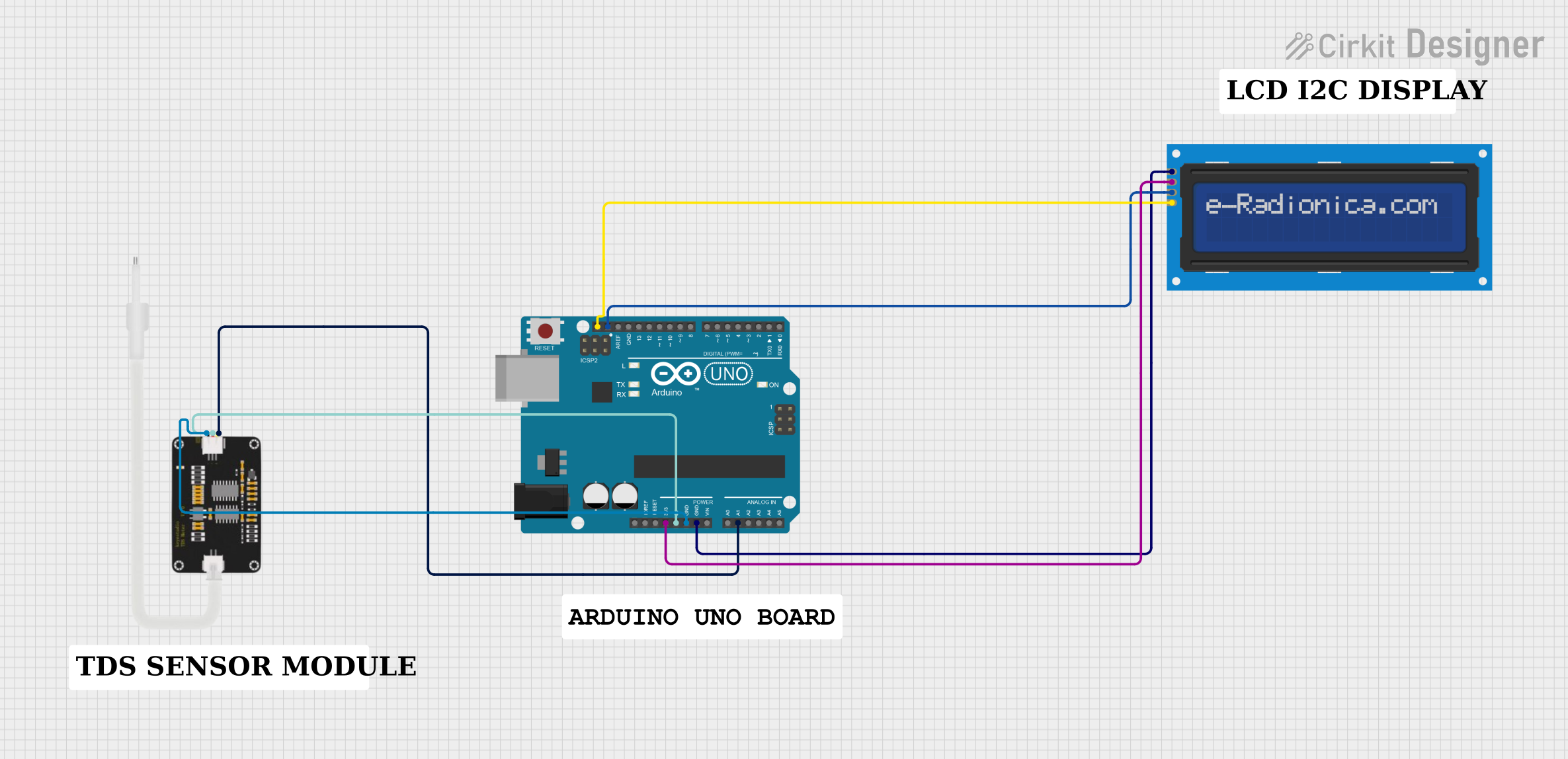
Circuit Documentation
Summary
This circuit involves an Arduino UNO microcontroller interfacing with an LCD screen (16x2 I2C) and a TDS Sensor. The Arduino UNO reads the TDS sensor values and displays the TDS value and water quality on the LCD screen. The circuit is designed to monitor water quality by measuring the Total Dissolved Solids (TDS) in the water.
Component List
Arduino UNO
- Description: A microcontroller board based on the ATmega328P.
- Pins: UNUSED, IOREF, Reset, 3.3V, 5V, GND, Vin, A0, A1, A2, A3, A4, A5, SCL, SDA, AREF, D13, D12, D11, D10, D9, D8, D7, D6, D5, D4, D3, D2, D1, D0
LCD screen 16x2 I2C
- Description: A 16x2 character LCD display with I2C interface.
- Pins: SCL, SDA, VCC, GND
TDS Sensor 2
- Description: A sensor used to measure the Total Dissolved Solids (TDS) in water.
- Pins: AIn, GND, 5V
Comment
- Description: Placeholder for comments in the circuit design.
- Pins: None
Wiring Details
Arduino UNO
- SCL connected to LCD screen 16x2 I2C SCL
- SDA connected to LCD screen 16x2 I2C SDA
- 3.3V connected to LCD screen 16x2 I2C VCC
- GND connected to LCD screen 16x2 I2C GND
- 5V connected to TDS Sensor 2 5V
- GND connected to TDS Sensor 2 GND
- A1 connected to TDS Sensor 2 AIn
LCD screen 16x2 I2C
- SCL connected to Arduino UNO SCL
- SDA connected to Arduino UNO SDA
- VCC connected to Arduino UNO 3.3V
- GND connected to Arduino UNO GND
TDS Sensor 2
- AIn connected to Arduino UNO A1
- GND connected to Arduino UNO GND
- 5V connected to Arduino UNO 5V
Code Documentation
#include <Wire.h>
#include <LiquidCrystal_I2C.h>

// Initialize the I2C LCD (address 0x27, 16 columns, 2 rows)
LiquidCrystal_I2C lcd(0x27, 16, 2);

#define TdsSensorPin A1  // Pin connected to the TDS sensor

float tdsValue = 0;      // Variable to store the TDS value

void setup() {
    Serial.begin(115200);  // Start serial communication at 115200 baud rate
    lcd.init();            // Initialize the LCD
    lcd.backlight();       // Turn on the backlight

    // Display student names and scroll them initially
    String studentNames = "Project by: Akshay, Harshda, Kartik, Vedashree";  // Modify as needed

    for (int position = 0; position < studentNames.length() - 16; position++) {
        lcd.setCursor(0, 0); // Set cursor to the first row
        lcd.print(studentNames.substring(position, position + 16)); // Scroll the student names
        delay(400);  // Adjust scrolling speed
        lcd.clear(); // Clear the screen for the next part of the name
    }

    delay(2000);  // Wait for 2 seconds after scrolling names
    lcd.clear();  // Clear the screen after scrolling the names
}

void loop() {
    // Read raw analog value from the TDS sensor
    int sensorValue = analogRead(TdsSensorPin);

    // Debugging output to Serial Monitor
    Serial.print("Raw ADC Value: ");
    Serial.println(sensorValue);

    // Convert the analog value to a voltage
    float voltage = (sensorValue / 1024.0) * 5.0;  // Assuming 5V reference and 10-bit ADC
    Serial.print("Voltage: ");
    Serial.println(voltage, 3);

    // Convert voltage to TDS value
    // Adjusting the scaling factor based on your sensor's specs
    tdsValue = voltage * (1000.0 / 2.3);  // TDS range: 0 to 1000 ppm for 0V to 2.3V

    // Handle TDS value of 0 and debugging TDS value
    if (tdsValue == 0) {
        Serial.println("TDS Value is 0 (Check sensor connection or water quality)");
        tdsValue = 0;  // Set to 0 if it's not reading correctly
    } else {
        Serial.print("TDS Value: ");
        Serial.println(tdsValue, 0); // Print as an integer
    }

    // Determine if the water is drinkable based on the new TDS range
    String waterQuality;
    if (tdsValue >= 50 && tdsValue <= 150) {
        waterQuality = "Excellent for drinking";
    } else if (tdsValue > 150 && tdsValue <= 250) {
        waterQuality = "Good";
    } else if (tdsValue > 250 && tdsValue <= 300) {
        waterQuality = "Fair";
    } else if (tdsValue > 300 && tdsValue <= 500) {
        waterQuality = "Poor, not good for drinking";
    } else {
        waterQuality = "Out of range";
    }

    // Display TDS value on I2C LCD (Top row)
    lcd.setCursor(0, 0);       // Set cursor to the first row
    lcd.print("TDS: ");
    lcd.print(tdsValue, 0);    // Display TDS value as an integer
    lcd.print(" PPM");         // Append PPM unit

    // Scroll water quality message on the bottom row
    int len = waterQuality.length();
    for (int position = 0; position <= len - 16; position++) {
        lcd.setCursor(0, 1); // Set cursor to the second row
        lcd.print(waterQuality.substring(position, position + 16)); // Display substring from position
        delay(500); // Adjust speed of scrolling (500ms per character)
    }

    // Keep displaying the last part of the water quality message until the next loop
    lcd.setCursor(0, 1);
    lcd.print(waterQuality.substring(len - 16, len));

    delay(2000); // Wait for 2 seconds before updating again
}
This code initializes the LCD and TDS sensor, reads the TDS value, converts it to a readable format, and displays the TDS value and water quality on the LCD screen. The code also includes a scrolling message displaying the names of the project contributors.