
Wi-Fi Controlled LED Strip with Sound Sensor using ESP32 and IRFZ44N MOSFETs
View and Edit Project In Cirkit Designer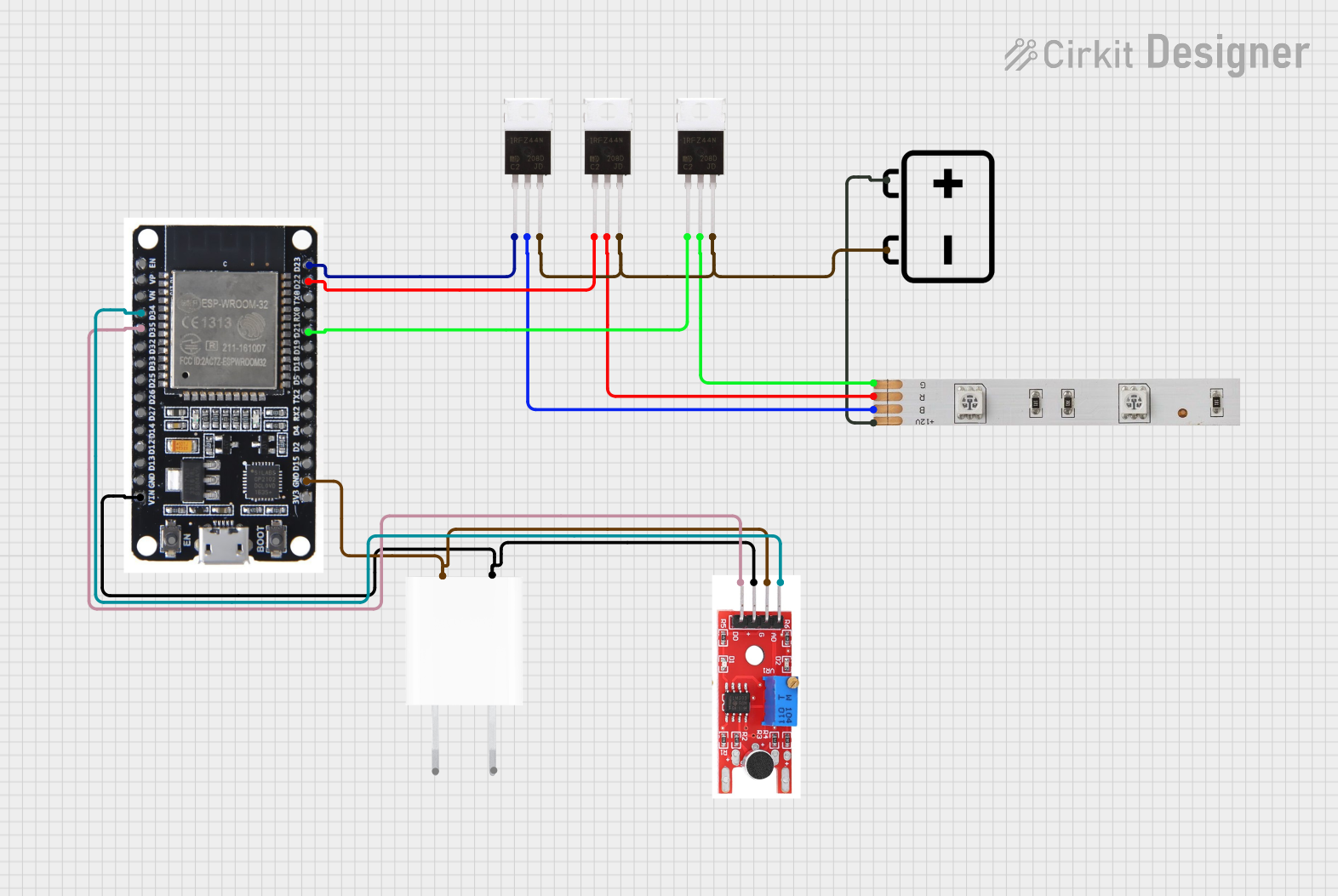
Circuit Documentation
Summary
This circuit is designed to control an LED strip using an ESP32 microcontroller and an Elegoo Sound Sensor. The LED strip's colors (Red, Green, and Blue) are controlled via three IRFZ44N MOSFETs, which are driven by the ESP32. The sound sensor provides input to the ESP32, allowing the LED strip to respond to sound. Power is supplied by a 12V battery and a 5V adapter.
Component List
IRFZ44N MOSFET
- Pins: Gate, Drain, Source
- Description: N-channel MOSFET used for switching the LED strip colors.
LED Strip
- Pins: B, +12V, R, G
- Description: RGB LED strip that changes color based on the input signals.
Elegoo Sound Sensor
- Pins: D0, VCC [5V], GND, A0
- Description: Sound sensor used to detect sound levels and provide input to the ESP32.
5V Adapter
- Pins: AC In 1, AC In 2, 5V, GND
- Description: Adapter to provide 5V power to the circuit.
ESP32
- Pins: EN, VP, VN, D34, D35, D32, D33, D25, D26, D27, D14, D12, D13, GND, VIN, 3V3, D15, D2, D4, RX2, TX2, D5, D18, D19, D21, RX0, TX0, D22, D23, BOOT
- Description: Microcontroller used to control the LED strip and process input from the sound sensor.
12V Battery
- Pins: -, +
- Description: Battery to provide 12V power to the LED strip.
Wiring Details
IRFZ44N MOSFET (1)
- Gate: Connected to ESP32 pin D21
- Drain: Connected to LED Strip pin G
- Source: Connected to the negative terminal of the 12V Battery
IRFZ44N MOSFET (2)
- Gate: Connected to ESP32 pin D22
- Drain: Connected to LED Strip pin R
- Source: Connected to the negative terminal of the 12V Battery
IRFZ44N MOSFET (3)
- Gate: Connected to ESP32 pin D23
- Drain: Connected to LED Strip pin B
- Source: Connected to the negative terminal of the 12V Battery
LED Strip
- B: Connected to IRFZ44N MOSFET (3) Drain
- +12V: Connected to the positive terminal of the 12V Battery
- R: Connected to IRFZ44N MOSFET (2) Drain
- G: Connected to IRFZ44N MOSFET (1) Drain
Elegoo Sound Sensor
- D0: Connected to ESP32 pin D35
- VCC [5V]: Connected to ESP32 VIN and 5V Adapter 5V
- GND: Connected to ESP32 GND and 5V Adapter GND
- A0: Connected to ESP32 pin D34
5V Adapter
- AC In 1: Not connected in this documentation
- AC In 2: Not connected in this documentation
- 5V: Connected to ESP32 VIN and Elegoo Sound Sensor VCC [5V]
- GND: Connected to ESP32 GND and Elegoo Sound Sensor GND
ESP32
- D34: Connected to Elegoo Sound Sensor A0
- D35: Connected to Elegoo Sound Sensor D0
- VIN: Connected to 5V Adapter 5V and Elegoo Sound Sensor VCC [5V]
- GND: Connected to 5V Adapter GND and Elegoo Sound Sensor GND
- D21: Connected to IRFZ44N MOSFET (1) Gate
- D22: Connected to IRFZ44N MOSFET (2) Gate
- D23: Connected to IRFZ44N MOSFET (3) Gate
12V Battery
- -: Connected to IRFZ44N MOSFET (1) Source, IRFZ44N MOSFET (2) Source, and IRFZ44N MOSFET (3) Source
- +: Connected to LED Strip +12V
Code
No code is provided for this circuit.