
Arduino Nano and LDR-Based Smart Light Control with 5V Relay
View and Edit Project In Cirkit Designer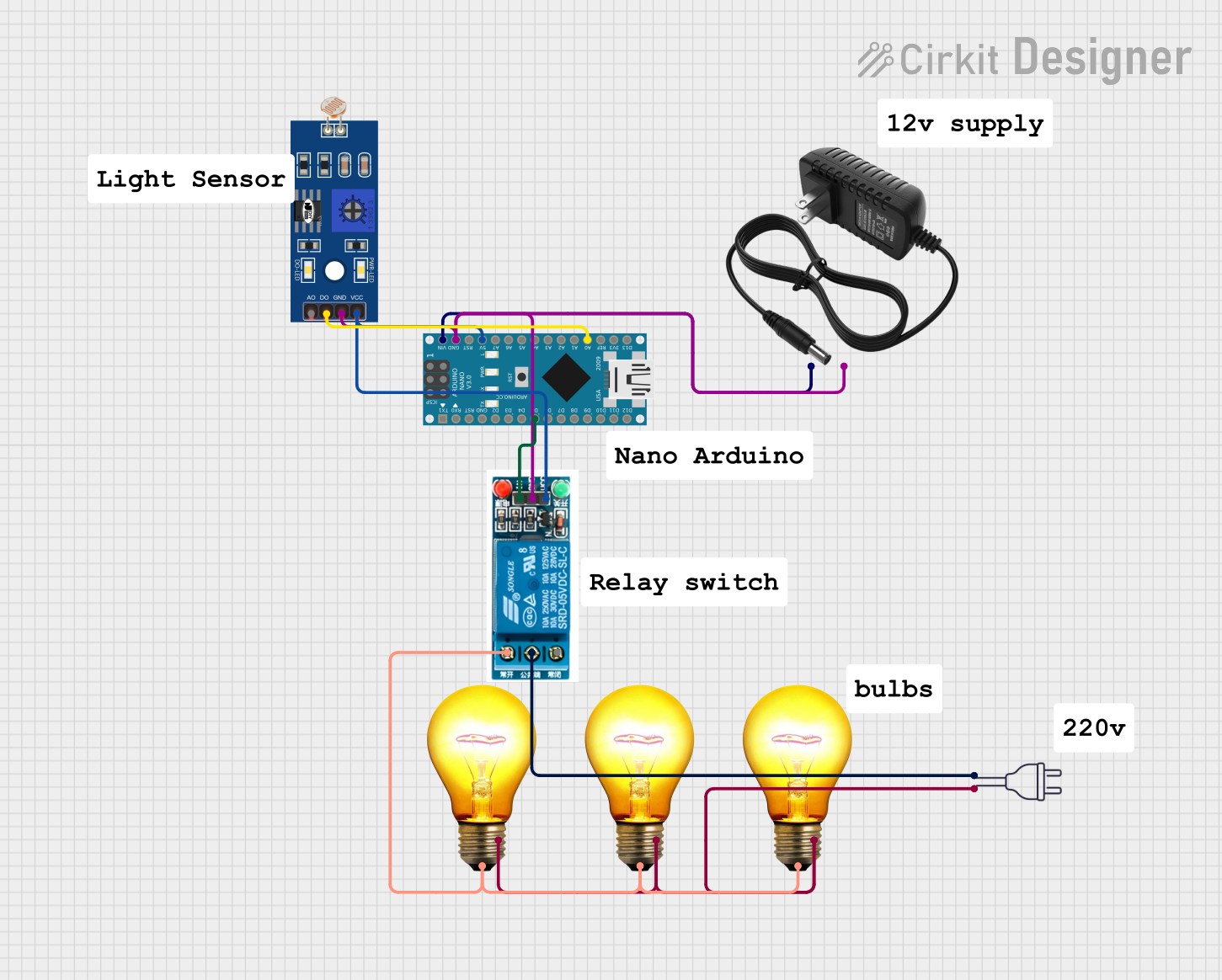
Circuit Documentation
Summary
This circuit is designed to control an AC bulb using a Light Dependent Resistor (LDR) and a 5V relay, all managed by an Arduino Nano. The LDR senses the ambient light level and sends the data to the Arduino Nano, which then controls the relay to turn the AC bulb on or off based on the light level. The circuit is powered by a 12V power supply and a 220V AC power source.
Component List
LDR (Light Dependent Resistor)
- Pins: A0, D0, GND, VCC
- Description: A sensor that changes its resistance based on the light intensity.
- Purpose: To sense the ambient light level.
5V Relay
- Pins: Normally Open, Common terminal, Normally Closed, In, GND, VCC
- Description: An electromechanical switch that can be controlled by a low voltage signal.
- Purpose: To control the AC bulb based on the signal from the Arduino Nano.
AC Bulb
- Pins: P, N
- Description: A standard AC bulb.
- Purpose: To provide illumination.
Arduino Nano
- Pins: D1/TX, D0/RX, RESET, GND, D2, D3, D4, D5, D6, D7, D8, D9, D10, D11/MOSI, D12/MISO, VIN, 5V, A7, A6, A5, A4, A3, A2, A1, A0, AREF, 3V3, D13/SCK
- Description: A small, complete, and breadboard-friendly microcontroller board.
- Purpose: To process the data from the LDR and control the relay.
12V Power Supply
- Pins: +, -
- Description: A power supply that provides 12V DC.
- Purpose: To power the Arduino Nano and other components.
220V Power Supply
- Pins: hot wire, neutral wire
- Description: A standard 220V AC power source.
- Purpose: To power the AC bulb.
Wiring Details
LDR (Light Dependent Resistor)
- D0 is connected to A0 of the Arduino Nano.
- GND is connected to GND of the 5V relay, GND of the 12V power supply, and GND of the Arduino Nano.
- VCC is connected to VCC of the 5V relay and 5V of the Arduino Nano.
5V Relay
- GND is connected to GND of the LDR, GND of the 12V power supply, and GND of the Arduino Nano.
- VCC is connected to VCC of the LDR and 5V of the Arduino Nano.
- Normally Open is connected to P of the AC Bulb.
- Common terminal is connected to hot wire of the 220V power supply.
- In is connected to D5 of the Arduino Nano.
AC Bulb
- P is connected to Normally Open of the 5V relay.
- N is connected to neutral wire of the 220V power supply.
Arduino Nano
- A0 is connected to D0 of the LDR.
- GND is connected to GND of the 5V relay, GND of the LDR, and GND of the 12V power supply.
- 5V is connected to VCC of the 5V relay and VCC of the LDR.
- D5 is connected to In of the 5V relay.
- VIN is connected to + of the 12V power supply.
12V Power Supply
- + is connected to VIN of the Arduino Nano.
- - is connected to GND of the 5V relay, GND of the LDR, and GND of the Arduino Nano.
220V Power Supply
- hot wire is connected to Common terminal of the 5V relay.
- neutral wire is connected to N of the AC Bulb.
Documented Code
Arduino Nano Code (sketch.ino)
void setup() {
  // put your setup code here, to run once:

}

void loop() {
  // put your main code here, to run repeatedly:

}
Documentation (documentation.txt)
This file is intended to provide documentation for the Arduino Nano code.