
Arduino-Based Fire Detection and Alert System with SMS Notification
View and Edit Project In Cirkit Designer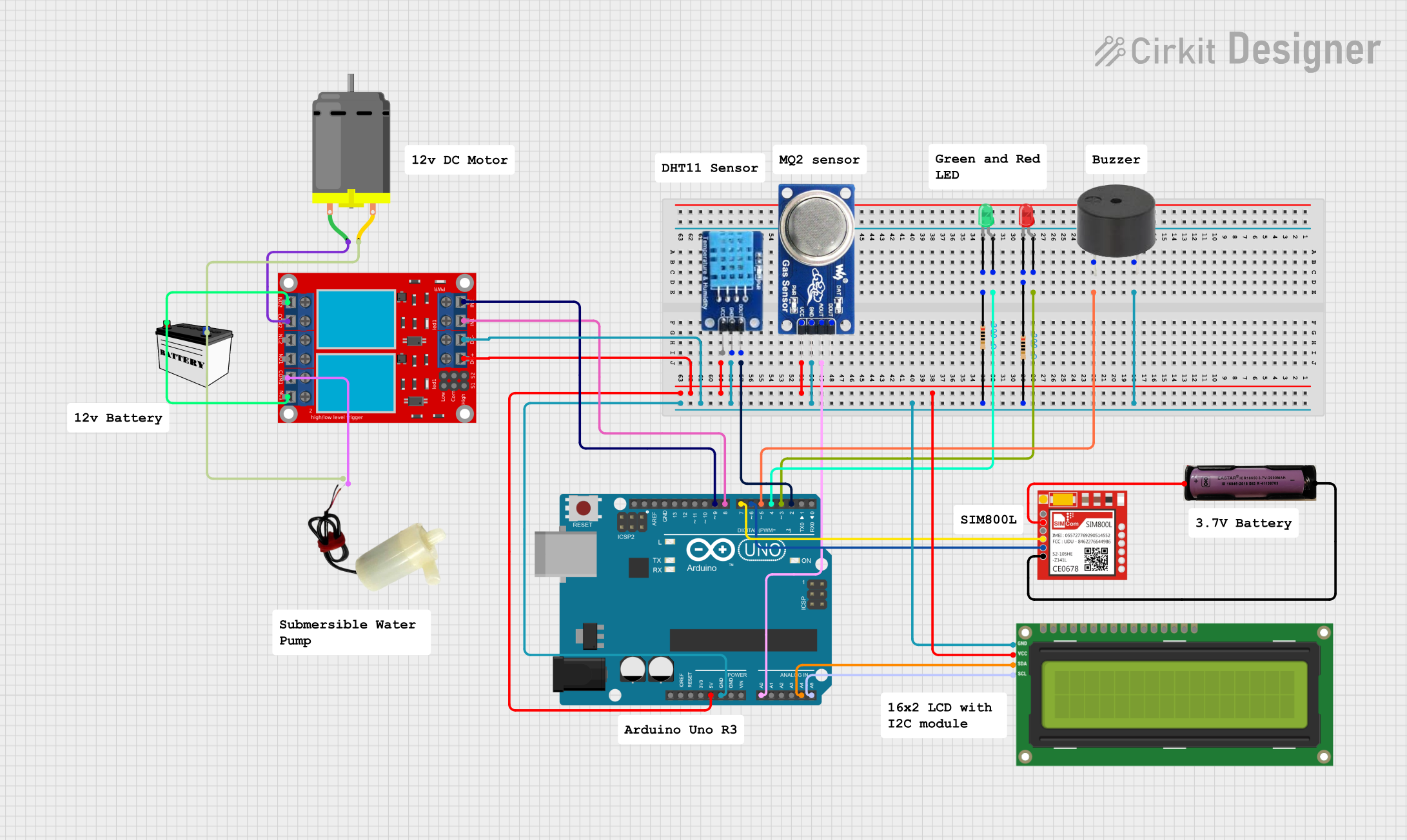
Circuit Documentation
Summary
The circuit is designed to monitor environmental conditions and respond to fire detection. It includes sensors for temperature, humidity, and smoke levels, along with actuators such as LEDs, a buzzer, a DC motor, and a water pump controlled by relays. The core of the circuit is an Arduino UNO microcontroller, which processes sensor data and controls the actuators based on predefined thresholds. The circuit also features an I2C LCD screen for displaying status information and a SIM800L module for sending SMS alerts in case of fire detection.
Component List
Sensors
- DHT11: A sensor for measuring temperature and humidity.
- MQ6: A gas sensor for detecting LPG, butane, propane, methane, alcohol, hydrogen, and smoke.
Actuators
- LED (Green): Indicates normal operational status.
- LED (Red): Indicates a fire alert.
- Buzzer: Emits an audible alert when a fire is detected.
- DC Motor: Can be used for various purposes, such as driving a fan.
- 5v Mini Water Pump: Activated during a fire alert to pump water.
- 2 Channel Relay Module: Controls high power devices like the DC motor and water pump.
Power Sources
- 12V Battery (Small Size): Provides power to the DC motor and relay module.
- 3.7V Battery: Powers the SIM800L module.
Communication Modules
- Sim800l: GSM module for sending SMS alerts.
Display
- I2C LCD 16x2 Screen: Displays temperature, humidity, and smoke levels, as well as system status.
Controllers
- Arduino UNO: The main microcontroller that runs the embedded code to monitor sensors and control actuators.
Passive Components
- Resistor (200 Ohms): Limits current to the LEDs.
Wiring Details
Sensors
DHT11:
DATAconnected to Arduino UNOD2.GNDconnected to common ground.VCCconnected to Arduino UNO5V.
MQ6:
A0connected to Arduino UNOA0.GNDconnected to common ground.VCCconnected to Arduino UNO5V.
Actuators
LED (Green):
Anodeconnected to Arduino UNOD4.Cathodeconnected to a 200 Ohm resistor, which is connected to common ground.
LED (Red):
Anodeconnected to Arduino UNOD3.Cathodeconnected to a 200 Ohm resistor, which is connected to common ground.
Buzzer:
PINconnected to Arduino UNOD5.GNDconnected to common ground.
DC Motor:
Pin 1connected toCOM 2on the 2 channel relay module.Pin 2connected to the negative terminal of the 12V battery and common ground.
5v Mini Water Pump:
Positive Pinconnected toCOM 1on the 2 channel relay module.Negative Pinconnected to the negative terminal of the 12V battery and common ground.
2 Channel Relay Module:
VCC+connected to Arduino UNO5V.VCC- (GND)connected to common ground.IN 1connected to Arduino UNOD8.IN 2connected to Arduino UNOD9.N.O. 2andN.C. 1connected to the positive terminal of the 12V battery.
Power Sources
12V Battery (Small Size):
VCCconnected toN.O. 2andN.C. 1on the 2 channel relay module.GNDconnected to common ground.
3.7V Battery:
+connected toVCCon the Sim800l.-connected toGNDon the Sim800l and common ground.
Communication Modules
- Sim800l:
RXDconnected to Arduino UNOD7.TXDconnected to Arduino UNOD6.GNDconnected to common ground.
Display
- I2C LCD 16x2 Screen:
SCLconnected to Arduino UNOA5.SDAconnected to Arduino UNOA4.VCC (5V)connected to Arduino UNO5V.GNDconnected to common ground.
Controllers
- Arduino UNO:
GNDconnected to common ground.5Vconnected toVCC+on the 2 channel relay module,VCCon the MQ6, andVCC (5V)on the I2C LCD 16x2 Screen.
Documented Code
#include <DHT.h>
#include <Wire.h>
#include <LiquidCrystal_I2C.h>
#include <SoftwareSerial.h>

// Pin Definitions
#define DHTPIN 2          // DHT11 sensor pin
#define DHTTYPE DHT11     // DHT sensor type
#define MQ2_PIN A0        // MQ2 gas sensor pin
#define RED_LED 3         // Red LED pin
#define GREEN_LED 4       // Green LED pin
#define BUZZER 5          // Buzzer pin
#define MOTOR1 8          // First motor relay pin
#define MOTOR2 9          // Second motor relay pin

// Constants
const int smokeThreshold = 300;       // threshold for MQ2 sensor
const float tempThreshold = 50.0;     // temperature threshold for DHT11 (in °C)

// SoftwareSerial for SIM800L and LiquidCrystal_I2C for LCD
SoftwareSerial sim800l(10, 11);         // RX, TX for SIM800L
LiquidCrystal_I2C lcd(0x27, 16, 2);   // LCD I2C address, 16 columns, 2 rows
DHT dht(DHTPIN, DHTTYPE);

void setup() {
  // Initialize components
  pinMode(MQ2_PIN, INPUT);
  pinMode(RED_LED, OUTPUT);
  pinMode(GREEN_LED, OUTPUT);
  pinMode(BUZZER, OUTPUT);
  pinMode(MOTOR1, OUTPUT);
  pinMode(MOTOR2, OUTPUT);

  // Initialize serial communication
  Serial.begin(9600);
  sim800l.begin(9600);

  // Turn off relays
  digitalWrite(MOTOR1, HIGH);
  digitalWrite(MOTOR2, HIGH);

  // Initialize sensors and display
  dht.begin();
  lcd.begin(16, 2);
  lcd.backlight();

  // Initial LCD message
  lcd.clear();
  lcd.setCursor(0, 0);
  lcd.print("System");
  lcd.setCursor(0, 1);
  lcd.print("Initializing...");
  delay(2000);
}

void loop() {
  // Read DHT11 sensor values
  float temperature = dht.readTemperature();
  float humidity = dht.readHumidity();

  // Read MQ2 sensor value
  int smokeLevel = analogRead(MQ2_PIN);

  // Display sensor readings on LCD
  lcd.clear();
  displayStatus(temperature, smokeLevel);

  // Fire detection logic
  if (isFireDetected(smokeLevel, temperature)) {
    activateFireAlert(); // Activate alert for fire detected
    sendSMSAlert();      // Send SMS alert
  } else {
    resetAlert();        // Reset alerts if no fire is detected
  }

  delay(500);  // Delay for sensor update
}

// Function to check if fire is detected
bool isFireDetected(int smokeLevel, float temperature) {
  return smokeLevel > smokeThreshold || temperature > tempThreshold;
}

// Function to display status on LCD
void displayStatus(float temperature, int smokeLevel) {
  lcd.setCursor(0, 0);
  if (isFireDetected(smokeLevel, temperature)) {
    lcd.print("Status: FIRE");
  } else {
    lcd.print("Status: Normal");
  }

  lcd.setCursor(0, 1);
  lcd.print("T:");
  lcd.print(temperature);  // Print temperature
  lcd.print(" C  S:");
  lcd.print(smokeLevel);   // Print smoke level
}

// Function to activate alerts for fire detection
void activateFireAlert() {
  digitalWrite(RED_LED, HIGH);
  digitalWrite(GREEN_LED, LOW);
  digitalWrite(BUZZER, HIGH);
  digitalWrite(MOTOR1, LOW); // Optional: If you have another motor to control

  // Control submersible water pump (MOTOR2)
  for (int i = 0; i < 4; i++) {  // Adjust the number of cycles as needed
    digitalWrite(MOTOR2, LOW);    // Turn on the pump
    delay(200);                   // Pump runs for 2 seconds (adjust as needed)
    digitalWrite(MOTOR2