
Circuit Documentation
Summary
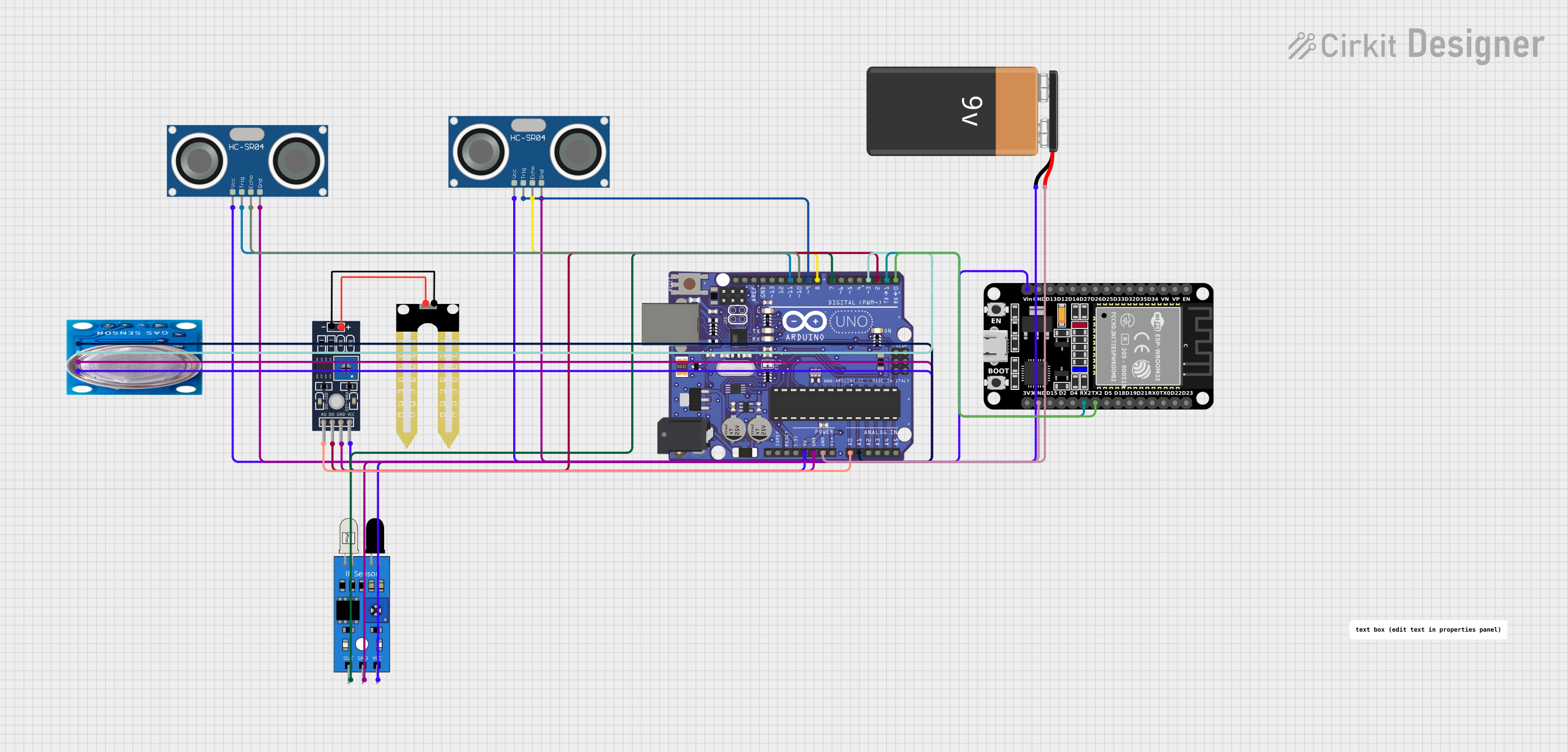
This circuit is designed to interface an Arduino UNO with multiple sensors including an HC-SR04 Ultrasonic Sensor, an IR sensor, a Humidity YL-69 sensor, an MQ-5 gas sensor, and an ESP32 microcontroller for additional processing and connectivity options. The circuit is powered by a 9V battery and includes serial communication between the Arduino UNO and the ESP32. The Arduino UNO is programmed to read data from the sensors, process the information, and communicate the sensor data to the ESP32.
Component List
Arduino UNO
- Microcontroller board based on the ATmega328P
- Features digital I/O pins, analog input pins, and various power options
Humidity YL-69
- Soil moisture sensor
- Outputs both analog and digital signals indicating soil moisture levels
IR Sensor
- Infrared obstacle detection sensor
- Outputs a digital signal when an obstacle is detected
MQ-5 Gas Sensor
- Gas sensor for detecting LPG, natural gas, and coal gas
- Provides both digital and analog outputs
ESP32 (30 pin)
- Microcontroller with Wi-Fi and Bluetooth capabilities
- Features a wide range of I/O pins and supports serial communication
HC-SR04 Ultrasonic Sensor (x2)
- Ultrasonic ranging module
- Provides distance measurements by emitting ultrasonic waves
9V Battery
- Provides power to the circuit
Wiring Details
Arduino UNO
D11 PWM/MOSIconnected to HC-SR04 Ultrasonic Sensor (TRIG)D10 PWM/SSconnected to HC-SR04 Ultrasonic Sensor (ECHO)D9 PWMconnected to second HC-SR04 Ultrasonic Sensor (TRIG)D8connected to second HC-SR04 Ultrasonic Sensor (ECHO)D7connected to IR Sensor (out)D3 PWMconnected to MQ-5 Gas Sensor (Digi Out)D2connected to Humidity YL-69 (D0)D1/TXconnected to ESP32 (RX2)D0/RXconnected to ESP32 (TX2)A0connected to Humidity YL-69 (A0)A1connected to MQ-5 Gas Sensor (Analog out)5Vconnected to Humidity YL-69 (VCC), 9V Battery (-), and other components requiring 5VGNDconnected to 9V Battery (+) and other components requiring GND
Humidity YL-69
A0connected to Arduino UNO (A0)D0connected to Arduino UNO (D2)GNDconnected to common groundVCCconnected to 5V supply
IR Sensor
outconnected to Arduino UNO (D7)gndconnected to common groundvccconnected to 5V supply
MQ-5 Gas Sensor
VCCconnected to 5V supplyGNDconnected to common groundDigi Outconnected to Arduino UNO (D3 PWM)Analog outconnected to Arduino UNO (A1)
ESP32 (30 pin)
Vinconnected to 5V supplyGNDconnected to common groundTX2connected to Arduino UNO (D0/RX)RX2connected to Arduino UNO (D1/TX)
HC-SR04 Ultrasonic Sensor
VCCconnected to 5V supplyTRIGconnected to Arduino UNO (D11 PWM/MOSI or D9 PWM)ECHOconnected to Arduino UNO (D10 PWM/SS or D8)GNDconnected to common ground
9V Battery
+connected to common ground-connected to 5V supply
Documented Code
// Define pins for sensors
const int trigPin = 9;
const int echoPin = 8;
const int irPin = 7;
const int moisturePin = A0;
const int gasPin = A1;

// Setup
void setup() {
  // Start serial communication
  Serial.begin(9600);

  // Ultrasonic sensor pins
  pinMode(trigPin, OUTPUT);
  pinMode(echoPin, INPUT);

  // IR sensor pin
  pinMode(irPin, INPUT);

  // ESP32 communication (if needed, you can use SoftwareSerial for ESP32)
  // ESP32 communication on Serial1
  Serial1.begin(115200);
}

// Function to read Ultrasonic sensor
long readUltrasonicDistance() {
  digitalWrite(trigPin, LOW);
  delayMicroseconds(2);
  digitalWrite(trigPin, HIGH);
  delayMicroseconds(10);
  digitalWrite(trigPin, LOW);

  long duration = pulseIn(echoPin, HIGH);
  long distance = duration * 0.034 / 2; // distance in cm
  return distance;
}

void loop() {
  // Read ultrasonic sensor
  long distance = readUltrasonicDistance();
  Serial.print("Distance: ");
  Serial.print(distance);
  Serial.println(" cm");

  // Read IR sensor
  int irValue = digitalRead(irPin);
  if (irValue == LOW) {
    Serial.println("Obstacle detected by IR sensor");
  }

  // Read Soil Moisture sensor
  int moistureValue = analogRead(moisturePin);
  Serial.print("Soil Moisture: ");
  Serial.println(moistureValue);

  // Read Chemical/Gas sensor
  int gasValue = analogRead(gasPin);
  Serial.print("Gas sensor value: ");
  Serial.println(gasValue);

  // Communicate data with ESP32 (optional)
  Serial1.println("Sending sensor data to ESP32");
  Serial1.print("Distance: ");
  Serial1.println(distance);
  Serial1.print("Soil Moisture: ");
  Serial1.println(moistureValue);
  Serial1.print("Gas sensor: ");
  Serial1.println(gasValue);

  delay(1000);
}
This code is designed to run on the Arduino UNO and handles the initialization and reading of the connected sensors. It also includes serial communication with the ESP32 for potential data transmission.