
Arduino-Based Vibration, RPM, and Wind Speed Monitoring System with MPU9250 and Sensors
View and Edit Project In Cirkit Designer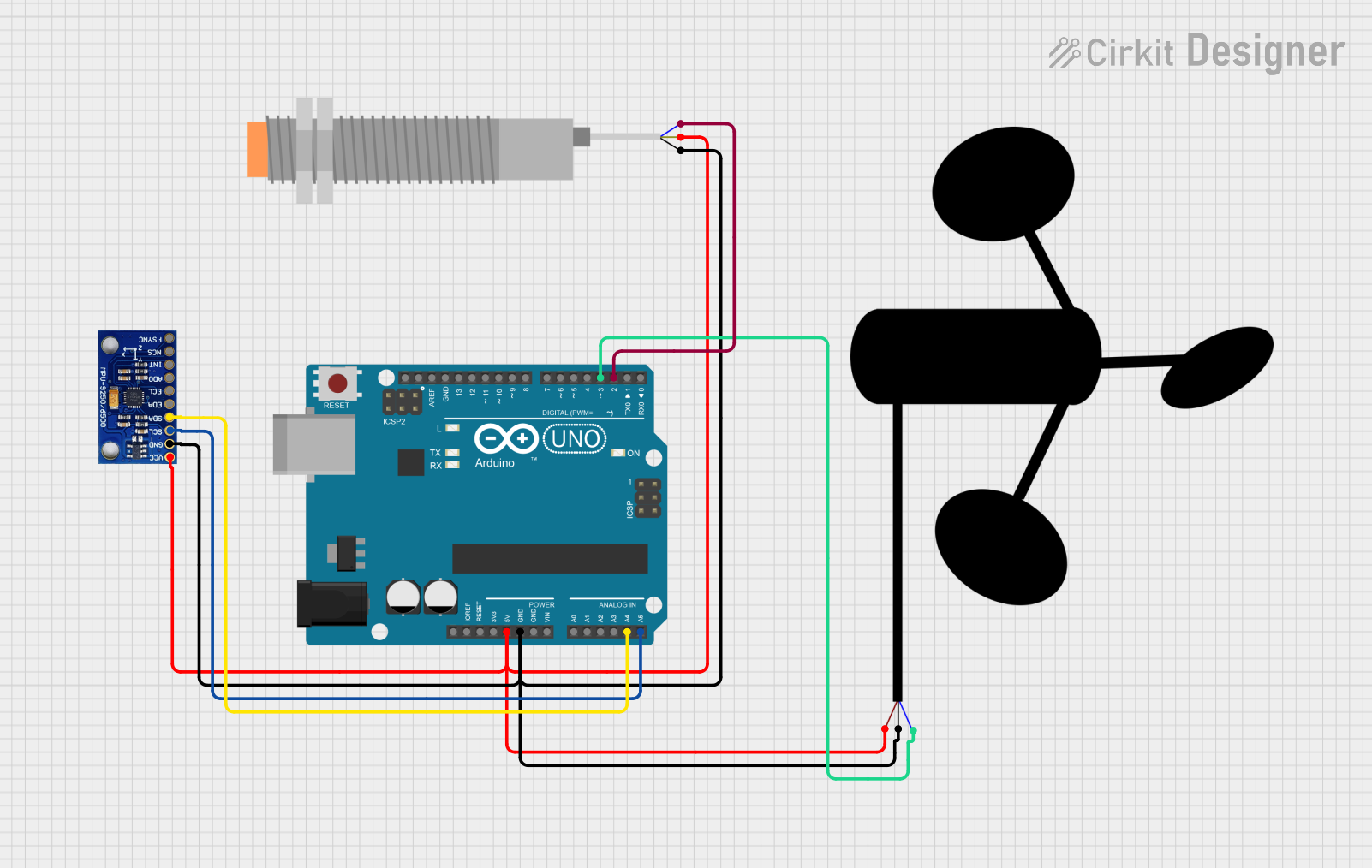
Circuit Documentation
Summary
This circuit is designed to measure vibration using an MPU9250 sensor, blade RPM using a proximity sensor, and wind speed using an anemometer sensor. The MPU9250 is connected via I2C, the proximity sensor is connected to pin D2, and the anemometer is connected to pin D3 on an Arduino UNO. The Arduino UNO reads data from the sensors and prints the results to the Serial Monitor.
Component List
Arduino UNO
- Description: A microcontroller board based on the ATmega328P.
- Pins: UNUSED, IOREF, Reset, 3.3V, 5V, GND, Vin, A0, A1, A2, A3, A4, A5, SCL, SDA, AREF, D13, D12, D11, D10, D9, D8, D7, D6, D5, D4, D3, D2, D1, D0
MPU-9250/6500/9255
- Description: A 9-axis motion tracking device that combines a 3-axis gyroscope, 3-axis accelerometer, and 3-axis magnetometer.
- Pins: VCC, GND, SCL/SCLK, SDA/SDI, EDA, ECL, ADO/SDO, INT, NCS, FSYNC
LJ18A3-H-ZBX Inductive Proximity Sensor
- Description: An inductive proximity sensor used to detect the presence of metal objects.
- Pins: VO (BLU), VI (BRN), SIG (BLK)
Anemometer
- Description: A device used for measuring wind speed.
- Pins: vcc, gnd, sig
Wiring Details
Arduino UNO
5V is connected to:
- VI (BRN) of the LJ18A3-H-ZBX Inductive Proximity Sensor
- vcc of the Anemometer
- VCC of the MPU-9250/6500/9255
GND is connected to:
- SIG (BLK) of the LJ18A3-H-ZBX Inductive Proximity Sensor
- gnd of the Anemometer
- GND of the MPU-9250/6500/9255
A4 is connected to:
- SDA/SDI of the MPU-9250/6500/9255
A5 is connected to:
- SCL/SCLK of the MPU-9250/6500/9255
D3 is connected to:
- sig of the Anemometer
D2 is connected to:
- VO (BLU) of the LJ18A3-H-ZBX Inductive Proximity Sensor
MPU-9250/6500/9255
VCC is connected to:
- 5V of the Arduino UNO
GND is connected to:
- GND of the Arduino UNO
SDA/SDI is connected to:
- A4 of the Arduino UNO
SCL/SCLK is connected to:
- A5 of the Arduino UNO
LJ18A3-H-ZBX Inductive Proximity Sensor
VI (BRN) is connected to:
- 5V of the Arduino UNO
SIG (BLK) is connected to:
- GND of the Arduino UNO
VO (BLU) is connected to:
- D2 of the Arduino UNO
Anemometer
vcc is connected to:
- 5V of the Arduino UNO
gnd is connected to:
- GND of the Arduino UNO
sig is connected to:
- D3 of the Arduino UNO
Code Documentation
/*
 * This Arduino sketch measures vibration using the MPU9250 sensor, blade RPM
 * using a proximity sensor, and wind speed using an anemometer sensor. The
 * MPU9250 is connected via I2C, the proximity sensor is connected to pin D2,
 * and the anemometer is connected to pin D3. The sketch reads data from the
 * sensors and prints the results to the Serial Monitor.
 */

#include <Wire.h>
#include <MPU9250.h>

MPU9250 mpu;

volatile int bladeCount = 0; // Counter for proximity sensor
volatile int windCount = 0;  // Counter for anemometer

unsigned long prevTimeRPM = 0;
unsigned long prevTimeWind = 0;

// Constants for calculations
float bladeTimeInterval = 0;
float windTimeInterval = 0;

const int proximityPin = 2; // Proximity sensor pin
const int anemometerPin = 3; // Anemometer pin

void setup() {
  Serial.begin(9600);

  // Initialize MPU9250
  Wire.begin();
  if (!mpu.begin(MPU9250_SCALE_2000DPS, MPU9250_RANGE_2G)) {
    Serial.println("MPU9250 Initialization Failed");
    while (1);
  }
  Serial.println("MPU9250 Initialized");

  // Set up Proximity Sensor
  pinMode(proximityPin, INPUT_PULLUP);
  attachInterrupt(digitalPinToInterrupt(proximityPin), countBlade, FALLING);

  // Set up Anemometer
  pinMode(anemometerPin, INPUT_PULLUP);
  attachInterrupt(digitalPinToInterrupt(anemometerPin), countWind, FALLING);
}

void loop() {
  // MPU9250 - Get Vibration Data
  mpu.readSensor();
  float accelX = mpu.getAccelX_mss();
  float accelY = mpu.getAccelY_mss();
  float accelZ = mpu.getAccelZ_mss();
  Serial.print("Acceleration X: "); Serial.println(accelX);
  Serial.print("Acceleration Y: "); Serial.println(accelY);
  Serial.print("Acceleration Z: "); Serial.println(accelZ);

  // Calculate RPM from Proximity Sensor
  if (millis() - prevTimeRPM >= 1000) { // Every second
    noInterrupts();
    bladeTimeInterval = bladeCount;
    bladeCount = 0;
    interrupts();
    float rpm = (bladeTimeInterval * 60.0) / 1.0; // RPM calculation
    Serial.print("Blade RPM: "); Serial.println(rpm);
    prevTimeRPM = millis();
  }

  // Calculate Wind Speed from Anemometer
  if (millis() - prevTimeWind >= 1000) { // Every second
    noInterrupts();
    windTimeInterval = windCount;
    windCount = 0;
    interrupts();
    float windSpeed = (windTimeInterval * 2.4); // Example: Adjust based on anemometer spec
    Serial.print("Wind Speed: "); Serial.println(windSpeed);
    prevTimeWind = millis();
  }

  delay(100); // Small delay
}

void countBlade() {
  bladeCount++;
}

void countWind() {
  windCount++;
}
This code initializes the MPU9250 sensor, sets up the proximity sensor and anemometer with interrupts, and continuously reads data from the sensors. The vibration data from the MPU9250 is printed to the Serial Monitor, and the RPM and wind speed are calculated and printed every second.